
1. Introduction
This manual provides essential instructions for the proper use and maintenance of your Rossmax AD761f Blood Pressure Monitor. Please read this manual thoroughly before using the device to ensure accurate measurements and safe operation. The Rossmax AD761f is an automatic blood pressure monitoring device designed for home use, featuring Real Fuzzy Technology and a Rest Condition Detector for precise readings.
2. Safety Information
- Consult your physician before using this device if you have any medical conditions.
- Do not self-diagnose or self-medicate based on measurements from this device. Always consult a healthcare professional.
- Keep the device out of reach of children and pets.
- Avoid using the device in environments with strong electromagnetic fields.
- Do not disassemble or attempt to repair the device yourself. Contact authorized service personnel.
- Ensure the cuff size is appropriate for your arm circumference to obtain accurate readings.
3. Package Contents
Verify that all items listed below are present in your package:
- Rossmax AD761f Blood Pressure Monitor Unit
- Cone Cuff (Latex-free)
- Instruction Manual (this document)
- Soft Carrying Bag
- 4 AA Batteries
- Adaptor Socket (Adaptor optional, not always included)
- Large and Small Size Patented Cone Cuffs (Optional, not always included)
4. Device Overview
The Rossmax AD761f features a large LCD display and intuitive controls for ease of use.

Figure 4.1: Front view of the Rossmax AD761f Blood Pressure Monitor with its arm cuff. The large LCD screen displays blood pressure readings (systolic, diastolic) and pulse rate, along with indicators for rest condition and memory.
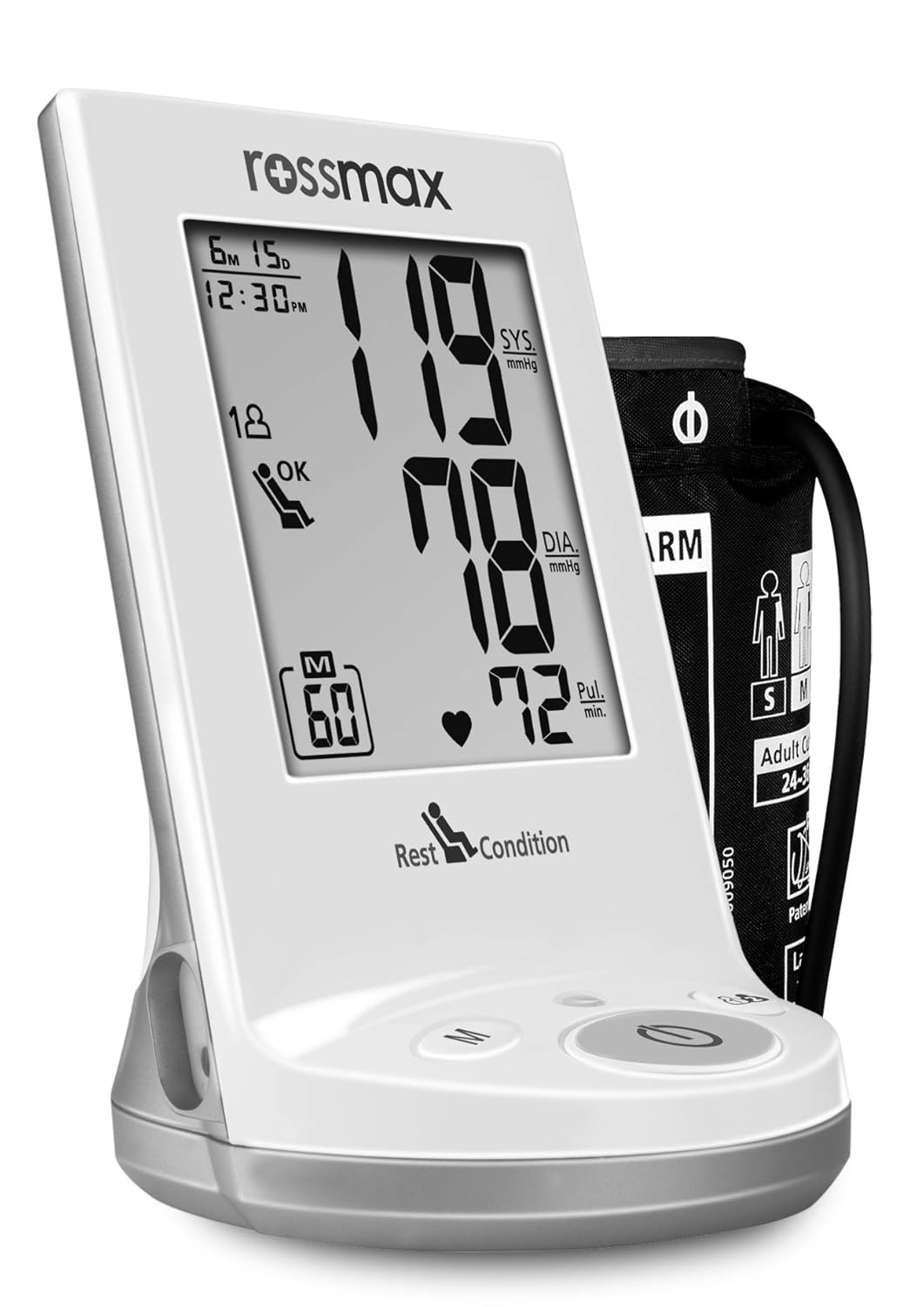
Figure 4.2: The Rossmax AD761f monitor alongside its arm cuff, illustrating proper arm placement for measurement. The cuff indicates M-size (1.5-2.5 cm) and shows an arrow for correct positioning on the left arm.

Figure 4.3: Close-up view of the Rossmax AD761f display, showing a reading of 119 SYS mmHg, 78 DIA mmHg, and a pulse of 72 Pul. min. The display also shows time, date, memory indicator (M 60), and a 'Rest Condition' icon.

Figure 4.4: A slightly angled view of the Rossmax AD761f Blood Pressure Monitor, highlighting its sleek design and the large, easy-to-read digital display. The control buttons are visible at the base.

Figure 4.5: Another perspective of the Rossmax AD761f, emphasizing its compact form factor and the clear presentation of measurement data on the screen.
5. Setup
5.1 Battery Installation
- Open the battery compartment cover located on the back of the device.
- Insert four (4) AA batteries, ensuring correct polarity (+/-) as indicated inside the compartment.
- Close the battery compartment cover securely.
5.2 Cuff Attachment
- Connect the air tube from the cuff securely into the air jack on the side of the monitor.
- Ensure the cuff size is appropriate for your arm. The cuff should fit snugly but not too tightly.
- For accurate measurement, apply the cuff to your bare upper arm, approximately 1-2 cm above the elbow joint. The air tube should run down the inside of your arm.
6. Operating Instructions
6.1 Before Measurement
- Avoid eating, drinking alcohol, smoking, or exercising for at least 30 minutes before measurement.
- Rest for at least 5 minutes in a quiet environment before taking a measurement.
- Sit comfortably with your back supported and feet flat on the floor. Place your arm on a table so the cuff is at heart level.
6.2 Taking a Measurement
- Press the START/STOP button to turn on the device. The display will show all symbols briefly.
- The cuff will automatically inflate. The Real Fuzzy Technology will determine the ideal inflation level based on your individual blood pressure.
- Once inflation is complete, the cuff will slowly deflate, and your blood pressure (systolic and diastolic) and pulse rate will be displayed.
- The measurement will automatically be stored in the selected user's memory.
- Press the START/STOP button again to turn off the device, or it will automatically shut off after 1 minute of inactivity.
6.3 Memory Functions
The Rossmax AD761f stores up to 120 memories for two users (240 total memories) with date and time. It also calculates the average of the last three readings.
- Viewing Memories: Press the M button to cycle through stored readings.
- Switching Users: Use the user selection button (if available, typically indicated by a person icon) to switch between User 1 and User 2.
- Average of Last 3 Readings: The device automatically displays the average of the last three measurements when accessing memory.
7. Understanding Your Readings
The device displays Systolic (SYS), Diastolic (DIA) blood pressure, and Pulse rate.
- Rest Condition Detector (HSD): This feature ensures measurements are taken under optimal resting conditions, minimizing errors caused by physical or mental stress. An "OK" indicator will appear when the rest condition is met.
- Hypertension Risk Indicator: The device may include an indicator to classify your blood pressure level according to established guidelines (e.g., WHO classification). Consult your doctor for interpretation.
- Irregular Heartbeat Detector (IHB): If an irregular heartbeat is detected during measurement, a specific symbol will appear on the display. If this symbol appears frequently, consult your physician.
8. Maintenance and Storage
8.1 Cleaning
- Clean the device and cuff with a soft, dry cloth.
- Do not use abrasive cleaners or immerse the device or cuff in water.
8.2 Storage
- Store the device in its soft carrying bag when not in use.
- Keep the device in a cool, dry place, away from direct sunlight, extreme temperatures, and humidity.
- Remove batteries if the device will not be used for an extended period to prevent leakage.
9. Troubleshooting
| Problem | Possible Cause | Solution |
|---|---|---|
| Device does not turn on. | Batteries are depleted or incorrectly inserted. | Replace batteries with new ones, ensuring correct polarity. |
| Inaccurate readings. | Incorrect cuff placement, movement during measurement, or talking. | Re-apply cuff correctly, remain still and silent during measurement. Ensure proper rest before measurement. |
| Cuff does not inflate or inflates too little/much. | Air tube not securely connected, or cuff is damaged. | Check air tube connection. If cuff is damaged, replace it. |
| Error message on display. | Various operational issues. | Refer to the specific error code in the full instruction manual (if available) or contact customer support. Often, re-taking the measurement after a short rest resolves temporary issues. |
10. Specifications
| Model Number | AD761f (RXAD761) |
| Brand | Rossmax |
| Measurement Method | Oscillometric |
| Display Type | LCD |
| Memory Capacity | 2 users x 120 memories (240 total) with date/time |
| Power Source | 4 AA Batteries (included) or AC Adaptor (optional) |
| Product Dimensions | 16 x 16 x 22 cm |
| Item Weight | 720 g |
| Included Components | Monitor, Cone Cuff, Instruction Manual, Soft Bag, Batteries, Adaptor Socket |
| Special Features | Real Fuzzy Technology, Rest Condition Detector (HSD), Hypertension Risk Indicator, Irregular Heartbeat Detector (IHB) |
11. Warranty and Support
The Rossmax AD761f Blood Pressure Monitor comes with a 2-year manufacturer's warranty from the date of purchase. This warranty covers defects in materials and workmanship under normal use.
For warranty claims, technical support, or any inquiries regarding your device, please refer to the contact information provided in the full product documentation or visit the official Rossmax website.
Note: Keep your purchase receipt as proof of purchase for warranty purposes.


