
1. Introduction
This manual provides detailed instructions for the safe and effective use of the TES RM 1500 Digital Tachometer. The RM 1500 is a portable, non-contact instrument designed for measuring rotational speed (RPM) of various machinery and components. Please read this manual thoroughly before operating the device to ensure proper function and to prevent damage or injury.
2. Safety Information
Observe the following safety precautions to avoid potential hazards and ensure the longevity of the device:
- Do not attempt to open or modify the device. Refer all servicing to qualified personnel.
- Keep the device away from water, moisture, and extreme temperatures.
- Avoid pointing the laser beam directly into eyes or at reflective surfaces that could redirect the beam into eyes.
- Ensure the measurement target is stable and safe to approach before taking readings.
- Battery Safety:
- Use only the specified battery type (four 1.5V AA batteries).
- Do not mix old and new batteries, or different types of batteries.
- Insert batteries with correct polarity (+/-).
- Remove batteries if the device will not be used for an extended period to prevent leakage.
- Dispose of used batteries according to local regulations.
3. Product Overview
The TES RM 1500 Digital Tachometer features a clear display and intuitive controls for efficient operation.

Figure 3.1: Front view of the TES RM 1500 Digital Tachometer, showing the LCD display, control buttons, and brand labeling.
3.1 Components
- LCD Display: 5-digit display for RPM readings and indicators.
- START/HOLD/ON/OFF Button: Multi-function button for power, starting measurement, and holding readings.
- Measurement Sensor/Laser Emitter: Located at the top of the device, emits a laser beam for non-contact measurement.
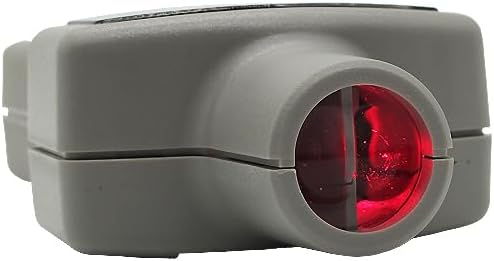
Figure 3.2: Side view illustrating the measurement sensor and laser emitter at the top of the device.

Figure 3.3: Front view showing the laser beam emitted from the sensor for targeting the reflective tape.

Figure 3.4: Top view of the sensor opening, where the laser is emitted and reflected light is received.
4. Setup
4.1 Battery Installation
- Locate the battery compartment cover on the back of the device.
- Slide or unclip the cover to open the compartment.
- Insert four 1.5V AA batteries, ensuring correct polarity as indicated inside the compartment.
- Replace the battery compartment cover securely.
4.2 Applying Reflective Tape
For accurate non-contact measurements, a piece of reflective tape must be applied to the rotating object.
- Clean the surface of the rotating object where the tape will be applied.
- Cut a small piece of the provided reflective tape (approximately 1 cm x 1 cm).
- Firmly apply the tape to the rotating surface. Ensure it is flat and securely adhered.
- For best results, apply the tape to a contrasting background on the rotating object if possible.
5. Operating Instructions
5.1 Powering On/Off
- To power on the device, press and hold the START/HOLD/ON/OFF button briefly. The display will illuminate.
- The device features an auto-power-off function, which will turn off the unit after approximately 30 minutes of inactivity to conserve battery life.
- To manually power off, press and hold the START/HOLD/ON/OFF button until the display turns off.
5.2 Taking a Measurement
- Ensure the device is powered on.
- Position the tachometer approximately 50 to 300 mm (2 to 12 inches) from the reflective tape on the rotating object.
- Aim the laser beam directly at the reflective tape. The laser indicator on the display will confirm detection.
- Press and hold the START/HOLD/ON/OFF button to begin measurement. The RPM reading will appear on the display.
- Release the button to hold the current reading on the display. The "HOLD" indicator will appear.
- To take another measurement, press and hold the button again.
Note: Maintain a steady distance and aim during measurement for optimal accuracy. The sampling rate varies with RPM: 0.7 seconds for > 60 rpm, and > 1 second for 10 to 60 rpm.

Figure 5.1: Illustrates the proper way to hold the tachometer for taking a measurement, aiming the sensor at the target.
6. Maintenance
6.1 Cleaning
- Wipe the device exterior with a soft, dry cloth.
- Do not use abrasive cleaners, solvents, or harsh chemicals.
- Keep the sensor lens clean and free of dust or debris for accurate readings. Use a lens cleaning cloth if necessary.
6.2 Storage
- Store the tachometer in its carrying case when not in use.
- Store in a cool, dry place, away from direct sunlight and extreme temperatures.
- Remove batteries if storing for extended periods to prevent leakage and damage.
7. Troubleshooting
If you encounter issues with your TES RM 1500, refer to the following common problems and solutions:
- Device does not power on:
- Check battery installation and polarity.
- Replace with fresh batteries.
- Inaccurate or no reading:
- Ensure reflective tape is securely applied and clean.
- Verify the measurement distance is within 50 to 300 mm.
- Confirm the laser beam is accurately aimed at the reflective tape.
- Clean the sensor lens if it appears dirty.
- Ensure the rotating object's speed is within the specified range (10 to 99,999 RPM).
- Display is dim or flickering:
- Batteries may be low. Replace all four AA batteries.
If problems persist after attempting these solutions, please contact TES customer support for further assistance.
8. Specifications
| Feature | Specification |
|---|---|
| Display | 5 digits, 99999 counts LCD |
| Sampling Rate | 0.7 second (> 60 rpm), > 1 second (10 to 60 rpm) |
| Measuring Distance | 50 to 300 mm |
| Time Base | 4.0 MHz Quartz Crystal |
| Power Source | Four 1.5V AA batteries (UM-3) |
| Power Consumption (Idle) | 1.5mA |
| Power Consumption (Non-contact Measurement) | 27mA |
| Auto-Power-Off | Approximately 30 minutes |
| Operating Temperature | 0 to 50°C (32 to 122°F) |
| Dimensions (L x W x H) | 172 mm x 63 mm x 36 mm (6.81 x 2.48 x 1.42 inches) |
| Weight | Approx. 190g (6.7 ounces) |
| Included Components | Carrying case, Reflective tape, Instruction Manual, 1.5V AA Batteries (x4) |
9. Warranty and Support
The TES RM 1500 Digital Tachometer is designed for reliability and performance. For warranty information or technical support, please refer to the documentation included with your purchase or contact TES customer service directly.
For further assistance, you may visit the official TES store or contact their support channels. Visit the TES Store on Amazon


