Introduction
This manual provides detailed instructions for the safe and effective use of your Vanguard Nivelo 214BK Travel Tripod. Please read this manual thoroughly before operating the product and retain it for future reference. Proper use and maintenance will ensure optimal performance and longevity of your tripod.

Image: The Vanguard Nivelo 214BK Travel Tripod, shown with its retail packaging, user manual, and included carrying bag. This image illustrates the complete product package.
Product Overview
The Vanguard Nivelo 214BK is a compact and lightweight travel tripod designed for portability and stability. It features an aluminum alloy construction and a versatile ball head.
Components
- Ball Head: For precise camera positioning and smooth movement.
- Quick Release Plate: For fast attachment and detachment of your camera.
- Center Column: Extends for additional height or can be reversed for low-angle/macro photography.
- Leg Sections: Multi-section legs for adjustable height and compact storage.
- Leg Locks: Twist locks to secure leg sections at desired lengths.
- Rubber Feet: Provide stability on various surfaces.
- Bubble Level: Integrated into the ball head for accurate leveling.

Image: A detailed view of the tripod's ball head, showing the quick release plate, camera mounting screw, and adjustment knobs for precise camera positioning.

Image: A close-up of the tripod's leg sections, illustrating the twist-lock mechanism for extending and securing the legs, and the non-slip rubber feet at the base.
Setup
- Unfolding the Tripod:
Gently unfold the tripod legs from their folded position. Ensure all leg hinges are fully extended.

Image: The Vanguard Nivelo 214BK tripod shown in its compact, folded configuration, ready for transport.
- Extending the Legs:
Twist the leg locks counter-clockwise to loosen each leg section. Pull out the desired sections to extend the legs to your preferred height. Twist the leg locks clockwise to secure them firmly.
- Adjusting Leg Angles:
The tripod features adjustable leg angles. Press the leg angle release tabs (if present) near the top of each leg to adjust the spread of the legs for different stability requirements or low-angle shots.

Image: A close-up view of the tripod's leg hinge area, showing the mechanism for adjusting the leg spread and angle.
- Attaching Your Camera:
Ensure the quick release plate is securely attached to your camera's tripod socket. Then, insert the quick release plate with the camera into the ball head receiver and secure it using the locking lever or knob on the ball head.
- Extending the Center Column:
To gain additional height, loosen the center column locking knob. Gently pull the center column upwards to extend it. Tighten the locking knob to secure the column at the desired height.
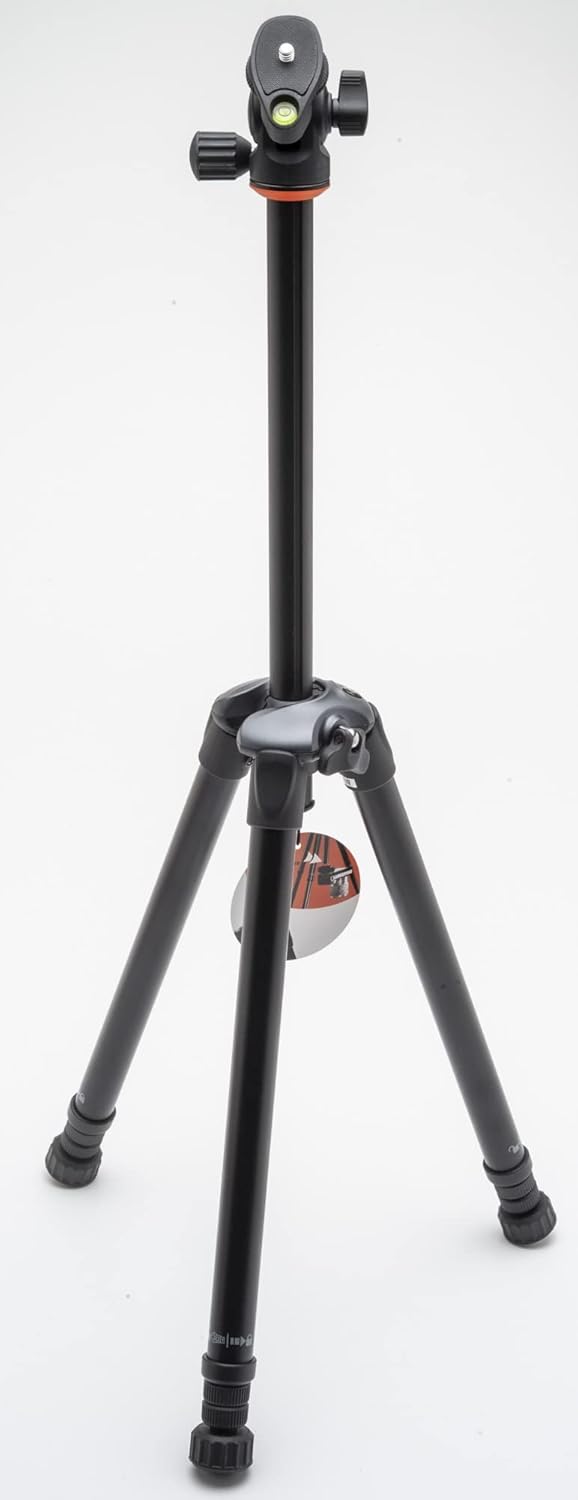
Image: The Vanguard Nivelo 214BK tripod with its center column fully extended, demonstrating its maximum height capability.
Operating Instructions
- Adjusting the Ball Head:
Loosen the main locking knob on the ball head to allow free movement of your camera. Position your camera as desired, then tighten the knob firmly to secure it.

Image: A detailed view of the ball head, highlighting the various knobs and levers used for adjusting camera angle and securing its position.
- Using the Bubble Level:
Utilize the integrated bubble level on the ball head to ensure your camera is perfectly level, especially for panoramic shots or architectural photography.
- Low-Angle and Macro Photography:
For extremely low-angle shots or macro photography, the center column can be reversed. To do this, fully extend and remove the center column, then reinsert it upside down. This allows your camera to be positioned very close to the ground.
Maintenance
- Cleaning: Wipe down the tripod with a soft, damp cloth after use, especially if exposed to dust, sand, or saltwater. Avoid using harsh chemicals or abrasive materials.
- Lubrication: Periodically check leg locks and moving parts for smooth operation. Do not over-lubricate; consult a professional if lubrication is required.
- Storage: Store the tripod in its carrying bag in a dry, cool place away from direct sunlight and extreme temperatures.
- Inspection: Regularly inspect all screws, knobs, and leg locks to ensure they are tight and functioning correctly.
Troubleshooting
- Tripod Instability:
Ensure all leg sections are fully extended and their locks are securely tightened. Verify that the leg angles are evenly spread and the tripod is on a stable, level surface. Do not exceed the maximum load capacity.
- Camera Not Secure:
Check that the quick release plate is properly attached to your camera and fully seated in the ball head receiver. Ensure the ball head locking knob is tightened firmly.
- Stiff Leg Locks:
If leg locks become stiff, clean them thoroughly to remove any accumulated dirt or debris. Avoid forcing them. If the issue persists, professional servicing may be required.
Specifications
| Feature | Specification |
|---|---|
| Brand | VANGUARD |
| Model Name | Nivelo 214 |
| Model Number | Nivelo 214BK |
| Color | Black |
| Product Dimensions (L x W x H) | 36.5 x 10 x 9.5 cm (folded) |
| Product Weight | 730 grams |
| Maximum Height | 148 cm |
| Compatible Devices | Camera |
| Material | Aluminum Alloy, Rubber (feet) |
| Manufacturer Warranty | 5 years |
Warranty and Support
The Vanguard Nivelo 214BK Travel Tripod comes with a 5-year manufacturer's warranty. This warranty covers defects in materials and workmanship under normal use.
For warranty claims, technical support, or service inquiries, please contact Vanguard customer service through their official website or authorized distributors. Please retain your proof of purchase for warranty validation.


