
1. Introduction
Welcome to the Hamilton Beach BrewStation 47900, your new programmable dispensing coffee maker. This appliance is designed to deliver fresh-tasting coffee for up to four hours, thanks to its innovative internal brewing system. This manual provides detailed instructions for setup, operation, maintenance, and troubleshooting to ensure you get the best experience from your new coffee maker.
2. Important Safety Information
Please read all instructions carefully before using this appliance. Failure to follow these instructions may result in electric shock, fire, or serious personal injury.
- Do not immerse the appliance, cord, or plug in water or other liquids.
- Close supervision is necessary when any appliance is used by or near children.
- Unplug from outlet when not in use and before cleaning. Allow to cool before putting on or taking off parts, and before cleaning the appliance.
- Do not operate any appliance with a damaged cord or plug, or after the appliance malfunctions or has been damaged in any manner.
- The use of accessory attachments not recommended by the appliance manufacturer may result in fire, electric shock, or injury to persons.
- Do not use outdoors.
- Do not let cord hang over edge of table or counter, or touch hot surfaces.
- Do not place on or near a hot gas or electric burner, or in a heated oven.
- To disconnect, turn any control to “off,” then remove plug from wall outlet.
- Do not use appliance for other than intended use.
- If filter basket overflows, unplug and allow to cool before removing filter basket.
- When using decaffeinated coffee, do not exceed the coffee manufacturer's recommended serving amount to avoid overflow.
3. Parts and Features
Familiarize yourself with the components of your Hamilton Beach BrewStation 47900:
- Control Panel: Features programmable buttons for time, brew options (regular, bold, iced coffee), and keep warm settings.
- Water Reservoir: Removable for easy filling and cleaning, with clear markings for up to 12 cups.
- Brew Basket: Holds the coffee filter and ground coffee.
- Internal Coffee Pot: Stores brewed coffee, keeping it hot and fresh without a traditional glass carafe.
- Dispensing Bar: Press to dispense coffee directly into your cup.
- Drip Tray: Catches any drips from the dispenser.


4. Setup
Before first use, wash all removable parts in hot, soapy water or in the dishwasher (top rack only for water reservoir and brew basket). Rinse thoroughly and dry.
- Positioning: Place the coffee maker on a flat, stable surface away from the edge of the counter. Ensure it is plugged into a 110-volt outlet.
- Water Reservoir: Lift up the water reservoir and remove the lid. Fill with cold water up to the desired cup line (minimum 2 cups, maximum 12 cups). Replace the lid and place the reservoir back on the base.
- Brew Basket: Lift the coffee maker lid and remove the removable grounds filter basket. Insert a basket-style paper filter or a reusable filter (not included) into the brew basket.
- Initial Cleaning Cycle: For the first use, run a brew cycle with only water to clean the internal components. Discard the water after the cycle.
5. Operating Instructions
5.1. Brewing Coffee
- Add Water: Ensure the water reservoir is filled to your desired level.
- Add Coffee Grounds: Place a filter in the brew basket and add your preferred amount of ground coffee. For a 12-cup brew, use approximately 8-12 tablespoons (70g) of coffee. Adjust to taste.
- Select Brew Options: Use the 'Brew Options' button to select your desired strength (Regular, Bold) or 'Iced Coffee' setting.
- Start Brewing: Press the 'ON/OFF' button to start the brewing cycle. The display will show the brewing progress.
5.2. Dispensing Coffee
Once brewing is complete, the coffee is held in the internal tank, keeping it hot and fresh. To dispense:
- Place your cup or travel mug under the dispensing bar.
- Press the dispensing bar firmly with your cup. Coffee will flow into your cup.
- Release the dispensing bar to stop the flow.
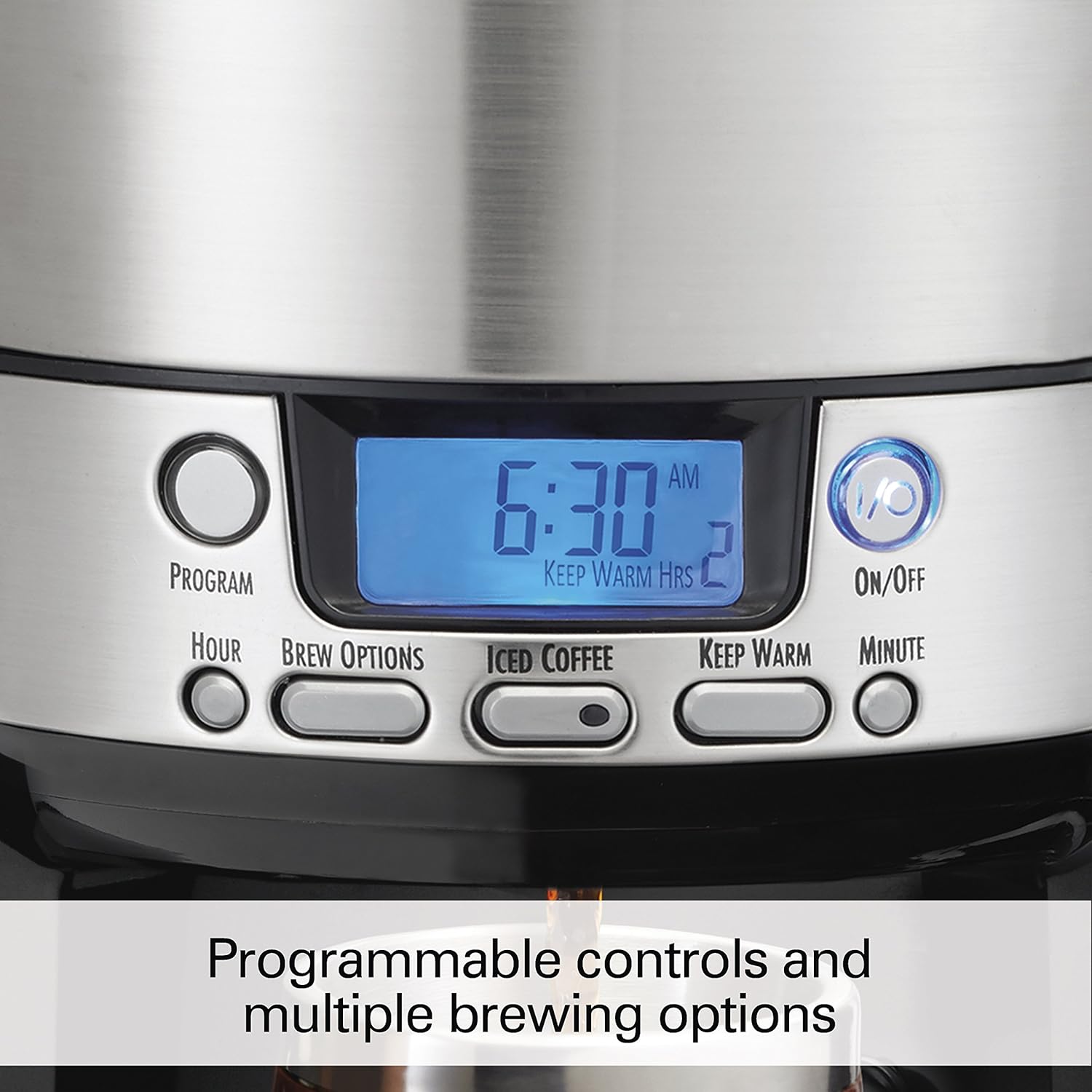
5.3. Programming the Timer
The BrewStation allows you to program a delayed start time for your coffee.
- Set Current Time: Press the 'HOUR' button to set the current hour, then the 'MINUTE' button to set the current minute.
- Set Program Time: Press and hold the 'PROGRAM' button until the display flashes. Use the 'HOUR' and 'MINUTE' buttons to set your desired brew start time.
- Activate Program: Press the 'PROGRAM' button once more to activate the programmed brew. The program indicator light will illuminate.
5.4. Keep Warm Function
The internal heater keeps coffee hot and fresh for up to 4 hours. You can adjust the keep warm duration:
- Press the 'KEEP WARM' button to cycle through 1, 2, 3, or 4 hours.
- The display will show the selected duration.
Video 5.2: A seller-provided video demonstrating the ease of use of the Hamilton Beach BrewStation, including filling the water reservoir, adding coffee, and dispensing. The video highlights the programmable features and the convenient dispensing mechanism.
6. Maintenance and Cleaning
Regular cleaning ensures optimal performance and longevity of your coffee maker.
6.1. Daily Cleaning
- Unplug the coffee maker and allow it to cool completely.
- Remove the water reservoir, brew basket, and internal coffee pot.
- Wash these removable parts in hot, soapy water or in the dishwasher (top rack only).
- Wipe the exterior of the coffee maker with a damp cloth. Do not use abrasive cleaners.
- Clean the dispensing bar and drip tray.
6.2. Descaling (Monthly or as needed)
Mineral deposits from water can affect performance. Descale your coffee maker regularly.
- Fill the water reservoir with 1 part white vinegar and 2 parts water.
- Place a paper filter in the brew basket (without coffee grounds).
- Run a full brew cycle.
- After the cycle, let the solution sit in the internal pot for 30 minutes.
- Discard the solution and run 2-3 cycles with fresh, clean water to rinse thoroughly.
7. Troubleshooting
If you encounter issues with your Hamilton Beach BrewStation, refer to the following common problems and solutions:
| Problem | Possible Cause | Solution |
|---|---|---|
| Coffee not brewing. | No water in reservoir; not plugged in; brew cycle not started. | Fill reservoir; ensure plug is secure; press 'ON/OFF' button. |
| Coffee tastes weak. | Not enough coffee grounds; 'Regular' brew selected. | Add more coffee grounds; select 'Bold' brew option. |
| Coffee overflows. | Too many coffee grounds; filter basket clogged. | Reduce coffee grounds; clean filter basket and ensure proper filter placement. |
| Dispenser not working. | Brew cycle not complete; internal pot not correctly seated. | Wait for brew cycle to finish; ensure internal pot is properly installed. |
8. Specifications
- Brand: Hamilton Beach
- Model Name: Coffee Maker, Programmable with 12-Cup
- Model Number: 47900
- Color: Black
- Capacity: 12 Cups
- Product Dimensions: 10.04"D x 10.43"W x 14.37"H
- Item Weight: 6 pounds
- Voltage: 110 Volts
- Operation Mode: Fully Automatic
- Special Feature: Programmable
- Coffee Input Type: Ground coffee
- Coffee Filter Size: #6
9. Warranty and Support
For warranty information or customer support, please refer to the documentation included with your product or visit the official Hamilton Beach website. Keep your purchase receipt as proof of purchase for any warranty claims.