
1. Introduction
This manual provides essential information for the safe and efficient operation, setup, and maintenance of your Zipper ZI-FS200 Tile Cutter. Please read these instructions thoroughly before using the machine to ensure proper handling and to prevent injury or damage.
2. Safety Instructions
Always follow basic safety precautions when using electrical tools to reduce the risk of fire, electric shock, and personal injury.
- Read the entire manual: Understand all instructions and warnings before operation.
- Wear personal protective equipment (PPE): Always wear safety glasses, hearing protection, and appropriate gloves. A dust mask is recommended when cutting.
- Ensure a safe work area: Keep the work area clean, well-lit, and free from obstructions. Do not operate in damp or wet conditions.
- Electrical safety: Ensure the power supply matches the tool's requirements (230V, 50Hz). Use a Residual Current Device (RCD) or Ground Fault Circuit Interrupter (GFCI) for added protection, especially with the integrated PRCD plug.
- Secure the workpiece: Always ensure the tile is firmly supported and guided during cutting.
- Keep guards in place: Never operate the tile cutter without all safety guards properly installed.
- Disconnect power: Always unplug the tool before making adjustments, changing blades, or performing maintenance.
- Avoid distractions: Focus entirely on the task at hand.
- Maintain the tool: Keep cutting blades sharp and clean for best and safest performance.
3. Product Overview
The Zipper ZI-FS200 is an electric tile cutter designed for precise cutting of various tile materials. It features a powerful motor, a diamond cutting disc, and a submersible pump for wet cutting operations.
3.1 Key Components
- Motor unit with diamond cutting disc
- Work table (685 x 400 mm)
- Removable stand
- Submersible pump
- Longitudinal stop
- PRCD plug (Personal Residual Current Device)
3.2 Product Diagram
Refer to the image below for a visual representation of the Zipper ZI-FS200 Tile Cutter.
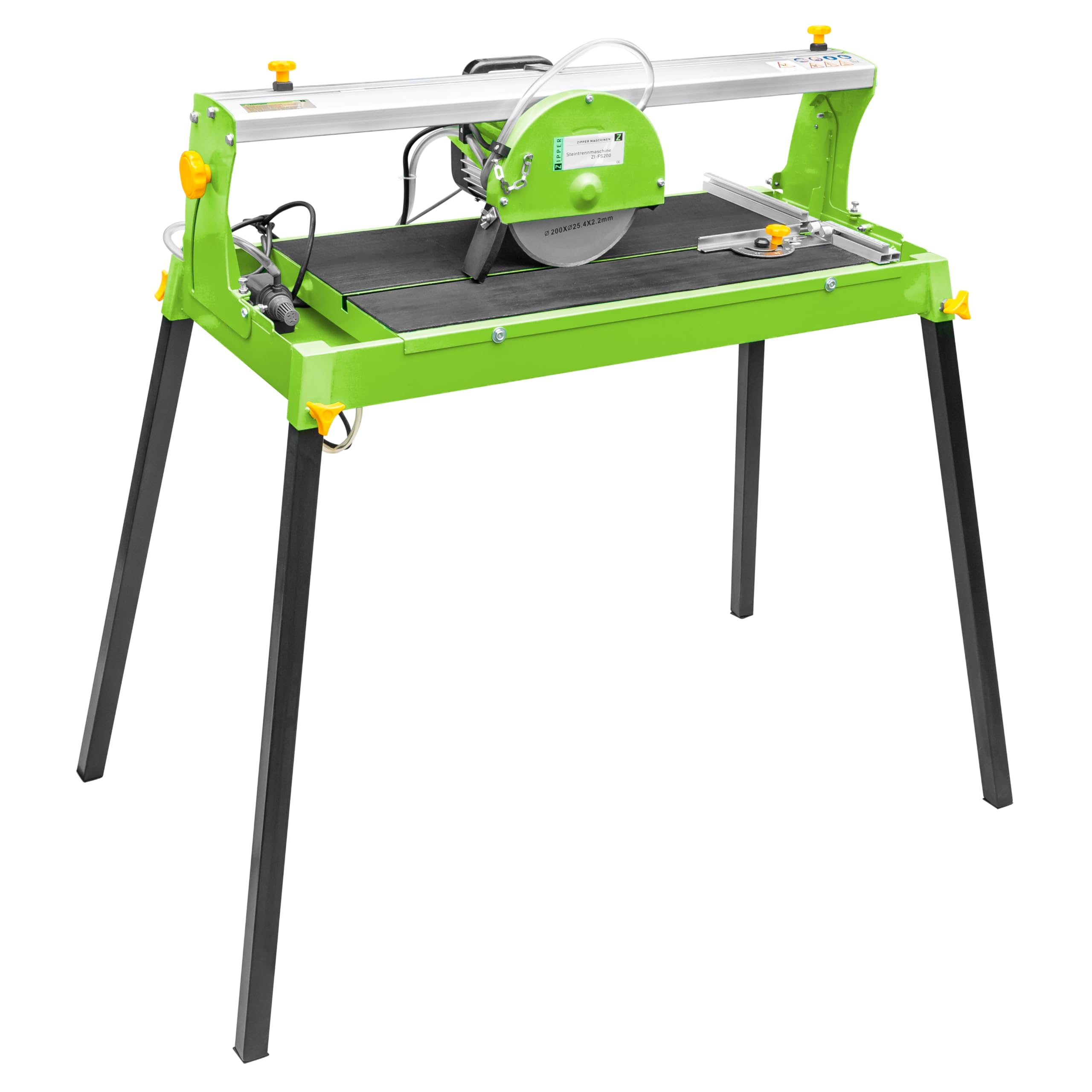
Figure 1: Main view of the Zipper ZI-FS200 Tile Cutter, showing the motor, cutting disc, work table, and stand.
4. Setup and Assembly
Before operating the tile cutter, ensure it is properly assembled and set up according to these instructions.
- Unpacking: Carefully remove all components from the packaging. Inspect for any shipping damage.
- Stand Assembly: Attach the removable stand to the main unit. Ensure all fasteners are securely tightened.
- Water Reservoir and Pump: Fill the water reservoir with clean water. Position the submersible pump within the reservoir, ensuring it is fully submerged. The water level should be sufficient to cool the diamond blade during operation.
- Longitudinal Stop: Install the longitudinal stop on the work table. This guide assists in making straight and consistent cuts. Adjust its position based on the desired tile dimensions.
- Electrical Connection: Connect the PRCD plug to a suitable 230V, 50Hz power outlet. Test the PRCD function before use by pressing the "TEST" button, then "RESET".
5. Operating Instructions
Follow these steps for safe and effective tile cutting.
- Preparation:
- Ensure the water reservoir is filled and the pump is operating, providing water to the blade.
- Mark the cutting line on your tile.
- Adjust the longitudinal stop and/or angle guide for the desired cut.
- Starting the Machine:
- Switch on the tile cutter. Allow the diamond blade to reach full operating speed (2950 min-1) before beginning the cut.
- Cutting the Tile:
- Place the tile firmly against the longitudinal stop and align the cutting line with the blade.
- Slowly and steadily push the tile through the blade. Do not force the cut.
- Maintain a firm grip on the tile throughout the cutting process.
- The maximum cutting length at 90° is 600 mm.
- The maximum cutting depth at 90° is 30 mm.
- The maximum cutting depth at 45° is 22 mm.
- After Cutting:
- Switch off the machine and wait for the blade to stop completely before removing the cut tile or making any adjustments.
5.1 Recommended Surfaces
This tile cutter is suitable for cutting various materials including porcelain, ceramic, granite, and marble.
6. Maintenance
Regular maintenance ensures the longevity and safe operation of your Zipper ZI-FS200 Tile Cutter.
- Disconnect Power: Always unplug the machine from the power source before any cleaning or maintenance.
- Cleaning: After each use, clean the work table, blade guard, and water reservoir. Remove any tile debris or sludge.
- Water Pump: Regularly clean the submersible pump to prevent blockages from tile dust and debris. Ensure the water intake is clear.
- Blade Inspection and Replacement:
- Inspect the diamond cutting disc for wear, cracks, or damage before each use. A dull or damaged blade can lead to poor cuts and increased risk of injury.
- Replace the blade when it becomes dull or damaged. Use only diamond cutting discs with dimensions 200 x 25.4 x 2.2 mm.
- Refer to the manufacturer's instructions for specific blade replacement procedures.
- Storage: Store the tile cutter in a clean, dry place, out of reach of children.
7. Troubleshooting
This section addresses common issues you might encounter with your tile cutter.
| Problem | Possible Cause | Solution |
|---|---|---|
| Machine does not start | No power supply; PRCD tripped; faulty switch. | Check power connection; reset PRCD; contact qualified service personnel. |
| Poor cut quality / Chipping | Dull or damaged blade; insufficient water cooling; incorrect feed rate; tile not secured. | Replace blade; ensure adequate water flow; reduce feed rate; secure tile firmly. |
| Excessive vibration or noise | Loose blade; damaged blade; motor issues. | Check blade mounting; replace damaged blade; contact service personnel. |
| Water pump not working | Clogged pump; low water level; faulty pump. | Clean pump and filter; refill water reservoir; replace pump if necessary. |
8. Technical Specifications
- Model: ZI-FS200
- Motor Power (S1): 800 W
- Voltage: 230 V / 50 Hz
- Protection Class: IP 54
- No-load Speed: 2950 min-1
- Work Table Dimensions: 685 x 400 mm
- Diamond Disc Dimensions: 200 x 25.4 x 2.2 mm
- Max. Cutting Length (90°): 600 mm
- Max. Cutting Depth (90°): 30 mm
- Max. Cutting Depth (45°): 22 mm
- Product Dimensions (L x W x H): 97 x 48 x 104 cm
- Weight: 29 kg
- Power Source: Electric cable
- Blade Material: Diamond
- Recommended Surface: Porcelain, ceramic, granite, marble
9. Warranty and Support
For warranty information, technical support, or spare parts, please contact your retailer or the manufacturer directly. Keep your purchase receipt as proof of purchase.
Manufacturer: Zipper


