
Lexon Lexon Titanium Bluetooth Speaker
Lexon Titanium Bluetooth Speaker User Manual
Model: Lexon Titanium Bluetooth Speaker
Introduction
Thank you for choosing the Lexon Titanium Bluetooth Speaker. This manual provides essential information for setting up, operating, and maintaining your speaker to ensure optimal performance and longevity. Please read this manual thoroughly before using the product.
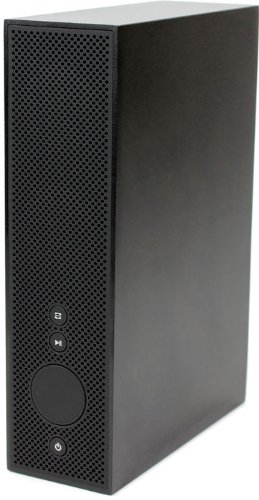
Image: The Lexon Titanium Bluetooth Speaker, showcasing its minimalist design, perforated speaker grille, and control buttons on the front panel. The speaker is a tall, rectangular black unit.
Setup
Package Contents
- Lexon Titanium Bluetooth Speaker
- USB Charging Cable
- User Manual (this document)
Charging the Speaker
Before first use, fully charge the speaker. Connect the supplied USB charging cable to the speaker's USB port and the other end to a compatible USB power adapter (not included) or a computer's USB port. The charging indicator light will illuminate during charging and turn off when fully charged. A full charge provides up to 6 hours of playback time.
Operating Instructions
Powering On/Off
Press and hold the Power button (usually indicated by a circle with a vertical line) located on the front panel for approximately 3 seconds to turn the speaker on or off.
Bluetooth Pairing
- Ensure the speaker is powered on.
- The speaker will automatically enter Bluetooth pairing mode, indicated by a flashing LED light (if present).
- On your smartphone, tablet, or PC, enable Bluetooth and search for available devices.
- Select "Lexon Titanium Speaker" from the list of devices.
- Once paired, the LED indicator will become solid, and you will hear a confirmation tone.
The speaker can connect to your smartphone or PC for audio playback.
Music Playback
After successful pairing, you can control music playback directly from your connected device. The speaker may also feature basic controls on its front panel:
- Play/Pause Button: Press to play or pause the current track.
- Volume Control: Use the large circular dial or dedicated buttons (if present) to adjust the volume.
- Track Navigation: Buttons for skipping to the next or previous track may be available.
Maintenance
- To clean the speaker, use a soft, dry cloth. Do not use abrasive cleaners or solvents.
- Avoid exposing the speaker to extreme temperatures, direct sunlight, or high humidity.
- Do not immerse the speaker in water or any other liquids.
- Store the speaker in a cool, dry place when not in use for extended periods.
Troubleshooting
| Problem | Possible Cause | Solution |
|---|---|---|
| Speaker does not turn on. | Battery is depleted. | Charge the speaker using the USB cable. |
| Cannot pair with Bluetooth device. | Speaker is not in pairing mode or device Bluetooth is off. | Ensure speaker is on and in pairing mode. Turn Bluetooth on your device and search again. Move devices closer. |
| No sound from speaker. | Volume is too low or device is not connected. | Increase volume on both speaker and connected device. Re-establish Bluetooth connection. |
Specifications
- Brand: Lexon
- Model: Lexon Titanium Bluetooth Speaker
- Connectivity Technology: Bluetooth
- Speaker Type: Wireless
- Maximum Speaker Output Power: 25 Watts
- Battery Life: Up to 6 hours
- Power Source: Electric Cable (USB rechargeable)
- Dimensions (L x W x H): 5.5 x 14 x 20.2 cm (2.17 x 5.51 x 7.95 inches)
- Weight: 1.2 kg (2.65 pounds)
- Material: Aluminum / ABS with rubber finish
- Special Features: USB Port, designed for music playback
Warranty Information
Specific warranty details for the Lexon Titanium Bluetooth Speaker are typically provided with the product packaging or on the manufacturer's official website. Please refer to these sources for the most accurate and up-to-date warranty terms and conditions. Keep your proof of purchase for warranty claims.
Customer Support
For further assistance, technical support, or inquiries regarding your Lexon Titanium Bluetooth Speaker, please visit the official Lexon website or contact their customer service department. Contact information can usually be found on the product packaging or the manufacturer's website.
Related documentsLexon Titanium Bluetooth Speaker


Ask a question about this manual
Ask about setup, troubleshooting, compatibility, parts, safety, or missing instructions. Manuals+ will review the question and use this page’s manual context to help answer it.