
1. Introduction
Thank you for purchasing the Duronic KS1007 Digital Kitchen Scale. This high-precision scale is designed for accurate measurement of ingredients in your kitchen. Please read this manual carefully before use to ensure proper operation and maintenance.
2. Safety Information
- Do not immerse the scale in water or other liquids.
- Clean the scale with a damp cloth. Do not use abrasive cleaners.
- Place the scale on a flat, stable surface for accurate measurements.
- Do not overload the scale beyond its maximum capacity of 10 kg.
- Keep out of reach of children.
- Remove batteries if the scale will not be used for an extended period.
3. Package Contents
- Duronic KS1007 Digital Kitchen Scale
- 2 x AAA Batteries
- Instruction Manual
4. Product Overview
The Duronic KS1007 kitchen scale features a slim design with a stainless steel platform and a backlit LCD display. It is equipped with four high-precision sensors for accurate measurements from 1g up to 10kg.

Image: The Duronic KS1007 digital kitchen scale with its sleek design.
Key Features:
- High-precision sensors for accurate results (1g to 10kg).
- Large, backlit LCD display for easy reading.
- Slim and lightweight design (1.7 cm thickness).
- Tare function for weighing multiple ingredients in one container.
- Multiple unit options: grams (g), milliliters (ml), pounds and ounces (lb.oz), fluid ounces (fl.oz).
- Low battery indicator.

Image: Diagram showing the dimensions of the Duronic KS1007 kitchen scale: 20 x 18.5 x 1.7 cm (platform).
5. Setup
5.1. Battery Installation
- Turn the scale upside down.
- Locate the battery compartment cover on the underside.
- Open the cover and insert 2 x AAA batteries, ensuring correct polarity (+/-).
- Close the battery compartment cover securely.

Image: Underside of the scale showing the battery compartment for 2x AAA batteries and anti-slip feet.
5.2. Initial Placement
Place the scale on a hard, flat, and stable surface to ensure accurate readings. Avoid placing it on soft or uneven surfaces.
6. Operating Instructions
6.1. Power On/Off
- To turn on: Press the ON/TARE button. The display will show "8888" then "0g".
- To turn off: Press and hold the ON/TARE button for a few seconds, or the scale will automatically shut off after approximately 60 seconds of inactivity to conserve battery life.
6.2. Weighing Items
- Turn on the scale.
- Ensure the display shows "0g" (or your desired unit).
- Place the item(s) to be weighed directly onto the center of the stainless steel platform.
- Read the weight displayed on the LCD screen.

Image: The Duronic KS1007 scale displaying a weight of 492g for ingredients in a bowl, with a maximum capacity of 10kg indicated.
6.3. Changing Units of Measurement
- With the scale on, press the UNIT button to cycle through the available units: grams (g), milliliters (ml), pounds and ounces (lb.oz), and fluid ounces (fl.oz).
- Select the desired unit for your measurement.
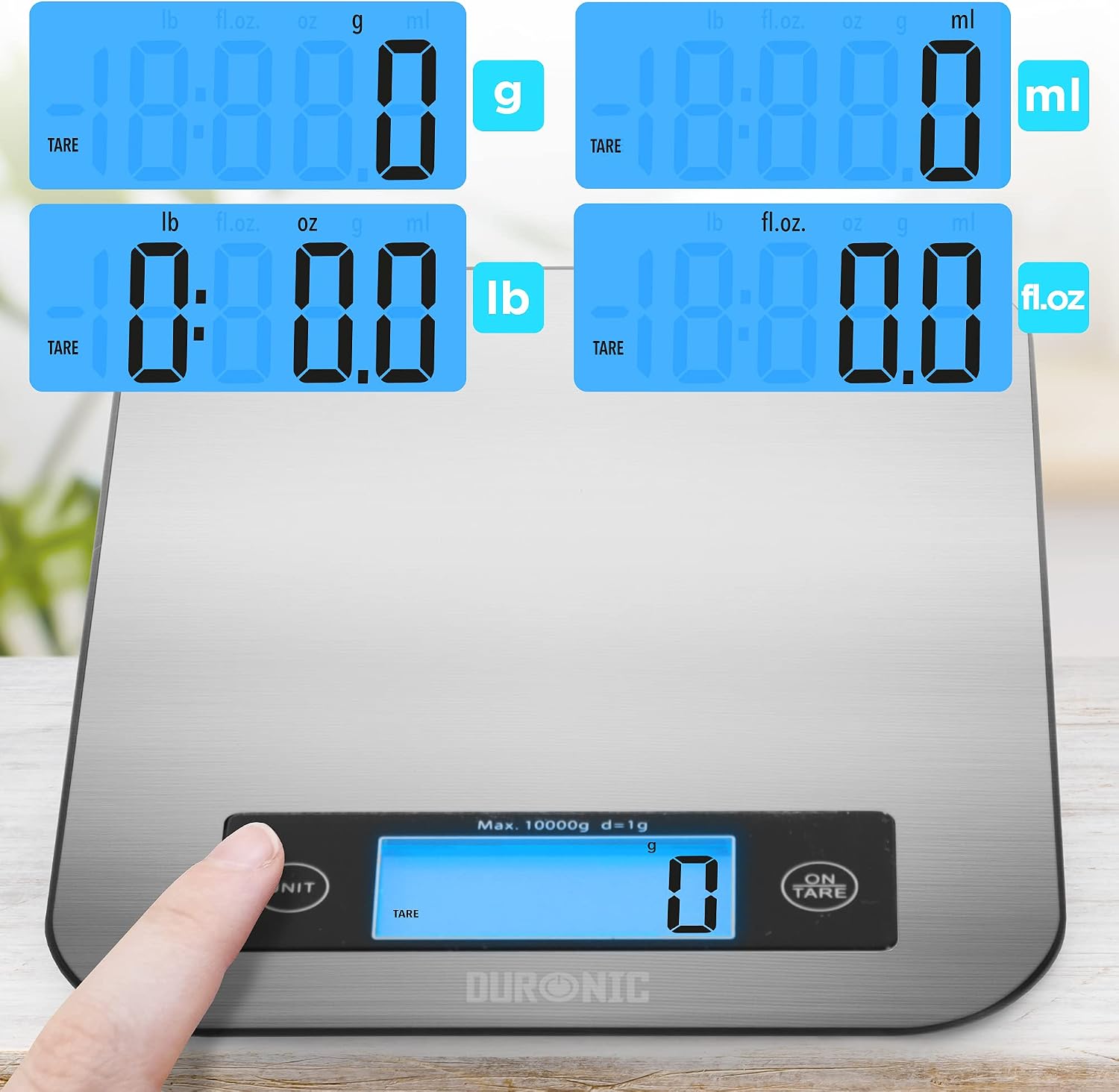
Image: Close-up of the scale's display showing different measurement units: grams (g), pounds (lb), milliliters (ml), and fluid ounces (fl.oz).
6.4. Tare Function
The tare function allows you to weigh multiple ingredients consecutively in the same container without removing previously weighed items. It also allows you to subtract the weight of a container.
- Place an empty container on the scale. The display will show its weight.
- Press the ON/TARE button. The display will reset to "0g".
- Add the first ingredient to the container. The display will show its weight.
- To add another ingredient, press the ON/TARE button again to reset the display to "0g".
- Add the next ingredient. Repeat as needed.

Image: A three-step demonstration of the tare function, showing an empty bowl being placed, the scale being tared to zero, and then pet food being added and weighed.
7. Maintenance and Cleaning
- Wipe the scale surface with a soft, damp cloth.
- Do not use chemical or abrasive cleaning agents.
- Do not submerge the scale in water.
- Store the scale in a dry place when not in use.
8. Troubleshooting
| Problem | Possible Cause | Solution |
|---|---|---|
| Scale does not turn on. | Batteries are dead or incorrectly installed. | Check battery polarity or replace with new AAA batteries. |
| Inaccurate readings. | Scale is on an uneven surface, overloaded, or needs calibration. | Place on a flat, stable surface. Do not exceed 10kg. Turn off and on again to re-calibrate to zero. |
| "Lo" or "Err" displayed. | Low battery or overload error. | Replace batteries if "Lo" appears. Remove excess weight if "Err" appears. |
9. Specifications
| Feature | Detail |
|---|---|
| Brand | Duronic |
| Model | KS1007 |
| Color | Silver |
| Material | Stainless Steel |
| Maximum Weight Capacity | 10 kg |
| Minimum Weight Capacity | 1 g |
| Display Type | Backlit LCD |
| Units of Measurement | g, ml, lb.oz, fl.oz |
| Power Source | 2 x AAA Batteries (included) |
| Platform Dimensions | 20 x 18.5 x 1.7 cm (approx.) |
| Item Weight | 300 Grams |
10. Warranty and Support
Duronic products are manufactured to high-quality standards. For warranty information or technical support, please refer to the contact details provided with your purchase or visit the official Duronic website. Keep your proof of purchase for warranty claims.


