
Product Overview
The Intermatic T103R is a robust 24-hour mechanical time switch designed for reliable control of electrical loads. This DPST (Double Pole Single Throw) timer operates at 125V and handles up to 40A, making it suitable for a variety of applications, including pool pumps, lighting, and other heavy-duty electrical equipment. Its NEMA 3R enclosure provides protection against rain, sleet, and external ice formation, making it ideal for outdoor installations. The timer features a direct 24-hour control dial, allowing for precise scheduling of ON/OFF operations.
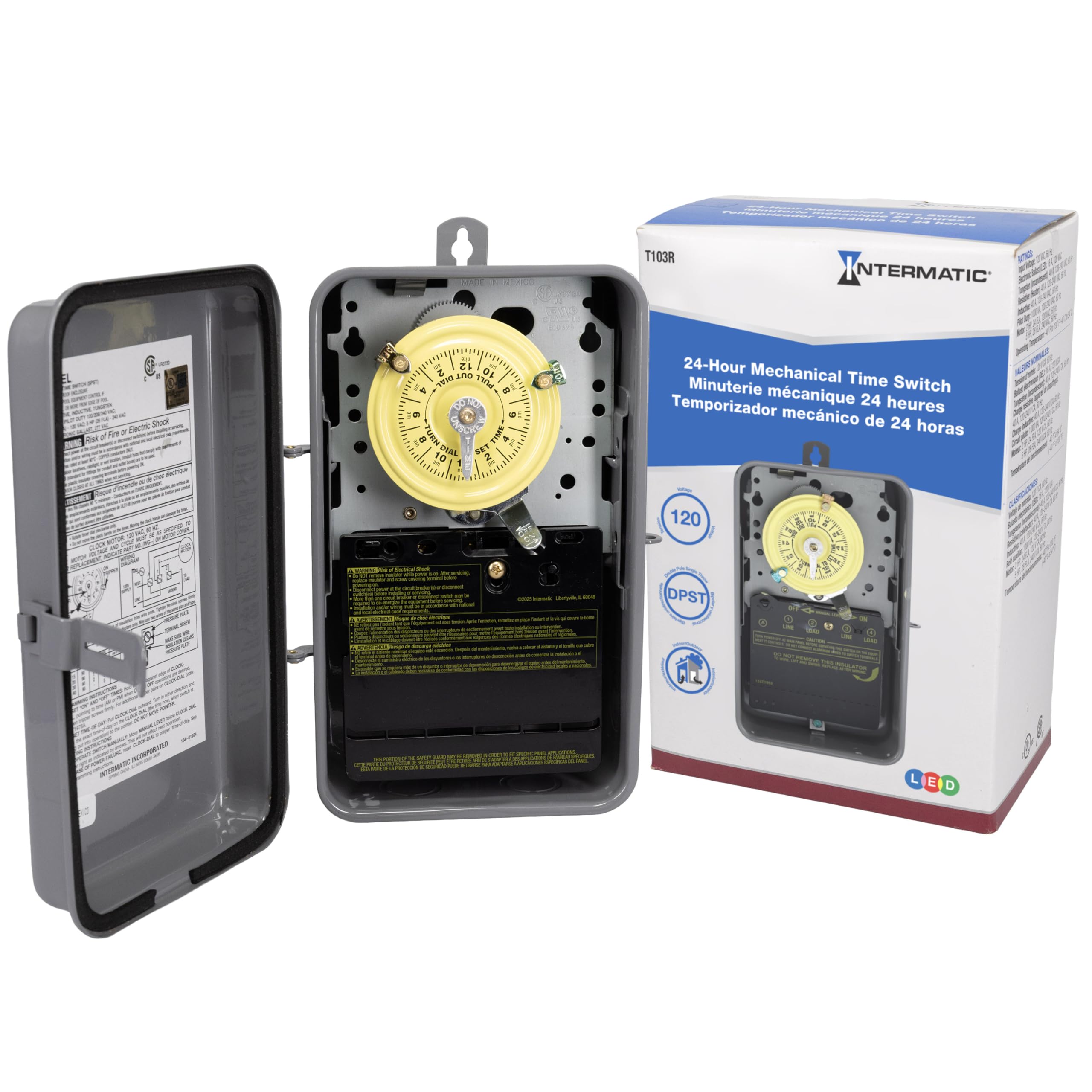
Figure 1: Intermatic T103R 24-Hour Mechanical Time Switch. This image shows the timer with its protective cover open, revealing the internal dial and wiring terminals.
Important Safety Information
WARNING: Risk of Fire or Electric Shock. This product must be installed by a qualified electrician in accordance with all national and local electrical codes. Disconnect power at the circuit breaker or fuse box before installing or servicing. Failure to follow these instructions could result in serious injury or death.
- Always ensure power is OFF before working on electrical connections.
- Verify voltage and amperage ratings are compatible with your application.
- Ensure proper grounding to prevent electrical shock.
- Do not operate the timer with damaged wiring or if the enclosure is compromised.
Setup and Installation
The Intermatic T103R is designed for simple installation, typically mounted on a wall or flat surface. The NEMA 3R enclosure is suitable for outdoor use, providing protection from environmental elements. Refer to the wiring diagram located inside the timer's cover for specific connection instructions. Ensure all connections are secure and meet local electrical code requirements.
- Mounting: Securely mount the timer enclosure to a stable surface using appropriate hardware.
- Wiring:
- Turn off power at the main circuit breaker.
- Open the timer enclosure.
- Connect the incoming power lines (LINE) and outgoing load lines (LOAD) to the designated terminals. The T103R supports loads up to 40A per pole.
- Connect the neutral wire and ensure proper grounding.
- Double-check all connections for tightness and correctness.
- Close Enclosure: Once wiring is complete and verified, close and secure the timer enclosure cover.
- Restore Power: Turn on power at the main circuit breaker.
Video 1: Intermatic T100 Series Mechanical Time Switches Overview. This video provides a general overview of the T100 series mechanical time switches, demonstrating key features like setting the time dial, installing ON/OFF trippers, and using the manual override switch. It highlights the simple installation and operation of these durable timers.
Operating Instructions
The T103R timer offers straightforward operation for scheduling your electrical loads.
- Setting the Current Time:
- Gently pull the clock dial outwards.
- Rotate the dial clockwise until the current time aligns with the "TIME SET" arrow. Ensure AM/PM is correctly observed.
- Push the dial back into place.
- Setting ON/OFF Operations:
- The timer comes with one ON tripper (green) and one OFF tripper (red). Additional trippers can be purchased separately to allow up to 12 ON/OFF operations per day.
- To set an ON time, slide the green ON tripper onto the dial at the desired time.
- To set an OFF time, slide the red OFF tripper onto the dial at the desired time.
- Ensure trippers are securely fastened.
- Manual Override Switch:
A manual override lever is located below the clock dial. This allows you to temporarily turn the load ON or OFF without affecting the programmed schedule. Simply move the lever to the "ON" or "OFF" position as needed. The timer will resume its programmed schedule at the next scheduled ON or OFF event.
Maintenance
The Intermatic T103R is designed for long-term, reliable operation with minimal maintenance. Periodically inspect the timer for:
- Enclosure Integrity: Check for any signs of damage, cracks, or loose seals that could compromise its NEMA 3R rating.
- Wiring Connections: Ensure all electrical connections remain tight and free from corrosion. (Always disconnect power before inspecting wiring.)
- Dial and Trippers: Verify the clock dial rotates freely and the ON/OFF trippers are securely in place and functioning correctly.
- Cleanliness: Keep the exterior of the enclosure clean and free from debris.
Troubleshooting
| Problem | Possible Cause | Solution |
|---|---|---|
| Timer not operating / Load not turning ON/OFF | No power to the timer; Trippers not set correctly; Manual override engaged; Faulty wiring. | Check circuit breaker; Verify tripper positions; Check manual override lever; Inspect wiring (with power off). |
| Clock dial not rotating | No power to the clock motor; Obstruction on the dial. | Check power supply; Ensure dial is pushed in completely and free of debris. |
| Inaccurate timing | Incorrect initial time setting; Trippers loose or moved. | Reset current time accurately; Secure trippers firmly. |
If troubleshooting steps do not resolve the issue, contact a qualified electrician or Intermatic customer support for assistance.
Specifications
- Model: T103R
- Switch Style: DPST (Double Pole Single Throw)
- Voltage: 125V
- Amperage: 40A
- Enclosure: NEMA 3R (Outdoor rated, rain-tight)
- Material: Steel
- Product Dimensions: 3.63"D x 6.5"W x 10.13"H
- Item Weight: 3.4 Pounds
- Number of Operations: Up to 12 ON/OFF operations per day (with additional trippers)
- Minimum ON/OFF Time: 1 hour
- Certifications: UL (Canada and US), CSA (Canada and US)
- UPC: 078275020061
Warranty and Support
For detailed warranty information, please refer to the manufacturer's description or contact Intermatic directly. For technical support or further assistance, visit the official Intermatic website or contact their customer service department. Always provide your product model number (T103R) when seeking support.
Manufacturer: Intermatic


