
Introduction
Thank you for choosing the Cyber Acoustics CA-3810 2.1 Multimedia Speaker System. This system is designed to deliver rich, room-filling sound with 80 watts peak power and 40 watts RMS, featuring crisp highs, warm mid-tones, and deep, powerful bass. This manual provides essential information for setting up, operating, and maintaining your speaker system to ensure optimal performance and longevity.
Package Contents
Please verify that all items listed below are included in your package:
- 1 x Subwoofer
- 2 x Satellite Speakers
- 1 x Control Pod
- All necessary audio cables
- 1 x 110V AC Power Adapter
- 1 x User Guide
Setup Instructions
Follow these steps to correctly set up your Cyber Acoustics CA-3810 speaker system:
- Position the Subwoofer: Place the subwoofer in a desired location, typically on the floor near your computer or audio source, ensuring adequate ventilation.
- Connect Satellite Speakers: Connect the two satellite speakers to the corresponding output ports on the rear of the subwoofer. Ensure a secure connection.
- Connect the Control Pod: Plug the control pod cable into the designated port on the subwoofer.
- Connect to Audio Source: Use the 3.5mm auxiliary cable from the control pod to connect to your computer, laptop, gaming system (PS4, PS5, Xbox, Nintendo Switch), tablet, or smartphone's audio output or headphone jack.
- Connect to Power: Plug the 110V AC power adapter into the subwoofer's power input and then into a wall outlet.

Figure 1: The 5.25-inch side-firing subwoofer provides deep, powerful bass.

Figure 2: Dual 2-inch satellite speakers with removable cloth grills for clear mid-tones and crisp highs.

Figure 3: The convenient desktop control pod features master volume, bass control, 3.5mm aux input, and a headphone jack.
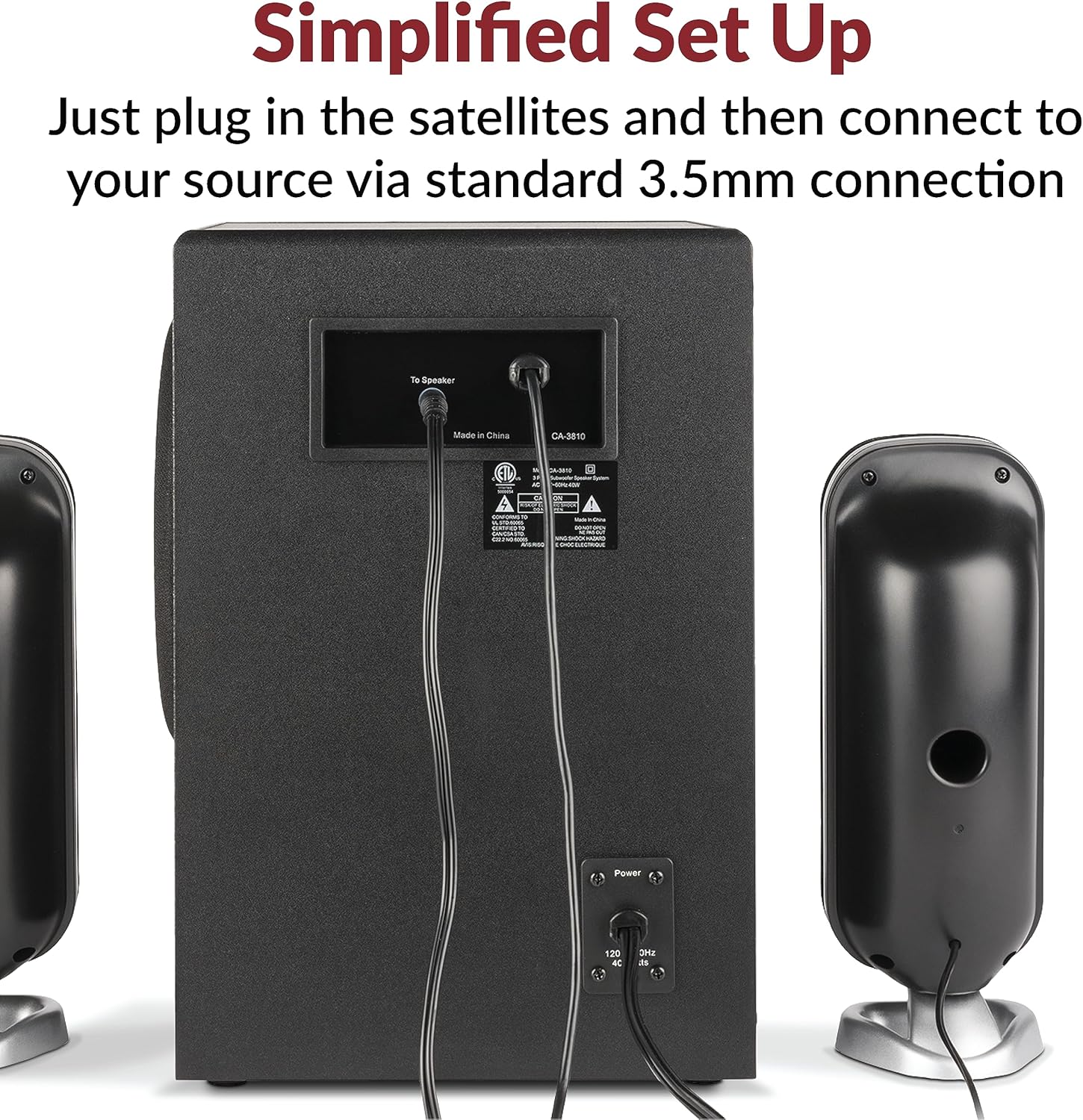
Figure 4: Rear panel of the subwoofer showing connections for satellite speakers and power input.
Setup Videos
Official Cyber Acoustics video demonstrating how to set up the speaker system with a Windows 10 computer.
Official Cyber Acoustics video demonstrating how to set up the speaker system with a Mac computer.
Operating Instructions
Once your speaker system is set up, follow these instructions for operation:
- Power On/Off: Use the power switch on the control pod to turn the system on or off. A blue LED light on the control pod indicates power status.
- Adjust Master Volume: Rotate the main dial on the control pod to increase or decrease the overall volume.
- Adjust Bass Level: Use the dedicated bass control knob on the control pod to customize the bass output to your preference.
- Headphone Use: For private listening, plug your headphones into the 3.5mm headphone jack on the control pod. This will mute the speakers.
- Auxiliary Input: The 3.5mm aux input on the control pod allows for quick connection of additional audio devices.
- Optimal Sound Fidelity: For the best sound quality, set the volume on your audio source (computer, tablet, etc.) between 65-80% and then use the speaker system's controls for fine-tuning the volume.
Maintenance
To ensure the longevity and performance of your CA-3810 speaker system, follow these maintenance guidelines:
- Cleaning: Use a soft, dry cloth to clean the surfaces of the subwoofer, satellite speakers, and control pod. Avoid using liquid cleaners or abrasive materials.
- Grill Maintenance: The satellite speakers feature classic cloth grills that can be removed for cleaning or for an open-face aesthetic. Handle with care when removing or reattaching.
- Ventilation: Ensure the subwoofer is placed in a location with adequate airflow to prevent overheating. Do not block any vents.
- Cable Management: Keep cables tidy and untangled to prevent damage and ensure a clean setup.
Troubleshooting
If you encounter any issues with your speaker system, please refer to the following common troubleshooting steps:
- No Sound:
- Ensure the power adapter is securely plugged into both the subwoofer and a working wall outlet.
- Verify the control pod is turned ON and the master volume is not set to minimum.
- Check that the 3.5mm audio cable is securely connected to both the control pod and your audio source.
- Confirm that the audio output on your device (computer, tablet, etc.) is correctly selected for the CA-3810 system and its volume is not muted or too low.
- If headphones are plugged into the control pod, remove them to enable speaker output.
- Distorted Sound:
- Reduce the volume on both the control pod and your audio source. Gradually increase until distortion is eliminated.
- Adjust the bass level on the control pod. Excessive bass can cause distortion.
- Ensure all cable connections are firm and free from damage.
- Uneven Sound (One Speaker Not Working):
- Check the connection of both satellite speakers to the subwoofer.
- Test with another audio source to rule out an issue with the original device.
If these steps do not resolve your issue, please contact Cyber Acoustics customer support.
Specifications
| Model Name | CA-3810 |
| Speaker Type | 2.1 Multimedia Speaker System with Subwoofer |
| Peak Power | 80 Watts |
| RMS Power | 40 Watts |
| Subwoofer Diameter | 5.25 Inches |
| Satellite Drivers | Dual 2-inch drivers per satellite |
| Impedance | 4 Ohms |
| Connectivity Technology | Wired (3.5mm Auxiliary) |
| Input Voltage | 110 Volts |
| Product Dimensions | 12"D x 13"W x 9.35"H |
| Item Weight | 10 Pounds |
| Color | Black |
| Material | Plastic |
Warranty and Support
Your Cyber Acoustics CA-3810 2.1 Multimedia Speaker System is covered by a 1-year manufacturer warranty.
Should you require assistance or have any questions, our US-based customer service team is available to help. Please contact us through Amazon for support.


