
1. Introduction
Thank you for choosing the Citizen Eco-Drive Analog Black Dial Men's Watch, Model CB0027-51E. This timepiece combines elegant design with advanced Eco-Drive technology, powered by any light source, eliminating the need for battery replacement. It also features radio-controlled timekeeping for precise accuracy. This manual provides essential information for the proper setup, operation, and maintenance of your watch.
2. Product Overview
Familiarize yourself with the key components of your Citizen Eco-Drive watch.

Figure 2.1: Front view of the Citizen Eco-Drive CB0027-51E watch, showcasing the black dial, silver-tone hands, and stainless steel band.

Figure 2.2: Close-up of the watch dial, highlighting the "CITIZEN" logo, "Eco-Drive RADIO CONTROLLED" text, and the signal reception indicator (OK, RX, NO) and Summer Time (SMT) switch.
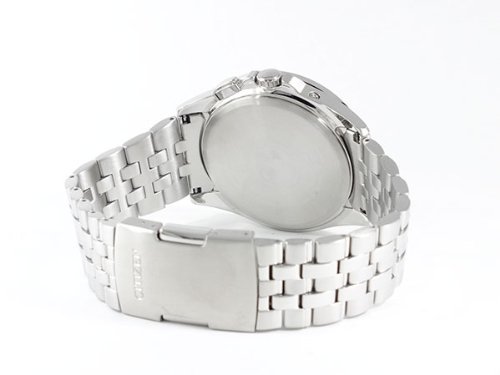
Figure 2.3: Rear view of the watch, showing the solid stainless steel case back and the clasp mechanism of the band.
Key Components:
- Dial: Black dial with luminous hands and markers. Features include a signal reception indicator (OK/RX/NO) and a Summer Time (SMT) ON/OFF display.
- Bezel: Outer bezel marked with major city names, indicating world time zones.
- Crown: Used for manual time adjustment and mode selection.
- Pushers: Buttons on the side of the case for specific functions (e.g., signal reception check, mode change).
- Case: Durable stainless steel case.
- Band: Stainless steel bracelet with a secure clasp.
3. Setup
3.1 Initial Charging
Your Eco-Drive watch is powered by light. Before initial use, ensure the watch is fully charged. Expose the watch dial to bright light (natural sunlight is ideal) for several hours. Avoid placing it in direct sunlight for prolonged periods where temperatures can become extremely high.
- For a full charge from a completely depleted state, expose to direct sunlight for approximately 11 hours, or to fluorescent light (30W, 20cm) for about 40 hours.
- A low charge indicator (if present, usually a two-second interval hand movement) signifies the need for charging.
3.2 Setting Time and Date (Radio Control)
This watch automatically receives time signals to maintain accurate time. Ensure the watch is exposed to an open area, away from electronic interference, for optimal signal reception.
- Select Home City: Rotate the crown or use the pushers (refer to specific model instructions for exact method) to align the city name on the bezel corresponding to your current time zone with the 12 o'clock position. This sets your home time zone.
- Automatic Reception: The watch attempts to receive the time signal automatically, typically overnight. Ensure the watch is placed near a window or in an area with good signal reception.
- Manual Reception: To manually initiate signal reception, press and hold the designated pusher (often the lower right pusher) for a few seconds until the second hand points to "RX" or "OK" on the dial. The reception indicator will show the result:
- OK: Successful reception.
- RX: Attempting reception.
- NO: Reception failed. Try again in a different location.
- Daylight Saving Time (SMT): Adjust the "SMT" switch on the dial (if applicable, usually via a pusher or crown function) to ON or OFF depending on your region's Daylight Saving Time status.
4. Operating the Watch
4.1 Checking Signal Reception Result
To check the last signal reception result, press the designated pusher (e.g., upper right pusher) briefly. The second hand will point to "OK" (successful), "NO" (failed), or "RX" (in progress) for a few seconds before returning to normal timekeeping.
4.2 Manual Time Adjustment (If Needed)
In areas where radio signals are not available, or if you prefer, you can manually set the time and date.
- Pull the crown out to the time setting position (usually the second click).
- Rotate the crown to adjust the hour and minute hands.
- Push the crown back in to resume timekeeping.
Note: Refer to the full Citizen instruction manual for detailed manual adjustment procedures, especially for date and specific functions.
5. Maintenance
5.1 Cleaning
Regularly wipe the watch case and band with a soft, dry cloth to remove dust and perspiration. For stainless steel bands, a slightly damp cloth can be used, followed by a dry cloth. Avoid using chemical cleaners or abrasive materials.
5.2 Water Resistance
While your watch is designed for daily use, its water resistance level should be noted. Avoid exposing the watch to hot water, steam, or chemicals, as these can compromise the seals. Ensure the crown is pushed in completely before any contact with water.
5.3 Light Exposure
To ensure continuous operation, expose your Eco-Drive watch to light regularly. When not in use, store it in a location where it can receive light, rather than in a dark drawer.
6. Troubleshooting
- Watch has stopped or is running slow:
This indicates insufficient charge. Expose the watch to bright light for an extended period to fully charge it. After charging, perform a manual signal reception if necessary.
- Time is incorrect after signal reception:
Check if your home city setting is correct. Ensure the Daylight Saving Time (SMT) setting is appropriate for your region. Try manual signal reception in a different location with better signal.
- Signal reception consistently fails ("NO" indicator):
Move to an open area, away from buildings, electronic devices, or large metal objects that might interfere with the signal. Try reception during nighttime hours when signal strength is often better.
- Hands are misaligned:
In rare cases, strong impact or magnetic fields can cause hand misalignment. Refer to the comprehensive Citizen manual for instructions on resetting the reference position of the hands.
7. Specifications
| Feature | Detail |
|---|---|
| Model Number | CB0027-51E |
| Dial Color | Black |
| Case Shape | Round |
| Dial Glass Material | Sapphire |
| Band Color | Silver-tone (Stainless Steel) |
| Band Material | Stainless Steel |
| Movement Type | Light Powered (Eco-Drive), Radio Controlled |
| Display Type | Analog |
| Case Material | Stainless Steel |
| Case Diameter | 49 mm |
| Item Weight | 500 g |
| Manufacturer | Citizen |
8. Warranty and Support
8.1 Warranty Information
This Citizen watch comes with a 1 Year International Guarantee from the manufacturer. Please retain your proof of purchase for warranty claims. The warranty covers manufacturing defects under normal use. It does not cover damage resulting from misuse, accidents, unauthorized repairs, or normal wear and tear.
8.2 Customer Support
For further assistance, detailed operating instructions, or warranty service, please contact Citizen customer support in your region. You can typically find contact information on the official Citizen website or through your authorized dealer.


