
1. Introduction
This manual provides detailed instructions for the OREI HD-104 HDMI Splitter. This device is designed to distribute one HDMI input signal to four identical HDMI output signals simultaneously, making it suitable for various display setups.
Key Features:
- Splits one HDMI input signal into four identical HDMI output signals.
- Supports resolutions up to 4K@30Hz, 1080p, and 720p.
- Compatible with HDCP 1.4 for secure content transmission.
- Supports advanced audio formats including LPCM, Dolby-AC3, DTS 7.1, DSD, Dolby TrueHD, and DTS-HD Master Audio.
- Compact design with easy plug-and-play operation.

Figure 1: OREI HD-104 HDMI Splitter distributing a single source to four displays.
Package Contents
Verify that all items are present in the package:
- 1 x OREI HD-104 HDMI Splitter (1 input, 4 outputs)
- 1 x 5V AC Power Adapter
- 1 x User Manual
Note: HDMI cables are not included and must be purchased separately.
2. Setup and Installation
Follow these steps to connect and set up your OREI HD-104 HDMI Splitter:
- Power Off Devices: Ensure all source devices (e.g., Blu-ray player, gaming console) and display devices (e.g., TVs, monitors) are powered off before making connections.
- Connect HDMI Input: Connect an HDMI cable from your source device to the 'IN' port on the OREI HD-104 splitter.
- Connect HDMI Outputs: Connect HDMI cables from the 'OUT 1', 'OUT 2', 'OUT 3', and 'OUT 4' ports on the splitter to your display devices.
- Connect Power Adapter: Plug the 5V AC power adapter into the 'DC 5V' port on the splitter, then plug the adapter into a power outlet.
- Power On Devices: Power on the splitter, then power on your display devices, and finally your source device.

Figure 2: Front and rear panel connections of the OREI HD-104 HDMI Splitter.
EDID Management
The HD-104 features an EDID (Extended Display Identification Data) switch to manage display compatibility. This switch is located on the front panel:
- STD (Standard): Select this mode for standard EDID settings, which may resolve compatibility issues with older or specific display devices.
- TV: Select this mode to copy the EDID from the display connected to Output 1. This ensures the source device outputs a signal compatible with the primary display. If Output 1 is not connected, the splitter will default to a standard EDID.
It is recommended to set the EDID mode before powering on the source device.
3. Operation
Once connected and powered on, the OREI HD-104 splitter will automatically duplicate the HDMI input signal to all four connected displays. No additional configuration is typically required for basic operation.
LED Indicators
The front panel of the splitter includes LED indicators to show the status of the device:
- Power LED: Illuminates when the device is powered on.
- Input LED: Illuminates when an active HDMI input signal is detected.
- Output 1-4 LEDs: Each LED illuminates when an active HDMI output connection is established with a display.
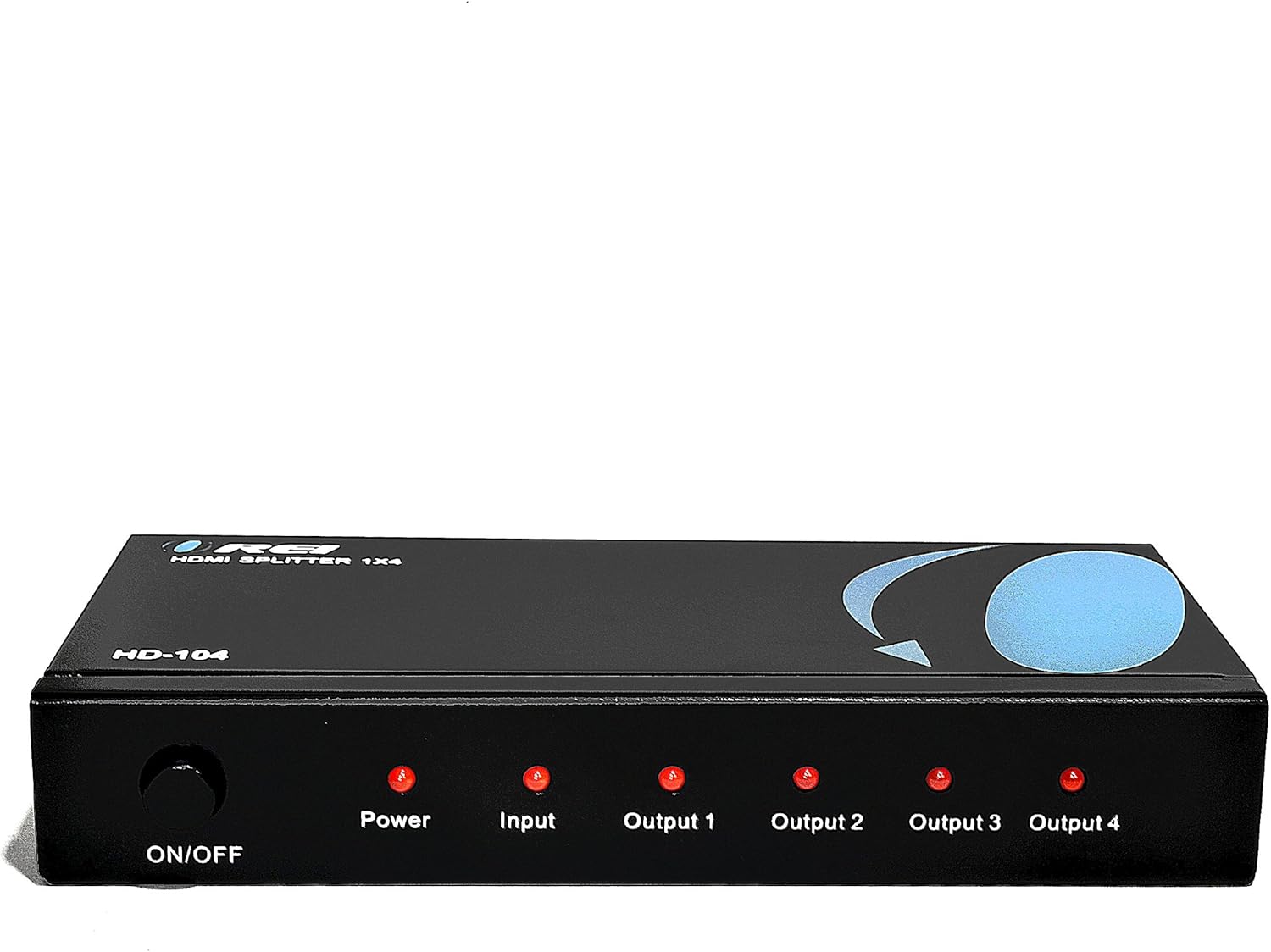
Figure 3: Front panel with LED indicators.
Important Considerations
- Duplication Only: This device duplicates the input signal. It does not extend your desktop across multiple monitors to create a single, larger display. All connected displays will show the same content.
- No Audio Extraction: The splitter passes through audio signals but does not extract or separate audio from the HDMI stream.

Figure 4: Connection diagram and functional limitations.
4. Specifications
| Model | HD-104 |
| Input Ports | 1 x HDMI |
| Output Ports | 4 x HDMI |
| HDMI Version | HDMI 2.0 (backward compatible) |
| HDCP Version | HDCP 1.4 |
| Max Resolution | 4K@30Hz, 1080p, 720p |
| Audio Support | LPCM, Dolby-AC3, DTS 7.1, DSD, Dolby TrueHD, DTS-HD Master Audio |
| Power Supply | DC 5V |
| Dimensions (L x W x H) | 7 x 3 x 1 inches (17.8 x 7.6 x 2.5 cm) |
| Weight | 15.4 ounces (436.6 grams) |
| Material | Heavy-duty metal enclosure |

Figure 5: Durable metal casing for heat dissipation.

Figure 6: Compact design and included power adapter.
5. Troubleshooting
If you encounter issues with your OREI HD-104 HDMI Splitter, refer to the following troubleshooting tips:
- No Picture/Signal:
- Ensure the splitter is powered on and the Power LED is illuminated.
- Verify all HDMI cables are securely connected to both the splitter and your source/display devices.
- Try using different HDMI cables, as faulty cables can cause signal loss.
- Test the source device and display directly without the splitter to confirm they are working correctly.
- Adjust the EDID switch (STD/TV) on the splitter and restart all devices.
- Ensure your display devices support the resolution output by your source device.
- Poor Picture Quality/Flickering:
- Use high-quality HDMI cables, especially for longer runs or higher resolutions (4K).
- Check for interference from other electronic devices.
- Ensure the power adapter is providing stable power to the splitter.
- Audio Issues:
- Confirm that your source device is outputting audio via HDMI.
- Check audio settings on your source device and display.
- Ensure the EDID setting is appropriate for your audio setup.
- LED Indicators Not Lighting Up:
- If the Power LED is off, check the power adapter and outlet.
- If Input/Output LEDs are off, ensure devices are connected and powered on, and active signals are present.
6. Maintenance
To ensure the longevity and optimal performance of your OREI HD-104 HDMI Splitter:
- Keep the device in a cool, dry place, away from direct sunlight, heat sources, and moisture.
- Avoid placing heavy objects on the splitter.
- Clean the device with a soft, dry cloth. Do not use liquid or aerosol cleaners.
- Ensure proper ventilation around the unit to prevent overheating.
7. Warranty and Support
The OREI HD-104 HDMI Splitter comes with a 12-Month Manufacturer's Warranty. OREI also provides Lifetime Technical Support for its products.
For technical assistance or warranty claims, please contact OREI customer support through their official website or the retailer where the product was purchased. Please have your model number (HD-104) and purchase information ready.


