
Go Power OVERLANDER
Go Power! Overlander 200W Solar Kit User Manual
Model: OVERLANDER
Product Overview
The Go Power! Overlander 200W Solar Kit is designed to provide reliable off-grid power for various applications, including RVs and dry camping. This comprehensive kit includes a high-efficiency solar panel and a 30-amp solar controller, ensuring your batteries remain charged without the need for a traditional generator. It is engineered for durability and ease of use, offering a sustainable energy solution.
Kit Components
The Go Power! Overlander 200W Solar Kit comes with all necessary components for installation and operation:
- 200W Solar Panel (GP-PV-200M)
- 30-amp single-bank, Bluetooth® PWM Solar Controller (GP-SB-PWM-30-BT)
- 25′ of solar output cable - RED (#10)
- 25′ of solar output cable - BLACK (#10)

Image: The complete Go Power! Overlander 200W Solar Kit, showing the solar panel, 30-amp solar controller, and included cabling.
Setup and Installation
Proper installation is crucial for optimal performance and longevity of your solar kit. It is recommended to consult a qualified professional for installation if you are not familiar with electrical systems.
Mounting the Solar Panel
The 200W solar panel should be mounted in a location that receives maximum direct sunlight throughout the day, free from obstructions like trees or other structures. Ensure the mounting surface is sturdy and can support the panel's weight. The panel dimensions are approximately 59 inches (L) x 26.3 inches (W) x 1.6 inches (H).

Image: Detailed view of the Go Power! Overlander solar panel with its dimensions indicated.
Connecting the Solar Controller
The 30-amp Bluetooth® PWM Solar Controller manages the power flow from the solar panel to your batteries, preventing overcharge and optimizing charging efficiency. Connect the solar panel to the controller using the provided 25-foot red and black solar output cables. Then, connect the controller to your battery bank. Ensure all connections are secure and follow the polarity markings carefully.
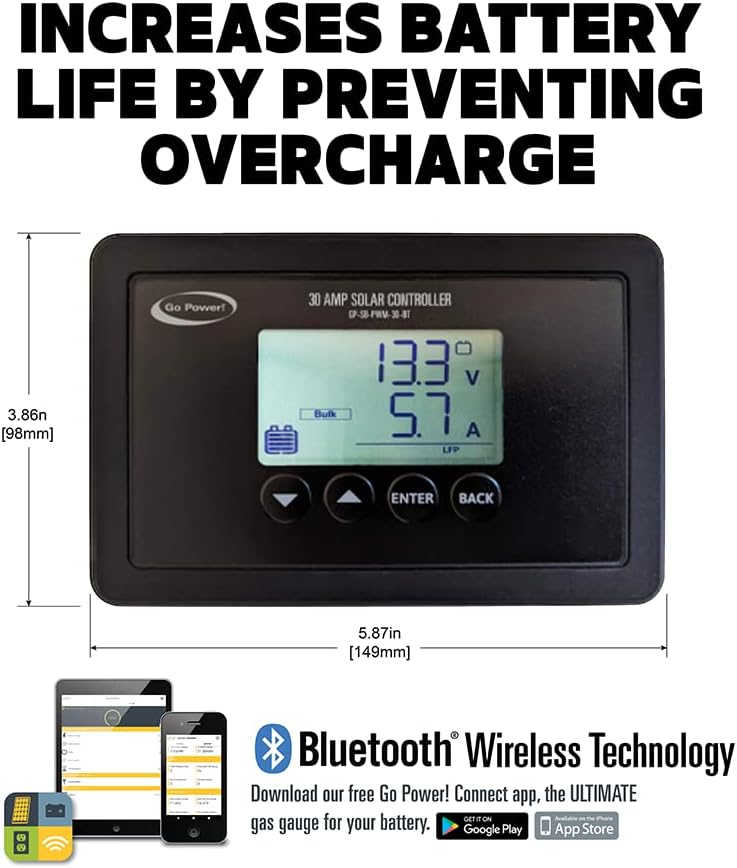
Image: Close-up of the Go Power! 30-amp solar controller, highlighting its display and Bluetooth wireless technology for monitoring.
The controller features a display that shows charging status, voltage, and current. It also includes Bluetooth connectivity, allowing you to monitor your system wirelessly via a compatible app.

Image: A diagram illustrating the key benefits of the Go Power! solar system, including high efficiency, wireless connectivity, and power-packed performance.
Operating the Solar Kit
Once installed, the Go Power! Overlander solar kit operates automatically, converting sunlight into electrical energy to charge your 12-volt battery bank. The 200W panel provides up to 9.6 amps of solar power, ensuring efficient charging.
Monitoring System Performance
Utilize the 30-amp solar controller's display to monitor real-time charging data, including battery voltage and charging current. For more detailed monitoring and remote access, connect to the controller via Bluetooth using the Go Power! Connect app on your smartphone or tablet.
System Expandability
The Overlander kit is designed to be expandable. You can add additional solar panels to increase your total power output, with the included 30-amp controller capable of handling up to 600 watts of solar input.

Image: Go Power! solar panels seamlessly integrated onto the roof of a vehicle, demonstrating their application in various environments, including snowy conditions.
Maintenance
The Go Power! Overlander solar kit is designed to be largely maintenance-free, providing decades of uninterrupted power. However, periodic checks can help ensure optimal performance:
- Panel Cleaning: Regularly clean the surface of the solar panel with a soft cloth and water to remove dirt, dust, or debris that may reduce efficiency. Avoid abrasive cleaners.
- Connection Inspection: Periodically inspect all electrical connections for tightness and corrosion. Ensure cables are not frayed or damaged.
- Controller Check: Verify the solar controller's display is functioning correctly and showing appropriate readings.
Troubleshooting
If you experience issues with your Go Power! Overlander solar kit, consider the following common troubleshooting steps:
- No Charge/Low Output:
- Ensure the solar panel is receiving direct sunlight and is not shaded.
- Check all cable connections for proper polarity and secure contact.
- Verify the battery voltage is within the operating range of the controller.
- Inspect the solar panel surface for dirt or damage.
- Controller Not Displaying:
- Check the battery connection to the controller. The controller typically draws power from the battery to operate its display.
- Ensure the battery has sufficient charge.
- Battery Not Holding Charge:
- This may indicate an issue with the battery itself rather than the solar kit. Test the battery independently.
- Ensure there are no excessive loads draining the battery faster than the solar panel can charge it.
For persistent issues or complex problems, please refer to the detailed troubleshooting guide in the full product manual or contact Go Power! customer support.
Specifications
| Attribute | Detail |
|---|---|
| Brand | Go Power |
| Model | OVERLANDER |
| Material | Tempered Glass, Aluminum |
| Product Dimensions | 59"L x 26.3"W x 1.6"H |
| Item Weight | 35 Pounds |
| Efficiency | High Efficiency |
| Connector Type | MC4 |
| AC Adapter Current | 9.3 Amps |
| Maximum Voltage | 12 Volts |
| Upper Temperature Rating | 149 Degrees Celsius |
| Maximum Power | 200 Watts |
Warranty Information
The Go Power! Overlander 200W Solar Kit comes with a 25-year limited solar panel output power warranty. This warranty covers the power output of the solar panel, ensuring it performs to specified standards over its lifespan. For detailed terms and conditions of the warranty, please refer to the official Go Power! warranty documentation included with your product or visit the manufacturer's website.
Customer Support
For technical assistance, product inquiries, or warranty claims, please contact Go Power! customer support. Refer to the contact information provided in your product packaging or on the official Go Power! website. When contacting support, please have your product model number (OVERLANDER) and purchase details ready.
Related documentsOVERLANDER


Ask a question about this manual
Ask about setup, troubleshooting, compatibility, parts, safety, or missing instructions. Manuals+ will review the question and use this page’s manual context to help answer it.