
Schneider Electric SR2B121FU
Schneider Electric Zelio SR2B121FU Smart Relay User Manual
Model: SR2B121FU
Introduction
This manual provides essential information for the installation, operation, and maintenance of the Schneider Electric Zelio SR2B121FU Smart Relay. The Zelio SR2B121FU is a compact, programmable relay designed for simple automation systems, featuring 12 I/O points and a display for direct interaction.
Please read this manual thoroughly before attempting to install or operate the device to ensure safe and efficient use.
Product Overview
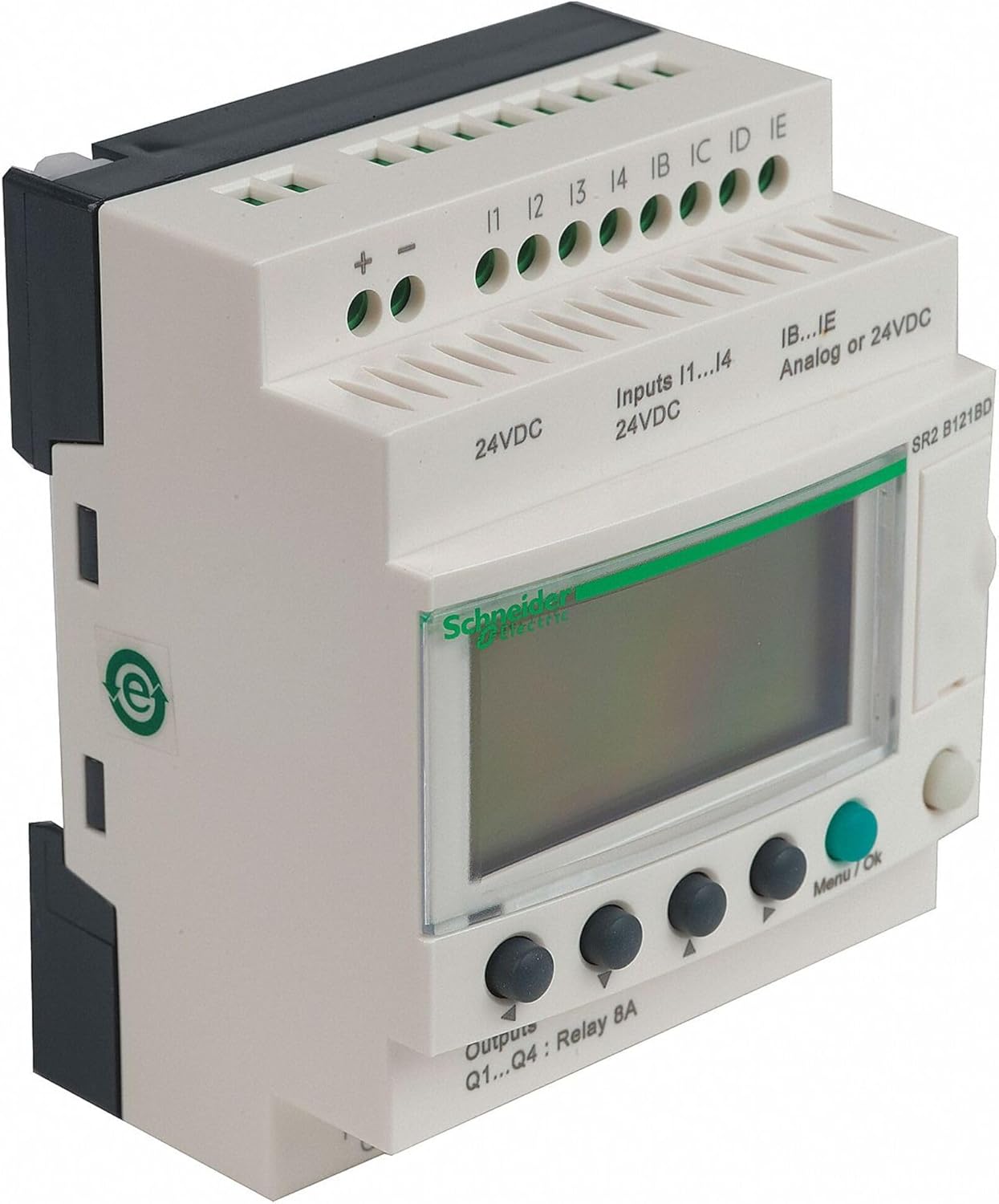
Figure 1: Zelio Smart Relay
The image displays the Schneider Electric Zelio Smart Relay. It features a light grey casing with a dark grey base. The top section includes screw terminals for inputs and power supply. Specifically, there are terminals labeled '+' and '-' for 24VDC power, followed by input terminals I1, I2, I3, I4, IB, IC, ID, and IE. Text indicates "Inputs I1...I4 24VDC" and "IB...IE Analog or 24VDC". The front panel has a display screen and four control buttons below it, with a "Menu/Ok" button on the right. The bottom section shows output terminals labeled "Q1...Q4: Relay 8A". The model number "SR2 B121BD" is visible on the top right of the front panel. The Schneider Electric logo is visible on the display bezel. This image represents a model similar to the SR2B121FU.
Key Features:
- 12 I/O points (Inputs and Outputs)
- Integrated display for programming and monitoring
- Operates on 100-240 Vac power supply
- Compact design for DIN rail mounting
Safety Information
WARNING:
- Disconnect all power before working on the device.
- Installation and maintenance should only be performed by qualified personnel.
- Ensure proper grounding to prevent electric shock.
- Adhere to all local and national electrical codes.
Setup and Installation
Mounting:
The Zelio SR2B121FU is designed for DIN rail mounting. Ensure the mounting surface is stable and free from excessive vibration.
- Hook the top edge of the device onto the DIN rail.
- Push the bottom edge firmly until it clicks into place.
Wiring:
Refer to the wiring diagram provided with the product for specific connections. Ensure all connections are secure and correctly polarized.
- Power Supply: Connect 100-240 Vac to the designated power terminals.
- Inputs (I1-I4): Connect 24VDC digital inputs.
- Analog/Digital Inputs (IB-IE): These inputs can be configured for analog or 24VDC digital signals.
- Outputs (Q1-Q4): These are relay outputs, rated for 8A. Connect loads according to their specifications.
Always verify wiring before applying power.
Operating Instructions
Initial Power-Up:
Once wired, apply power to the device. The display will illuminate, and the device will perform a self-test. The default program or the last loaded program will begin execution.
Programming and Navigation:
The Zelio SR2B121FU can be programmed directly via its front panel display and buttons or using ZelioSoft software on a PC.
- Navigation Buttons: Use the arrow buttons (left, right, up, down) to navigate through menus and parameters.
- Menu/Ok Button: Press to enter a menu, confirm a selection, or save a setting.
- Programming Mode: Access programming mode through the main menu to create or modify logic programs.
For detailed programming instructions, refer to the comprehensive ZelioSoft programming manual available on the Schneider Electric website.
Maintenance
The Zelio SR2B121FU is designed for minimal maintenance. Regular checks can help ensure optimal performance and longevity.
Routine Checks:
- Visual Inspection: Periodically inspect the device for any signs of physical damage, loose connections, or discoloration.
- Terminal Tightness: Ensure all wiring terminals remain tight to prevent intermittent connections or overheating.
- Environmental Conditions: Verify that the operating environment remains within the specified temperature and humidity ranges.
Cleaning:
Clean the exterior of the device with a soft, dry cloth. Do not use abrasive cleaners or solvents.
CAUTION:
Do not attempt to open the device enclosure. There are no user-serviceable parts inside.
Troubleshooting
| Problem | Possible Cause | Solution |
|---|---|---|
| Device does not power on. | No power supply; Incorrect wiring; Blown fuse (external). | Check power source; Verify wiring connections; Check external fuse. |
| Display is blank or shows error. | Power issue; Internal fault; Programming error. | Ensure stable power; Consult advanced troubleshooting guide; Review program logic. |
| Inputs not responding. | Incorrect input wiring; Sensor fault; Input configuration error. | Verify input wiring; Test sensor functionality; Check input settings in program. |
| Outputs not activating. | Incorrect output wiring; Load fault; Output configuration error; Program logic issue. | Verify output wiring; Test load; Check output settings; Debug program logic. |
If problems persist after attempting these solutions, contact Schneider Electric technical support.
Specifications
| Attribute | Value |
|---|---|
| Model Number | SR2B121FU |
| Manufacturer | SCHNEIDER ELECTRIC |
| Input/Output Points | 12 I/O |
| Power Supply | 100-240 Vac |
| Display | Yes |
| Item Weight | 8.8 ounces (approx. 249 grams) |
| Product Dimensions | 4 x 3.5 x 2.8 inches (approx. 10.16 x 8.89 x 7.11 cm) |
| Color | Multicolor (typically light grey/dark grey) |
Warranty and Support
Warranty Information:
Schneider Electric products are covered by a standard manufacturer's warranty. For specific warranty terms and conditions applicable to the Zelio SR2B121FU, please refer to the warranty documentation included with your purchase or visit the official Schneider Electric website.
Technical Support:
For technical assistance, product inquiries, or to report issues, please contact Schneider Electric customer support. Contact information can typically be found on the Schneider Electric official website or on the product packaging.
Online Resources: www.se.com
Related documentsSR2B121FU


Ask a question about this manual
Ask about setup, troubleshooting, compatibility, parts, safety, or missing instructions. Manuals+ will review the question and use this page’s manual context to help answer it.