
1. Introduction
Thank you for choosing the ELRO SA50M Wireless Magnetic Contact Sensor. This device is designed to enhance the security of your home or office by detecting the opening of doors or windows. It is fully compatible with ELRO HA41, HA51, and HA55 alarm systems. This manual provides detailed instructions for installation, operation, and maintenance to ensure optimal performance and reliability.
2. Product Overview
The ELRO SA50M consists of two main parts: a sensor unit and a magnetic contact. When these two parts are separated (e.g., when a door or window opens), the sensor triggers an alarm signal to your connected ELRO alarm system.
2.1 Package Contents
- 1x ELRO SA50M Wireless Magnetic Contact Sensor (Main Unit)
- 1x Magnetic Contact
- Mounting Screws and Adhesive Tape
- 1x Battery (CR2032, typically pre-installed or included)
- 1x User Manual (this document)
2.2 Key Features
- Wireless operation for easy installation.
- Detects opening of doors and windows.
- Compatible with ELRO HA41, HA51, and HA55 alarm systems.
- Low power consumption for extended battery life.
- Maximum wireless range of approximately 35 meters (in open air).
2.3 Product Components
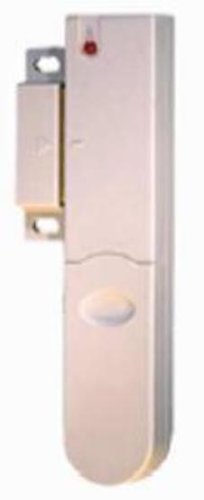
Figure 1: ELRO SA50M Wireless Magnetic Contact Sensor. This image shows the main sensor unit and the smaller magnetic contact, typically mounted on a door or window frame and the moving part, respectively.
3. Setup and Installation
3.1 Battery Installation
- Carefully open the main sensor unit's casing.
- Insert the CR2032 battery, ensuring correct polarity (+ and -).
- Close the casing securely.
- A small LED indicator may flash briefly to confirm power.
3.2 Pairing with the Alarm System
Before mounting, it is recommended to pair the sensor with your ELRO HA41, HA51, or HA55 alarm system.
- Put your ELRO alarm system into pairing mode (refer to your alarm system's manual for specific instructions).
- Activate the SA50M sensor by separating the main unit and the magnetic contact. This simulates an opening event.
- The alarm system should acknowledge the new sensor. Follow the alarm system's prompts to assign the sensor to a specific zone or name.
- Test the pairing by separating the sensor and magnet again. The alarm system should register the event.
3.3 Mounting the Sensor
Choose a suitable location on a door or window frame. Ensure the main sensor unit and the magnetic contact are aligned and within 1 cm of each other when the door/window is closed.
- Clean the Surface: Ensure the mounting surface is clean, dry, and smooth.
- Positioning:
- Mount the main sensor unit on the fixed part of the door/window frame.
- Mount the magnetic contact on the moving part of the door/window.
- Attachment:
- Using Adhesive Tape: Peel off the protective backing from the adhesive tape and firmly press the sensor and magnet onto the desired positions. Hold for 30 seconds.
- Using Screws: Mark the screw holes on the mounting surface. Drill pilot holes if necessary. Secure the sensor and magnet using the provided screws.
- Test Alignment: Open and close the door/window several times to ensure the sensor and magnet separate and come together correctly, triggering the alarm system as expected.
4. Operating the Sensor
The ELRO SA50M operates automatically once installed and paired with your alarm system. When the alarm system is armed:
- If the door or window where the sensor is installed opens, the magnetic contact separates from the main unit.
- The sensor immediately transmits a signal to your ELRO alarm system.
- The alarm system will then trigger its programmed response (e.g., siren, notification).
When the alarm system is disarmed, the sensor will still detect openings but will not trigger an alarm, though it may log the event depending on your alarm system's settings.
5. Maintenance
5.1 Battery Replacement
The sensor is powered by a CR2032 lithium coin cell battery. When the battery is low, your alarm system may indicate a low battery warning for the specific sensor. Replace the battery as follows:
- Carefully open the main sensor unit's casing.
- Remove the old CR2032 battery.
- Insert a new CR2032 battery, observing correct polarity.
- Close the casing securely.
- Test the sensor to ensure it is functioning correctly and the low battery warning has cleared on your alarm system.
Note: Dispose of used batteries responsibly according to local regulations.
5.2 Cleaning
Wipe the sensor and magnet with a soft, dry cloth. Do not use liquid cleaners or abrasive materials, as these can damage the device.
5.3 Regular Testing
It is recommended to test your magnetic contact sensors periodically (e.g., monthly) to ensure they are functioning correctly. Arm your alarm system and then open the door/window where the sensor is installed to verify that the alarm triggers.
6. Troubleshooting
Sensor Not Triggering Alarm
- Check Battery: Ensure the battery is correctly installed and not depleted. Replace if necessary.
- Check Alignment: Verify that the main sensor unit and magnetic contact are aligned and within 1 cm when the door/window is closed.
- Check Pairing: Ensure the sensor is properly paired with your ELRO alarm system. Re-pair if needed (refer to Section 3.2).
- Wireless Interference: Large metal objects or other wireless devices nearby can cause interference. Try repositioning the sensor or the alarm system if possible.
- Distance: The sensor might be too far from the alarm system. The maximum range is approximately 35 meters in open air; walls and obstacles reduce this range significantly.
False Alarms
- Loose Mounting: Ensure both parts of the sensor are securely mounted and do not shift when the door/window is closed.
- Vibrations: Strong vibrations might cause the sensor and magnet to momentarily separate. Re-mount more securely or choose a different location.
- Environmental Factors: Extreme temperature changes or humidity can sometimes affect electronics.
7. Specifications
| Model: | ELRO SA50M |
| Compatibility: | ELRO HA41, HA51, HA55 Alarm Systems |
| Wireless Frequency: | (Not specified in input, assume standard for ELRO systems) |
| Wireless Range: | Up to 35 meters (open air) |
| Battery Type: | CR2032 Lithium Coin Cell |
| Operating Temperature: | (Not specified in input, assume standard indoor range) |
8. Warranty
ELRO products are covered by a manufacturer's warranty. Please refer to the warranty card included with your purchase or visit the official ELRO website for detailed warranty terms and conditions. Keep your proof of purchase for warranty claims.
9. Support
If you encounter any issues or have questions regarding your ELRO SA50M Wireless Magnetic Contact Sensor that are not covered in this manual, please contact ELRO customer support. Contact details can typically be found on the ELRO website or on the product packaging.