
1. Introduction
This manual provides detailed instructions for the setup, operation, maintenance, and troubleshooting of your RIBAO TECHNOLOGY Coin-Mate CS-2000 Heavy Duty Coin Counter and Sorter. Please read this manual thoroughly before operating the device to ensure proper function and longevity.
The Coin-Mate CS-2000 is designed for efficient and accurate counting of various round coins and tokens. It features a large hopper capacity and multiple counting modes to suit diverse needs.
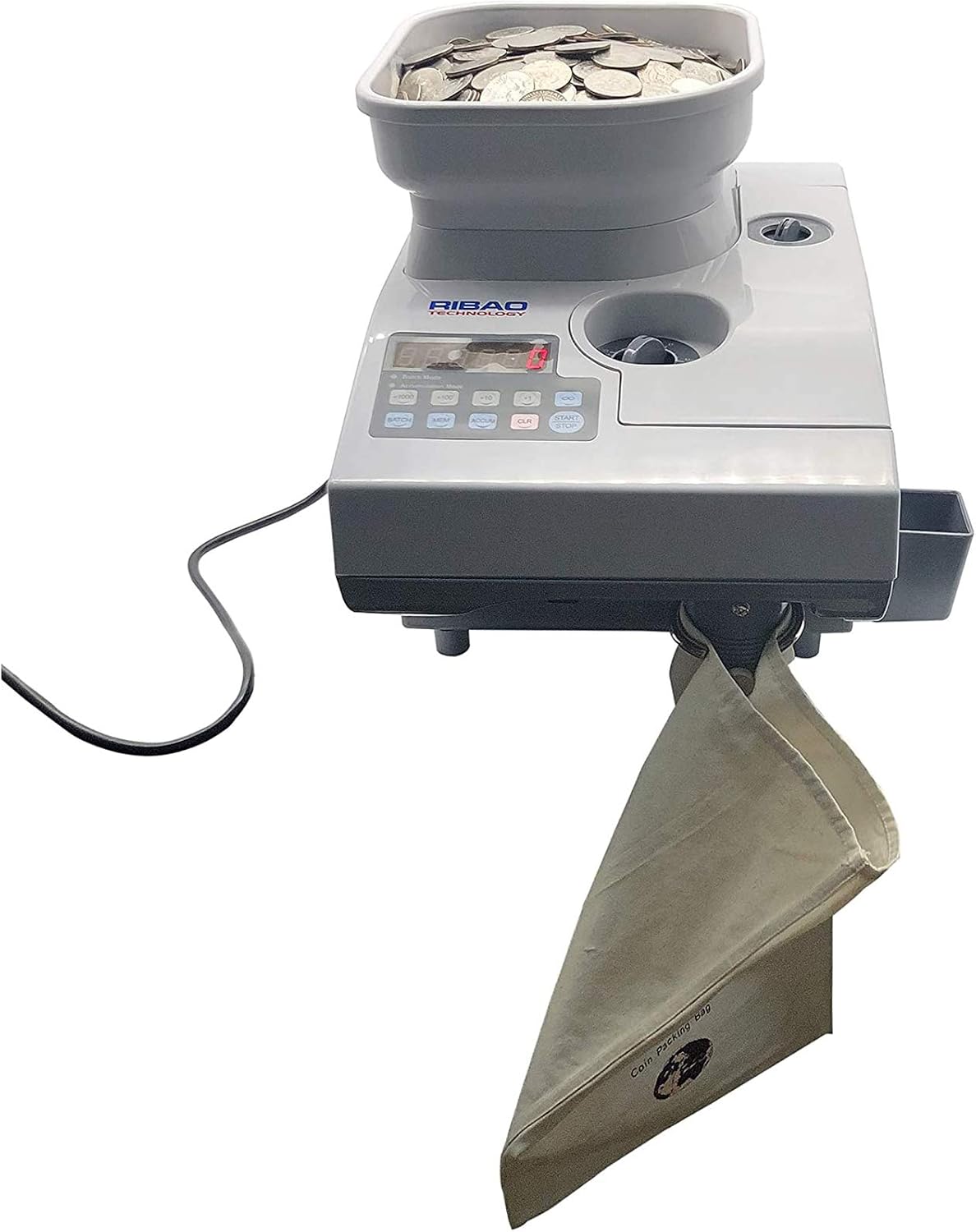
Figure 1.1: The RIBAO TECHNOLOGY Coin-Mate CS-2000 Coin Counter and Sorter in operation, showing coins in the hopper and a collection bag attached.
2. Safety Information
Observe the following safety precautions to prevent damage to the device or injury to yourself:
- Ensure the power supply matches the specifications listed on the device.
- Do not operate the device with wet hands or in damp environments.
- Keep fingers and loose clothing away from moving parts during operation.
- Unplug the device before cleaning or performing any maintenance.
- Do not attempt to disassemble or repair the device yourself. Contact qualified service personnel.
- Place the device on a stable, level surface to prevent jams and ensure accurate counting.
3. Package Contents
Verify that all items are present in the package:

Figure 3.1: Exploded view of the Coin-Mate CS-2000 components and accessories.
- Coin-Mate CS-2000 Main Unit
- Hopper Extender
- Power Cable
- Rejected Coin Box
- Rejected Coin Outlet Holder
- Spare Belts (2)
- Spare Dials (2)
- User Manual (this document)
4. Product Overview
Familiarize yourself with the main components and controls of the Coin-Mate CS-2000.

Figure 4.1: Top view of the Coin-Mate CS-2000, highlighting the control panel and coin adjustment dials.
4.1. Front Panel and Controls
- Hopper: Where coins are loaded for counting.
- LED Display: Shows the counted quantity and error messages.
- Coin Size Adjustment Dials: Used to set the thickness and diameter for specific coins.
- Control Buttons: Include BATCH, MEM (Memory), ACCUM (Accumulation), CLR (Clear), START/STOP.
- Rejected Coin Outlet: Where coins that do not match the set parameters are ejected.
4.2. Rear Panel

Figure 4.2: Rear interface of the Coin-Mate CS-2000.
- Power Switch: Turns the device on or off.
- Power Socket: Connects the power cable.
- External Display Port: For connecting an optional external display.
- RS-232 Port: For data communication with other devices.
5. Setup
Follow these steps to set up your Coin-Mate CS-2000 for first use:
- Unpack: Carefully remove all components from the packaging.
- Placement: Place the main unit on a stable, level surface.
- Hopper Extender (Optional): If counting a large volume of coins (up to 9000pcs), attach the hopper extender to the main hopper.
- Rejected Coin Box: Attach the rejected coin outlet holder and place the rejected coin box underneath the outlet.
- Power Connection: Connect the power cable to the power socket on the rear panel and then to a suitable power outlet.
- Power On: Flip the power switch on the rear panel to the 'ON' position. The LED display should illuminate.
6. Operation
The Coin-Mate CS-2000 offers several counting modes. Ensure coins are within the specified thickness (1.0-4.0mm) and diameter (14-33mm) range.
6.1. Adjusting Coin Size
Before counting, adjust the coin size dials on the top panel to match the specific coin type you are counting. Precise adjustment is crucial for accurate counting and to prevent jams.
6.2. Counting Modes
- Continuous Counting Mode:
- Ensure no batch or accumulation mode is active (press CLR if needed).
- Load coins into the hopper.
- Press the START/STOP button to begin counting. The machine will count all coins in the hopper.
- Add Mode (Accumulation Mode):
- Press the ACCUM button. The display will show the accumulated total.
- Load coins into the hopper.
- Press START/STOP. The new count will be added to the previous total.
- To clear the accumulated total, press CLR.
- Batch Mode:
- Press the BATCH button. Use the '+1000', '+100', '+10', '+1' buttons to set the desired batch quantity.
- Load coins into the hopper.
- Press START/STOP. The machine will count until the set batch quantity is reached, then pause.
- Remove the counted batch, then press START/STOP to continue counting the next batch.
- To exit Batch Mode, press BATCH again or CLR.
- Memory Function:
The device retains the last set batch quantity even after being powered off and on. Press MEM to recall the last batch setting.
6.3. Stopping Operation
Press the START/STOP button at any time to pause or stop the counting process.
7. Maintenance
Regular cleaning and maintenance ensure optimal performance and extend the lifespan of your Coin-Mate CS-2000.

Figure 7.1: The Coin-Mate CS-2000 with its front panel open for easy access to internal components for cleaning.
- Power Off and Unplug: Always turn off the power switch and unplug the device before cleaning.
- Clear Jams: If coins jam, open the right side cover (or front panel as shown in Figure 7.1) to access the internal mechanisms and carefully remove any obstructions.
- Dust Removal: Use a soft brush or compressed air to remove dust and coin residue from the hopper, coin pathways, sensors, and internal components.
- Exterior Cleaning: Wipe the exterior with a soft, dry cloth. Do not use abrasive cleaners or solvents.
- Belt Inspection: Periodically inspect the drive belts for wear and tear. Replace them if necessary using the spare belts provided.
8. Troubleshooting
Refer to the table below for common issues and their solutions.
| Problem | Possible Cause | Solution |
|---|---|---|
| Machine does not power on. | Power cable not connected; Power switch off; No power from outlet. | Check power cable connection; Ensure power switch is ON; Test power outlet. |
| Coins jam frequently. | Incorrect coin size adjustment; Foreign objects; Worn belts; Machine not on level surface. | Adjust coin size dials precisely; Remove foreign objects; Replace belts; Place on a level surface. |
| Inaccurate counting. | Incorrect coin size adjustment; Dirty sensors; Worn parts. | Adjust coin size dials; Clean sensors; Contact support if parts are worn. |
| Coins are rejected incorrectly. | Coin size adjustment too tight; Damaged coins. | Loosen coin size adjustment slightly; Remove damaged coins. |
If the problem persists after attempting these solutions, please contact RIBAO TECHNOLOGY customer support.
9. Specifications
- Model: Coin-Mate CS-2000 (COICS2000)
- Manufacturer: Ribao Technology
- Countable Coin Thickness: 1.0 - 4.0 mm
- Countable Coin Diameter: 14 - 33 mm
- Hopper Capacity: 3000 pcs (standard), 9000 pcs (with extender)
- Product Dimensions: 14.3 x 10.6 x 9.3 inches
- Item Weight: 26.5 pounds
- Counting Modes: Continuous, Add, Accumulation, Batch, Memory
- Display: Red LED
10. Warranty and Support
For warranty information, service, or technical support, please refer to the warranty card included with your product or visit the official RIBAO TECHNOLOGY website. Please have your model number (CS-2000 or COICS2000) and purchase date available when contacting support.
RIBAO TECHNOLOGY is committed to providing reliable and efficient solutions for cash processing. For further assistance, please contact our customer service team.

