
FILA FAR001DG-1
FILA FAR001DG-1 Digital Running Watch Instruction Manual
Model: FAR001DG-1
Introduction
Thank you for choosing the FILA FAR001DG-1 Digital Running Watch. This watch is designed for athletes and active individuals, featuring essential functions such as a 150-lap memory chronograph and a countdown timer. This manual provides detailed instructions on how to set up, operate, and maintain your watch to ensure optimal performance and longevity.
Product Overview
The FILA FAR001DG-1 is a robust digital watch with a durable polyurethane band and a stainless steel case back. It features a clear digital display and multiple buttons for easy navigation and function control.
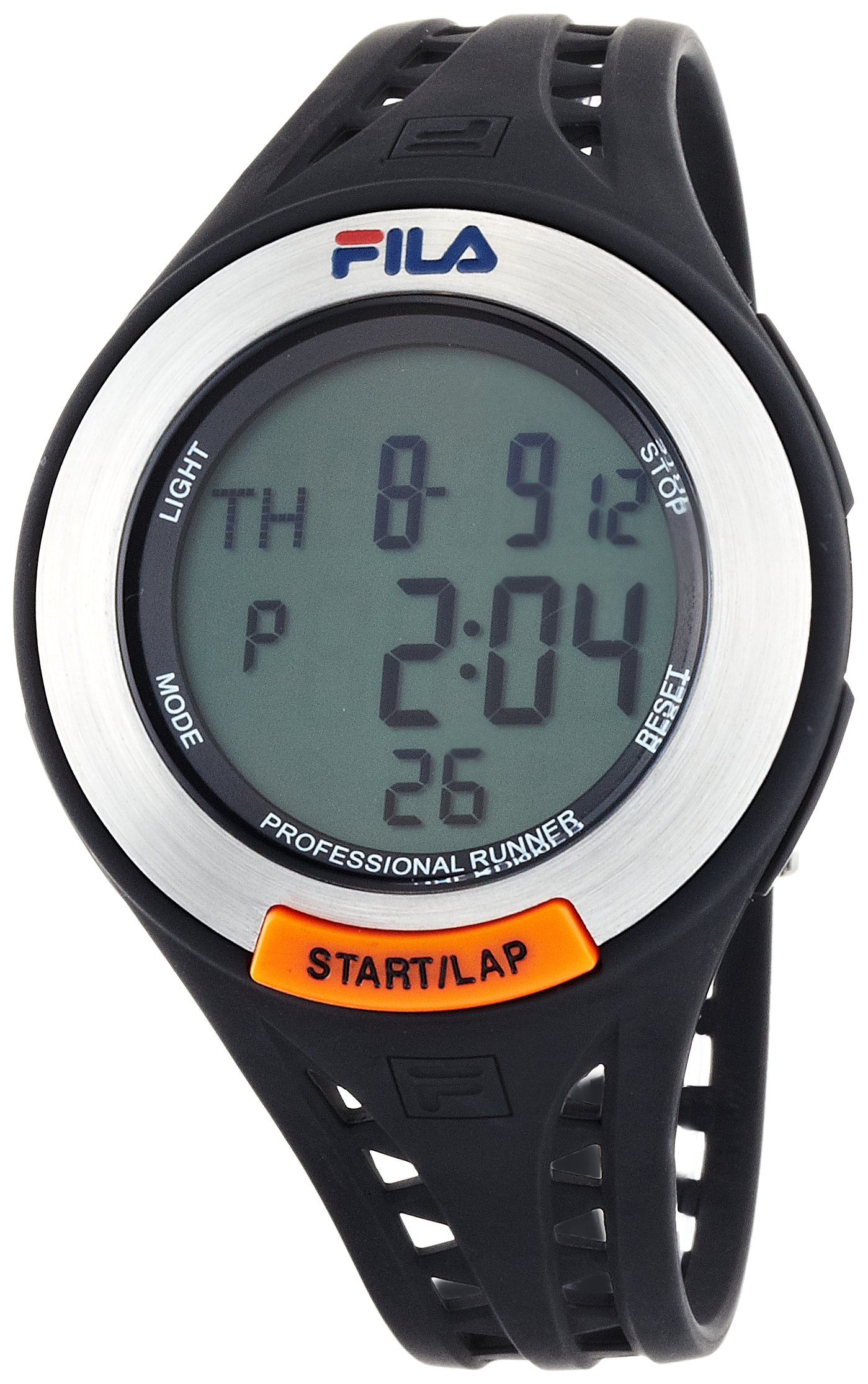
Figure 1: Front view of the FILA FAR001DG-1 Digital Running Watch, showing the digital display and control buttons.

Figure 2: Back view of the watch, highlighting the stainless steel case back with FILA branding and model information.

Figure 3: Side view of the watch, showing the profile and the placement of the control buttons on the side of the case.

Figure 4: The watch displayed on a wrist, illustrating its size and fit during wear.

Figure 5: The watch's packaging box, featuring FILA branding.
Setup
1. Initial Power On / Battery Activation
Your watch may arrive in a power-saving mode. If the display is blank, press any button to activate it. If it remains blank, the battery may need replacement (refer to Maintenance section).
2. Setting Time and Date
- Press the MODE button repeatedly until the time setting screen appears (usually indicated by flashing digits).
- Use the START/LAP button to adjust the flashing digit (hours, minutes, seconds).
- Press the RESET button to move to the next digit or setting (e.g., 12/24-hour format, year, month, day).
- Once all settings are correct, press the MODE button to exit the setting mode.
3. Setting Alarm
- Press the MODE button until the alarm setting screen is displayed.
- Use the START/LAP button to adjust the alarm hour.
- Press the RESET button to move to the alarm minute setting.
- Adjust the alarm minute using the START/LAP button.
- Press the MODE button to save and exit. To toggle the alarm on/off, typically press START/LAP while in alarm display mode.
Operating Instructions
1. Time Mode
This is the default display mode, showing the current time, day of the week, and date. Press the LIGHT button to illuminate the display in low-light conditions.
2. Chronograph (Stopwatch) Mode
- Press the MODE button until "STW" or "CHRONO" appears on the display.
- Press START/LAP to start the stopwatch.
- Press START/LAP again to pause the stopwatch.
- Press RESET to reset the stopwatch to zero while paused.
- To record lap times, press RESET while the stopwatch is running. The lap time will display briefly, and the stopwatch will continue running in the background. The watch can store up to 150 lap records.
- To view stored lap times, enter Chronograph mode and press RESET when the stopwatch is stopped and reset. Use START/LAP to scroll through records.
3. Countdown Timer Mode
- Press the MODE button until "TMR" or "TIMER" appears on the display.
- To set the timer, press and hold RESET until the digits flash.
- Use START/LAP to adjust the hours, minutes, and seconds. Use RESET to move between digits.
- Press MODE to save the set time.
- Press START/LAP to start the countdown.
- Press START/LAP again to pause the countdown.
- Press RESET to reset the timer to the preset time.
- An alarm will sound when the countdown reaches zero.
4. Alarm Mode
When the alarm is set, it will sound at the designated time daily. To stop the alarm, press any button. To turn the alarm on or off, navigate to the alarm display mode and press the START/LAP button.
Maintenance
1. Cleaning Your Watch
Wipe the watch case and band regularly with a soft, dry cloth. For stubborn dirt, use a slightly damp cloth and mild soap, then wipe dry immediately. Avoid using harsh chemicals or abrasive cleaners.
2. Water Resistance
This watch has a water resistance rating of 5 ATM (50 meters). This means it is suitable for everyday use and can withstand splashes, rain, and brief immersion in water. Do not press any buttons while the watch is submerged in water. Not suitable for showering, swimming, or diving.
3. Battery Replacement
When the display becomes dim or functions become erratic, the battery may need replacement. Battery replacement should ideally be performed by a qualified watch technician to ensure proper sealing and water resistance. Opening the watch yourself may void the warranty.
4. Storage
Store your watch in a cool, dry place away from direct sunlight, extreme temperatures, and strong magnetic fields when not in use.
Troubleshooting
- Display is blank:
- Press any button to wake the watch from power-saving mode.
- If still blank, the battery may be depleted. Refer to the Battery Replacement section.
- Time is incorrect:
- Re-set the time and date following the instructions in the Setup section.
- Ensure the 12/24-hour format is set correctly.
- Buttons are unresponsive:
- Ensure the watch is not in a locked mode (if applicable, though not specified for this model).
- The battery may be low.
- Avoid pressing buttons underwater.
- Alarm does not sound:
- Verify that the alarm is set and activated in the Alarm Mode.
- Check battery level.
Specifications
| Model Number | FAR001DG-1 |
| Brand | FILA |
| Display Type | Digital |
| Movement | Quartz |
| Special Features | Alarm, Chronograph |
| Sport Type | Outdoor |
| Clasp | Buckle |
| Case Shape | Round |
| Band Color | Black |
| Dial Color | Gray |
| Band Material | Polyurethane |
| Case Material | Stainless Steel |
| Windshield Material | Mineral Glass |
| Case Diameter | 44 mm |
| Band Width | 30 mm |
| Case Thickness | 13 mm |
| Water Resistance | 5 ATM (50 meters) |
Warranty Information
This FILA FAR001DG-1 Digital Running Watch comes with a 1-year limited warranty from the date of purchase. The warranty covers manufacturing defects in materials and workmanship under normal use. It does not cover damage resulting from improper use, accidents, unauthorized repairs, or normal wear and tear. Please retain your proof of purchase for warranty claims.
Support
For further assistance, technical support, or warranty inquiries, please contact your retailer or the official FILA customer service in your region. You can often find contact details on the official FILA website or on the product packaging.
For online resources and frequently asked questions, please visit the official FILA support page.
Related documentsFAR001DG-1


Ask a question about this manual
Ask about setup, troubleshooting, compatibility, parts, safety, or missing instructions. Manuals+ will review the question and use this page’s manual context to help answer it.