Introduction
This manual provides detailed instructions for the installation, operation, and maintenance of your Intermatic T101R3 110-volt pool timer. Please read this manual thoroughly before attempting any installation or operation to ensure proper function and safety.
Safety Information
WARNING: Risk of Electric Shock. Disconnect power at the circuit breaker or fuse box before installation or servicing. Installation should be performed by a qualified electrician in accordance with all national and local electrical codes.
- Always ensure the power supply is disconnected before working on the timer.
- Do not operate the timer with damaged wiring or if the enclosure is open.
- This timer is designed for outdoor use and must be installed in a location protected from direct water spray.
- Ensure all connections are secure and properly insulated.
Product Features
- Operates on 110 volts.
- Capable of programming up to 12 different ON/OFF cycles per day.
- Durable metal enclosure for protection.
- Includes ON/OFF timer trippers for scheduling.
Setup and Installation
The Intermatic T101R3 timer is designed for wall mounting. Ensure the mounting surface is stable and capable of supporting the timer's weight. All wiring must comply with local and national electrical codes.
Mounting the Timer
- Select a suitable outdoor location, protected from direct rain and sunlight, near the equipment to be controlled.
- Open the timer enclosure door.
- Use appropriate fasteners (not included) to secure the timer to the wall through the mounting holes provided in the back of the enclosure.
Wiring Instructions
IMPORTANT: Ensure power is OFF at the main circuit breaker before proceeding with wiring.
- Route the 110-volt power supply wires into the timer enclosure through the designated knockouts.
- Connect the incoming line (hot) wire to the terminal marked 'L'.
- Connect the incoming neutral wire to the terminal marked 'N'.
- Connect the load (to pump/equipment) hot wire to the terminal marked 'LOAD'.
- Connect the load neutral wire to the terminal marked 'N' (shared with incoming neutral).
- Ensure proper grounding by connecting the ground wire to the designated ground terminal within the enclosure.
- Double-check all connections for tightness and correct polarity.
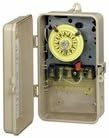
Image: Intermatic T101R3 Pool Timer with its metal enclosure open, revealing the internal clock mechanism and wiring terminals. This view is typical during installation.
Operating Instructions
Setting the Current Time
- Rotate the dial clockwise until the current time aligns with the time arrow indicator.
Programming ON/OFF Cycles
The timer uses ON (green) and OFF (red) trippers to set the operating schedule.
- Locate the small slots around the perimeter of the timer dial.
- Insert the green ON tripper into the slot corresponding to the desired start time for your equipment.
- Insert the red OFF tripper into the slot corresponding to the desired stop time for your equipment.
- Ensure trippers are securely snapped into place. You can program up to 12 ON/OFF cycles per day.
Manual Override
To manually turn the equipment ON or OFF outside of the programmed schedule, use the manual override lever located on the timer mechanism. Push the lever to the desired position. The timer will resume its programmed schedule at the next ON or OFF tripper.
Maintenance
The Intermatic T101R3 timer requires minimal maintenance. Periodically inspect the timer for any signs of damage or loose connections. Keep the enclosure clean and free of debris. Do not use abrasive cleaners or solvents.
Troubleshooting
- Timer Not Running: Check the power supply at the circuit breaker. Ensure all wiring connections are secure. Verify the manual override is not engaged in an unintended position.
- Equipment Not Turning ON/OFF: Confirm that the ON and OFF trippers are correctly installed and positioned on the dial. Ensure the current time is accurately set. Check the load wiring for proper connection.
- Intermittent Operation: Inspect for loose wiring connections or damaged insulation. Ensure the timer is not exposed to excessive moisture or extreme temperatures.
If issues persist after performing these checks, contact a qualified electrician or Intermatic customer support for assistance.
Specifications
| Specification | Detail |
|---|---|
| Brand | Intermatic |
| Model Number | T101R |
| Voltage | 110 Volts |
| Material | Metal |
| Number of Settings | Up to 12 ON/OFF cycles per day |
| Item Weight | 3.75 pounds |
| Package Dimensions | 11.7 x 7.4 x 4.2 inches |
| UPC | 789610254163 |
Warranty and Support
For warranty information, technical support, or service inquiries, please contact Intermatic directly. Refer to the product packaging or the official Intermatic website for the most current contact details and warranty terms.


