
Introduction
Thank you for choosing the Casio Edifice EFA-117D-1AVDF Analog-Digital Watch. This manual provides detailed instructions on how to set up, operate, and maintain your watch to ensure optimal performance and longevity. Please read this manual thoroughly before using your watch.
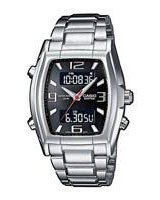
Image: Casio Edifice EFA-117D-1AVDF watch. This image displays the watch's black dial, square case, and silver stainless steel band, highlighting its analog and digital display features.
Setup and Initial Configuration
Before using your watch, it is important to set the correct time and date.
1. Setting the Analog Time
- Pull the crown out to the first click position.
- Rotate the crown to adjust the hour and minute hands to the desired time.
- Push the crown back in to the normal position to start the timekeeping.
2. Setting the Digital Time and Date
The digital display allows for precise time and date settings, along with other functions.
- In the Timekeeping Mode, press the MODE button (usually bottom left) to cycle through modes until you reach the Time Setting Mode (indicated by flashing digits).
- Press the ADJUST button (usually top left) to select the digit or setting you wish to change (e.g., seconds, hour, minute, year, month, day).
- Use the FORWARD (usually top right) and REVERSE (usually bottom right) buttons to change the selected value.
- Once all settings are correct, press the MODE button to exit the setting mode.
Operating Your Watch
1. Mode Navigation
Press the MODE button to cycle through the various functions of your watch, which typically include:
- Timekeeping Mode (current time and date)
- Alarm Mode
- Stopwatch Mode
- Timer Mode (if available)
- World Time Mode (if available)
2. Using the Stopwatch
- Navigate to the Stopwatch Mode using the MODE button.
- Press the START/STOP button (often top right) to begin timing.
- Press START/STOP again to stop timing.
- Press the RESET button (often bottom right) to clear the stopwatch to zero.
3. Alarm Function
- Enter the Alarm Mode using the MODE button.
- Use the ADJUST button to select the alarm time digits.
- Use the FORWARD and REVERSE buttons to set the desired alarm time.
- Press MODE to confirm and exit.
- To turn the alarm ON/OFF, press the ADJUST button while in Alarm Mode.
4. Backlight
Press the LIGHT button (usually top right or left) to illuminate the digital display for easy viewing in low-light conditions.
5. Water Resistance
Your Casio Edifice watch is designed with a certain level of water resistance. Refer to the markings on the watch case back for specific water resistance depth. Avoid operating buttons or the crown while the watch is wet or submerged to prevent water intrusion.
Maintenance and Care
Proper care will help maintain the appearance and function of your watch.
1. Cleaning Your Watch
- Wipe the watch case and band with a soft, dry cloth regularly to remove dirt and moisture.
- For stainless steel bands, a soft brush and mild soapy water can be used, followed by thorough rinsing and drying.
- Avoid using chemical cleaners, solvents, or abrasive materials, as these can damage the watch's finish.
2. Battery Replacement
When the display becomes dim or the watch stops functioning, the battery may need replacement. It is recommended to have the battery replaced by an authorized Casio service center to ensure proper sealing and water resistance.
3. Temperature and Storage
- Avoid exposing your watch to extreme temperatures (hot or cold) for extended periods.
- Store your watch in a dry, cool place away from direct sunlight and strong magnetic fields when not in use.
Troubleshooting
If you encounter issues with your watch, refer to the following common problems and solutions.
1. Digital Display is Blank or Dim
- Possible Cause: Low battery.
- Solution: Replace the battery at an authorized service center.
2. Analog Time Does Not Match Digital Time
- Possible Cause: Analog hands were accidentally moved or not synchronized.
- Solution: Manually adjust the analog hands using the crown as described in the "Setting the Analog Time" section. Some models may have an analog-digital synchronization feature; consult the full manual if available.
3. Buttons Are Unresponsive
- Possible Cause: Watch is in a locked mode or battery is low.
- Solution: Check if the watch has a button lock feature (refer to a comprehensive manual if available). If not, consider battery replacement. Ensure buttons are not stuck due to dirt.
Specifications
Key specifications for the Casio Edifice EFA-117D-1AVDF watch:
| Model Number | EFA-117D-1AVDF (ED248) |
| Display Type | Analog-Digital |
| Movement Type | Quartz |
| Case Material | Stainless Steel |
| Band Material | Stainless Steel |
| Dial Color | Black |
| Band Color | Silver |
| Case Shape | Square |
| Dial Glass Material | Mineral |
| Case Diameter | 46 mm |
| Special Features | Alarm, Stopwatch |
| Water Resistance | (Refer to watch case back for specific rating) |
Warranty and Support
Your Casio Edifice EFA-117D-1AVDF watch comes with a 2 Years Domestic Warranty.
For warranty claims, service, or further assistance, please contact an authorized Casio service center or refer to the official Casio website for support information. Keep your purchase receipt as proof of purchase for warranty validation.
You can find more information and support on the official Casio website: www.casio.com


