
Derale 16908
Derale 16908 8" Dyno-Cool High Performance Electric Fan User Manual
Model: 16908
Product Overview
The Derale 16908 8" Dyno-Cool High Performance Electric Fan is designed for efficient cooling in various automotive applications. This fan features a straight blade design and an ultra-low profile, making it suitable for installations with limited space. It is engineered to provide reliable airflow for optimal thermal management.
Key features include:
- Ultra low profile design for versatile installation.
- Straight fan blades for effective air movement.
- Capable of moving 350 Cubic Feet Per Minute (CFM) of air.
- Reversible design, allowing use as either a pusher or puller fan.

Package Contents
Upon opening the package, verify that all components are present:
- 1 x Derale 16908 8" Dyno-Cool Electric Fan
- 4 x Plastic Through-Radiator Core Rods with Clips
- 4 x Foam Pads
- 4 x Mounting Feet
- 1 x Electrical Cord (integrated with fan)
Setup and Installation
Before beginning installation, ensure the vehicle's battery is disconnected to prevent electrical shorts. This fan can be configured as either a "pusher" (mounted in front of the radiator, pushing air through) or a "puller" (mounted behind the radiator, pulling air through). The fan's reversible design allows for this flexibility by reversing the electrical polarity.
Mounting Instructions:
- Position the fan against the radiator or condenser in the desired location.
- Insert the plastic through-radiator core rods through the mounting feet on the fan shroud and then through the radiator fins.
- On the opposite side of the radiator, attach the clips to the rods, pulling them taut to secure the fan firmly. Trim any excess rod length.
- Apply the foam pads between the fan shroud and the radiator to reduce vibration and ensure a snug fit.
Electrical Connection:
The fan operates on a 12-volt DC system. It is recommended to use a relay and an appropriate fuse for proper operation and circuit protection. Consult a professional automotive electrician if you are unsure about wiring procedures.
- For puller configuration (fan behind radiator, pulling air): Connect the fan's positive wire to a switched 12V source (e.g., via a thermostat switch or ignition relay) and the negative wire to a chassis ground.
- For pusher configuration (fan in front of radiator, pushing air): Reverse the polarity of the fan's electrical connection. Connect the fan's negative wire to a switched 12V source and the positive wire to a chassis ground.
Note: While the fan's electrical polarity can be reversed for pusher/puller operation, the physical fan blades are designed for optimal efficiency in one direction. Reversing polarity will change airflow direction but may result in slightly reduced efficiency compared to a dedicated pusher or puller fan with optimized blade pitch for that direction.
Operating Instructions
Once installed and wired correctly, the Derale 16908 electric fan will activate based on the control method used (e.g., thermostat switch, manual switch, or engine management system). Ensure the fan spins freely and without obstruction before initial operation.
Airflow Direction Verification:
After installation, briefly activate the fan and verify the direction of airflow. For a puller fan, air should be drawn through the radiator towards the engine. For a pusher fan, air should be pushed through the radiator away from the engine.
Monitor engine temperature during initial operation to confirm the fan is effectively contributing to the cooling system.
Maintenance
Regular maintenance helps ensure the longevity and optimal performance of your electric fan.
- Cleaning: Periodically inspect the fan blades and shroud for accumulation of dirt, debris, or leaves. Clean gently with a soft brush or compressed air. Avoid using harsh chemicals that could damage plastic components.
- Wiring Inspection: Check electrical connections for corrosion, fraying, or loose terminals. Ensure all wiring is securely routed and protected from heat and abrasion.
- Mounting Security: Verify that the fan remains securely mounted to the radiator. Tighten any loose mounting rods or clips if necessary.
- Bearing Check: Listen for unusual noises from the fan motor, which could indicate worn bearings. If excessive noise or vibration occurs, inspect the fan for damage or consider replacement.
Troubleshooting
| Problem | Possible Cause | Solution |
|---|---|---|
| Fan does not turn on. | No power to fan; Blown fuse; Faulty relay or switch; Loose electrical connection; Damaged fan motor. | Check fuse in the fan circuit; Verify 12V power at fan connector; Inspect relay and switch for proper function; Secure all electrical connections; Test fan motor directly with 12V power. |
| Fan runs continuously. | Stuck thermostat switch; Incorrect wiring. | Test or replace thermostat switch; Review wiring diagram and correct connections. |
| Fan is noisy or vibrates excessively. | Loose mounting; Debris in fan blades; Worn motor bearings; Bent fan blade. | Check and tighten mounting hardware; Clean fan blades; Inspect fan for physical damage; Replace fan if bearings are worn or blades are bent. |
| Insufficient airflow. | Incorrect fan direction; Obstruction in front/behind fan; Low voltage; Fan blades dirty. | Verify correct fan rotation for pusher/puller setup; Clear any obstructions; Check voltage supply to fan; Clean fan blades. |
Specifications
| Model Number | 16908 |
| Brand | Derale |
| Fan Diameter | 8 inches |
| Air Flow Capacity | 350 CFM (Cubic Feet Per Minute) |
| Operating Voltage | 12 Volts DC |
| Current Draw | 5.3 Amps (as per product description) |
| Material | Plastic |
| Item Weight | 2.25 pounds (approx. 1.02 kg) |
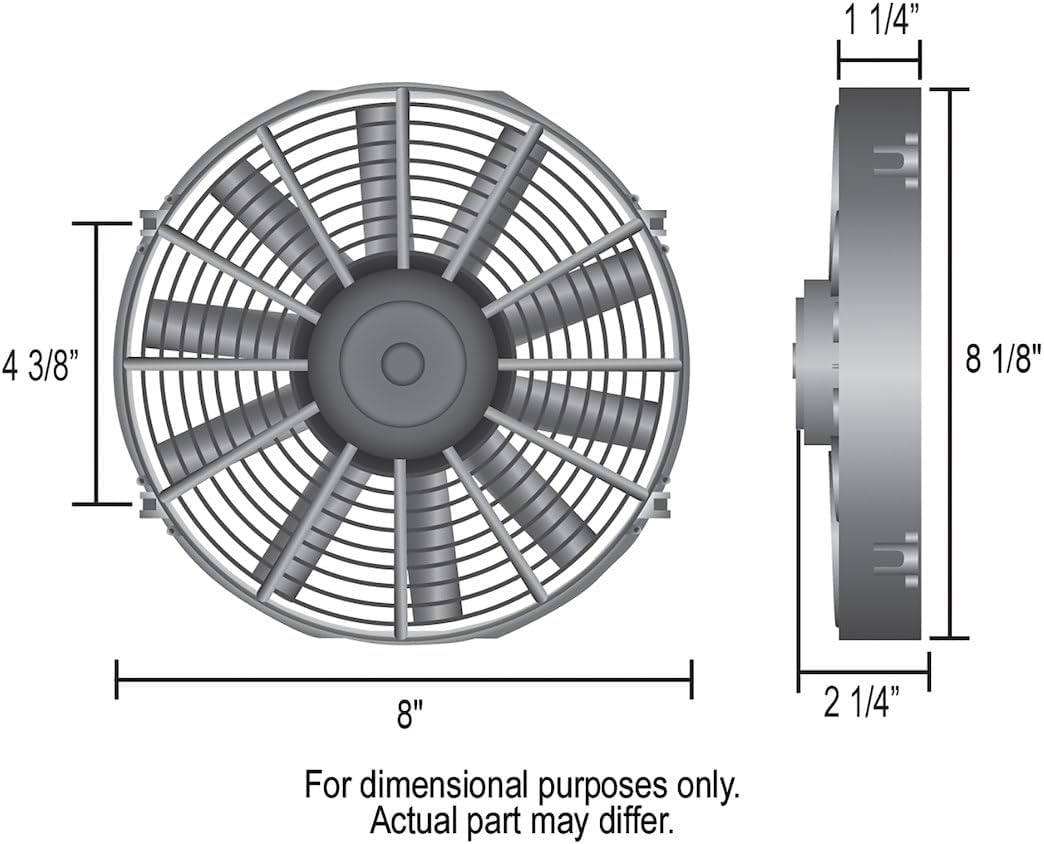
| Product Dimensions (L x W x H) | 9.3 x 9.1 x 2.6 inches (approx. 23.6 x 23.1 x 6.6 cm) |
| Country of Origin | Taiwan |
| UPC | 083277169083 |
Warranty and Support
For warranty information and technical support regarding your Derale 16908 electric fan, please refer to the official Derale website or contact their customer service directly. Keep your purchase receipt as proof of purchase for any warranty claims.
Derale Performance Contact Information:
- Website: www.derale.com
- Customer Service: Refer to the website for current contact methods (phone, email).
Note: Product specifications and appearance are subject to change without notice for product improvement.
Ask a question about this manual
Ask about setup, troubleshooting, compatibility, parts, safety, or missing instructions. Manuals+ will review the question and use this page’s manual context to help answer it.