
Dorman 80369
Dorman 80369 Interior Door Handle Installation Manual
Model: 80369 | Brand: Dorman
Introduction
This manual provides detailed instructions for the installation, operation, and maintenance of the Dorman 80369 Interior Door Handle. This replacement handle is designed to match the fit and appearance of the original handle in specific Chevrolet HHR models.
Compatible Vehicles:
- Chevrolet HHR: 2006, 2007, 2008, 2009, 2010, 2011
Always verify compatibility with your specific vehicle's make, model, and trim level before proceeding with installation.
Package Contents
The Dorman 80369 Interior Door Handle Kit includes the following components:
- 1 x Interior Door Handle Assembly (Black with Chrome Lever)
- Installation hardware (drill bit, washers, screws)

Image: The Dorman 80369 interior door handle assembly shown with the included installation hardware, which consists of a drill bit, several washers, and screws.
Setup and Installation
This section outlines the general steps for installing the Dorman 80369 Interior Door Handle. Specific vehicle disassembly procedures may vary. Refer to your vehicle's service manual for detailed instructions on removing the door panel.
Required Tools (Not Included):
- Screwdrivers (Phillips and flathead)
- Panel removal tools (plastic pry tools recommended to prevent damage)
- Drill (if required for original handle removal)
- Safety glasses
Installation Steps:
- Prepare the Vehicle: Ensure the vehicle is parked on a level surface with the ignition off.
- Remove Door Panel: Carefully remove the interior door panel. This typically involves removing screws, clips, and disconnecting electrical connectors for windows, locks, and speakers. Consult your vehicle's service manual for precise instructions.
- Disconnect Original Handle: Disconnect the door handle linkage rods or cables from the original handle assembly.
- Remove Original Handle: The original handle may be secured by screws or plastic welds. If plastic welds are present, use the provided drill bit to carefully remove them, allowing the old handle to be detached from the door panel.
- Install New Handle: Position the Dorman 80369 replacement handle into the door panel opening.
- Secure New Handle: Use the provided screws and washers to securely fasten the new handle to the door panel. Ensure a snug fit without overtightening.
- Connect Linkage: Reconnect the door handle linkage rods or cables to the new handle. Test the handle's operation before reassembling the door panel.
- Reassemble Door Panel: Reconnect all electrical connectors and carefully reattach the interior door panel, ensuring all clips and screws are properly secured.

Image: Front view of the Dorman 80369 interior door handle, showcasing the black housing and chrome lever.
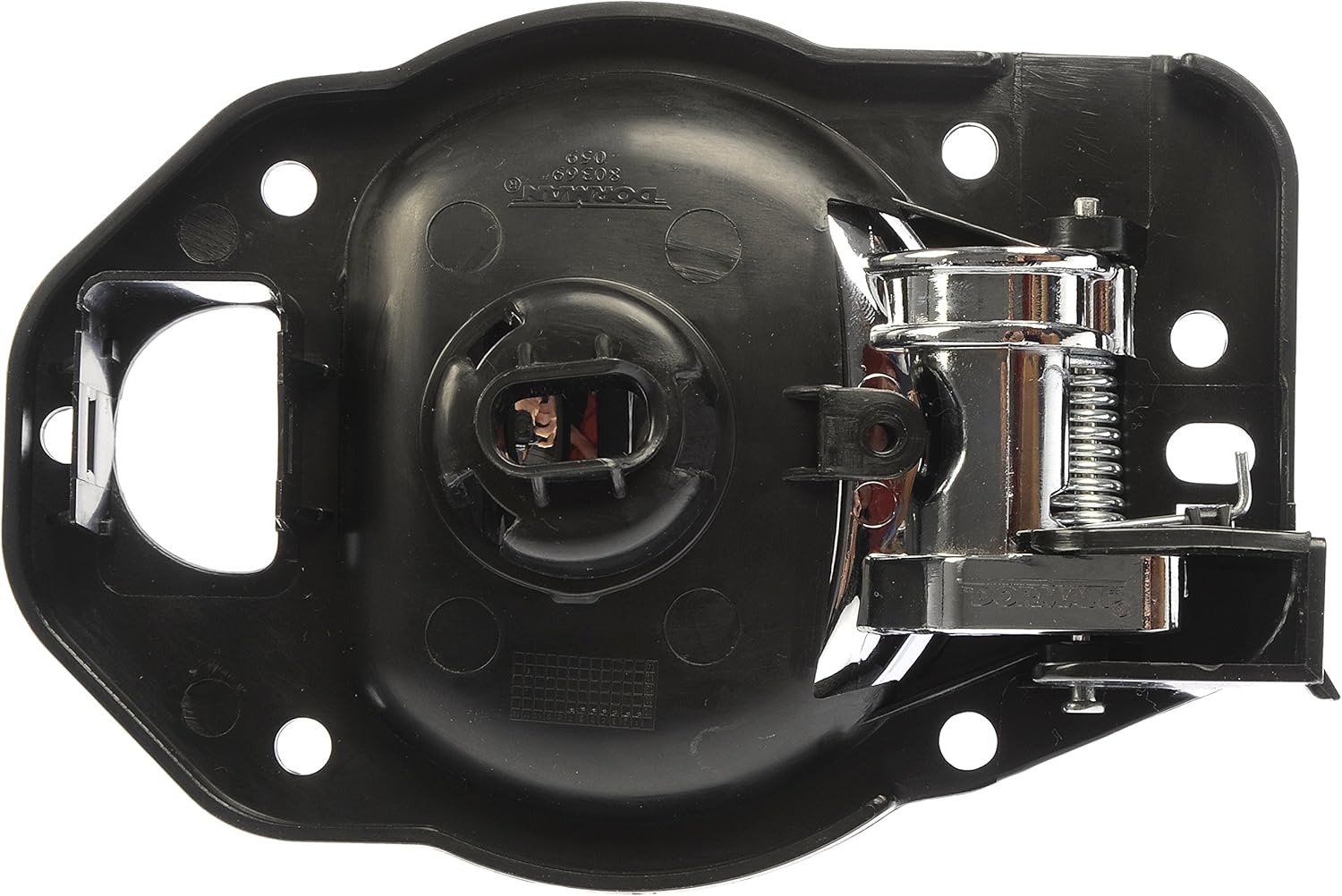
Image: Rear view of the Dorman 80369 interior door handle, showing the mounting points and internal mechanism.

Image: Close-up view of the installation hardware, including the specialized drill bit, washers, and screws provided with the Dorman 80369 kit.
Operating Instructions
The Dorman 80369 Interior Door Handle operates identically to the original equipment handle. To open the door from the inside:
- Ensure the door is unlocked.
- Pull the handle lever towards you.
- Push the door open.
Avoid excessive force when operating the handle to ensure its longevity.
Maintenance
The Dorman 80369 Interior Door Handle requires minimal maintenance. Follow these guidelines to ensure proper function and appearance:
- Cleaning: Wipe the handle with a soft, damp cloth to remove dust and grime. Avoid abrasive cleaners or solvents, which can damage the finish.
- Inspection: Periodically check the handle for any signs of looseness or damage. If the handle feels loose, the mounting screws may need to be gently tightened.
- Lubrication: If the handle mechanism feels stiff, a small amount of silicone-based lubricant can be applied to the moving parts, ensuring not to get lubricant on the visible surfaces.
Troubleshooting
If you encounter issues with your Dorman 80369 Interior Door Handle, consider the following troubleshooting steps:
- Handle Does Not Open Door:
- Ensure the door is unlocked.
- Check if the linkage rods or cables are properly connected to the handle mechanism. Reconnect if loose.
- Inspect the linkage for any obstructions or damage.
- Handle Feels Loose:
- The mounting screws may be loose. Carefully remove the door panel and gently tighten the screws securing the handle. Avoid overtightening.
- Inspect the handle assembly for any cracks or damage to the plastic housing.
- Handle is Stiff or Hard to Pull:
- Apply a small amount of silicone lubricant to the moving parts of the handle mechanism.
- Check for any binding or obstructions in the linkage or the handle's pivot points.
If these steps do not resolve the issue, professional assistance may be required.
Specifications
| Feature | Detail |
|---|---|
| Model Number | 80369 |
| Brand | Dorman |
| Material | Plastic (Handle), Alloy Steel (Internal components/Hardware) |
| Color | Black (Housing), Chrome (Lever) |
| Product Dimensions | 7.7"L x 5"W |
| Item Weight | 0.65 Pounds (approx. 10.4 ounces) |
| UPC | 019495803690 |
| Special Feature | Easy to Install |
| OEM Part Number | 80369; 25812196 |
Warranty Information
For detailed warranty information regarding the Dorman 80369 Interior Door Handle, please refer to the official Dorman website or contact Dorman customer support directly. Warranty terms and conditions may vary.
Customer Support
If you require further assistance, have questions about installation, or need to report an issue, please contact Dorman customer support:
- Website: Visit the official Dorman website for support resources and contact options.
- Phone: Refer to the Dorman website for current customer service phone numbers.
When contacting support, please have your product model number (80369) and vehicle information readily available.
Related documents80369


Ask a question about this manual
Ask about setup, troubleshooting, compatibility, parts, safety, or missing instructions. Manuals+ will review the question and use this page’s manual context to help answer it.