
Gallagher G503014
Gallagher Digital Volt Meter Instruction Manual
Model: G503014
Product Overview
The Gallagher Digital Volt Meter (Model G503014) is an essential tool designed for accurately measuring electric fence output. It helps in diagnosing shorts, testing power, and confirming the overall performance of your electric fencing system. This robust and water-resistant device provides precise voltage readings from 0 to 12,000 volts, ensuring your fences maintain optimal deterrent levels.
Key Features
- Accurate Fence Voltage Readings: Measures electric fence output from 0 to 12,000 volts with 100V precision under 10kV and 1,000V steps above.
- Universal Compatibility: Works with all fence energizers, including battery-powered, solar, and mains energizers, even those in battery save mode.
- Integrated Tools: Includes a built-in earth probe and fence stud for easy and accurate readings.
- Automatic Operation & Durability: Turns on automatically when connected and features a durable, water-resistant housing.
- Long-lasting Battery: Comes with a 9V battery (GLR61) providing 6–12 months of life, ready for immediate use without calibration.
Components and What's Included

This image displays the Gallagher Digital Volt Meter along with its included components. The package contains the volt meter unit itself, an earth lead for grounding, and a 9V battery, ensuring the device is ready for immediate use upon unboxing.
- Gallagher Digital Volt Meter Unit
- Earth Lead
- 9V Battery (GLR61)
Setup and Installation
Battery Installation
The Gallagher Digital Volt Meter comes with a 9V battery pre-installed. If replacement is needed:
- Locate the battery compartment on the back of the unit.
- Open the compartment cover.
- Insert a new 9V battery, ensuring correct polarity.
- Close the battery compartment securely.
Initial Check
No calibration or complex setup is required. The device is designed for immediate use.
Operating Instructions
Taking a Voltage Reading
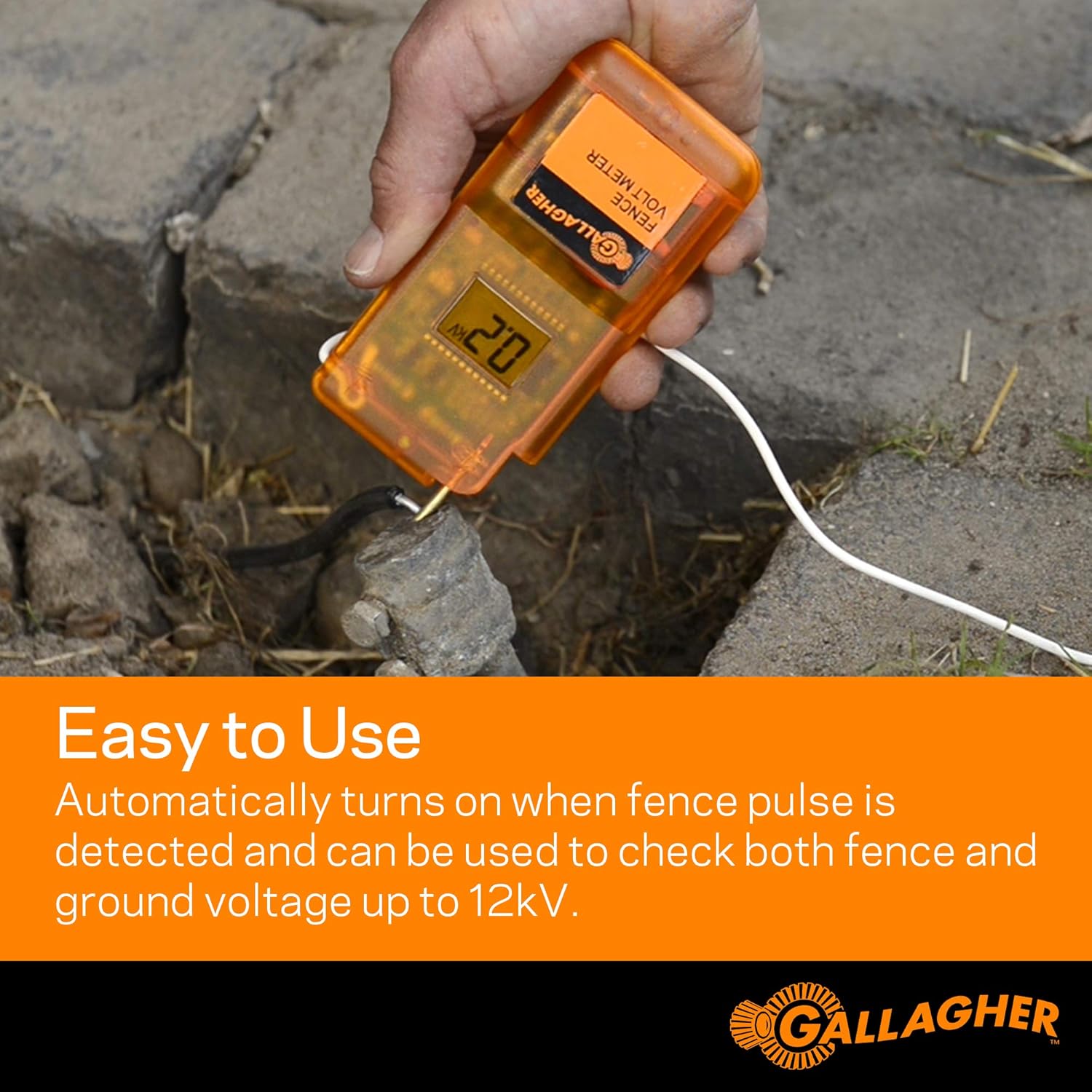
This image illustrates the process of taking a voltage reading with the Gallagher Digital Volt Meter. A hand holds the device, with its top probe touching the electric fence wire and the integrated ground rod inserted into the earth. The digital display shows a reading of "2.0 kV", indicating the fence voltage.
- Hold the volt meter firmly.
- Insert the integrated ground rod (or connect the earth lead) into the ground. Ensure good contact with moist soil if possible.
- Touch the metal probe at the top of the volt meter to the electric fence wire.
- The device will automatically turn on and display the voltage reading in kilovolts (kV) on the digital screen.
- Read the displayed voltage. The meter provides 100V precision under 10kV and 1,000V steps above.
Interpreting Readings
A healthy electric fence should maintain a consistent voltage level, typically above 3 kV for effective animal control. Fluctuations or significantly low readings may indicate issues such as shorts, vegetation contact, or energizer problems.

This image shows the Gallagher Digital Volt Meter in a practical farm setting, emphasizing its portability. The device is small enough to be easily carried around the farm, making it convenient for checking fence lines in various locations, such as near cattle pastures.
Maintenance
Cleaning
Wipe the unit with a damp cloth. Do not use abrasive cleaners or immerse the unit in water.
Battery Replacement
Replace the 9V battery when the display becomes dim or the unit fails to power on. Refer to the "Battery Installation" section for instructions.
Storage
Store the volt meter in a dry place away from extreme temperatures when not in use.

This image highlights the durability of the Gallagher Digital Volt Meter, showing it in a field with horses under stormy skies, with icons for rain/umbrella and a 9V battery. It signifies the device's water-resistant design and long battery life, built to withstand various weather conditions and provide reliable performance.
Troubleshooting
No Reading or Low Reading
- Check Battery: Ensure the 9V battery is properly installed and has sufficient charge. Replace if necessary.
- Ground Contact: Verify that the ground rod has good contact with the earth. If the ground is dry, moisten the area around the rod.
- Fence Contact: Ensure the probe makes firm contact with the live fence wire.
- Fence Shorts: A low reading often indicates a short circuit on the fence line (e.g., vegetation touching the wire, broken insulators). Inspect the fence line for any obstructions or damage.
- Energizer Issue: If the fence line is clear and the meter still shows low or no reading, the energizer may be faulty. Test the energizer output directly if possible.
Inaccurate Readings
- Poor Grounding: Ensure the ground rod is deeply inserted and has good electrical contact with the soil.
- Interference: Keep the meter away from other strong electrical fields during measurement.
Specifications
| Specification | Detail |
|---|---|
| Brand | Gallagher |
| Model Number | G503014 |
| Power Source | Battery Powered |
| Style | Digital |
| Measurement Type | Voltmeter |
| Voltage Range | 0 to 12,000 Volts (12 kV) |
| Measurement Accuracy | 100V precision (under 10kV), 1,000V steps (above 10kV) |
| Item Weight | 4.8 ounces |
| Dimensions (L x W x H) | 3 x 5 x 9 inches |
| Battery Type | 1 x 9V battery (included) |
| Water Resistance | Yes (Water-resistant housing) |
Warranty and Support
Gallagher products are built to high standards. For specific warranty information or technical support, please contact Gallagher North America directly.
You can find more information and contact details on the official Gallagher website or through your authorized dealer.

This image features the Gallagher brand logo and the slogan "The Brand You Can Trust," alongside a large bull in a pasture, symbolizing the company's long-standing heritage in animal management products since 1938. It reinforces the brand's reputation for quality and innovation.
Related documentsG503014


Ask a question about this manual
Ask about setup, troubleshooting, compatibility, parts, safety, or missing instructions. Manuals+ will review the question and use this page’s manual context to help answer it.