
1. Introduction
Thank you for choosing the Gardena 8893-U 3-Inch Cordless Lithium-Ion Grass Shears. This manual provides essential information for the safe and efficient operation, maintenance, and care of your new tool. Please read these instructions carefully before first use and keep them for future reference.
The Gardena 8893-U is designed for easy, cord-free cutting of lawn edges and for shaping boxwood plants. Its ergonomic design ensures comfortable handling during use.
2. Safety Information
WARNING: Read all safety warnings, instructions, illustrations, and specifications provided with this power tool. Failure to follow all instructions listed below may result in electric shock, fire, and/or serious injury.
- Always wear appropriate personal protective equipment, including safety glasses, gloves, and sturdy footwear, when operating the shears.
- Keep hands and feet away from the blade area during operation.
- Do not operate the shears in wet conditions or near flammable liquids or gases.
- Ensure the battery is fully charged before use and only use the charger supplied by Gardena.
- Store the tool in a dry, secure place, out of reach of children.
- Before cleaning or performing maintenance, ensure the tool is switched off and the battery is removed.
- This product contains chemicals known to the State of California to cause cancer and birth defects or other reproductive harm.
3. Package Contents
Verify that all items are present upon unpacking:
- Gardena 8893-U Cordless Lithium-Ion Grass Shears
- Grass Blade (3-inch / 8 cm cutting width)
- Blade Protection Cover
- Battery Charger
- Lithium-Ion Batteries (x2)
- Instruction Manual
4. Product Overview
Familiarize yourself with the components of your Gardena Grass Shears:
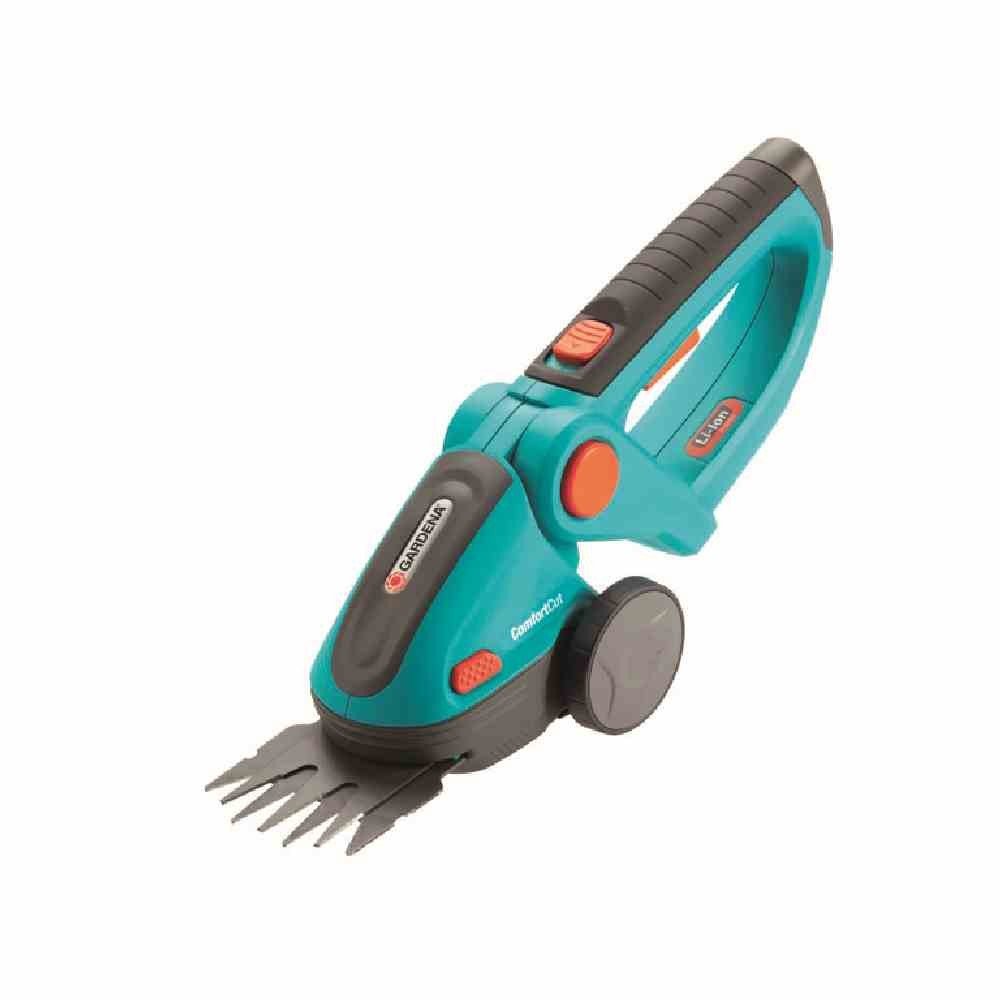
- Power Switch: On/Off button.
- Safety Lock: Prevents accidental activation.
- Ergonomic Handle: Designed for comfortable grip.
- LED Battery Status Display: Indicates charge level.
- Blade Release Button: For quick blade changes.
- Grass Blade: 3-inch (8 cm) cutting width.
- Charging Port: For connecting the charger.
5. Setup
5.1 Charging the Battery
- Ensure the grass shears are switched off.
- Connect the charger to the charging port on the shears.
- Plug the charger into a standard electrical outlet.
- The LED battery status display will indicate charging progress. A full charge takes approximately 6 hours.
- Once fully charged, disconnect the charger. The operating time is approximately 90 minutes on a full charge.
5.2 Attaching/Changing Blades
The Gardena 8893-U features an innovative blade change system that requires no tools.
- Ensure the shears are switched off and the battery is charged.
- Press the blade release button (refer to Product Overview, item 5).
- Carefully slide the current blade out.
- Insert the desired blade (e.g., grass blade or optional shrub blade) until it clicks securely into place.
- Always attach the blade protection cover when the tool is not in use.
The shears can be adapted with optional blades: Model 2340 (3" Grass Shears) or Model 2343 (7" Shrub Shears).
6. Operating Instructions
6.1 Starting the Shears
- Remove the blade protection cover.
- Press and hold the safety lock button.
- While holding the safety lock, press the power switch to start the shears.
- Release the safety lock button once the shears are running.
6.2 Cutting Grass Edges
- Hold the shears firmly with both hands if necessary, ensuring a comfortable and stable grip.
- Guide the blade along the lawn edge, maintaining a steady pace.
- Allow the blade to cut without forcing the tool.
- For best results, cut when the grass is dry.
6.3 Shaping Boxwood Plants
- Use precise, controlled movements to shape the plant.
- Work in small sections to achieve the desired form.
- Regularly clear cut material from the blades to maintain cutting efficiency.
6.4 Stopping the Shears
To stop the shears, simply release the power switch.
6.5 Operational Video
7. Maintenance
Regular maintenance ensures the longevity and optimal performance of your Gardena Grass Shears.
7.1 Cleaning
- Always switch off the shears and remove the battery before cleaning.
- Use a brush or cloth to remove grass clippings and debris from the blades and housing.
- Do not use water or harsh chemicals to clean the electrical components.
- Lightly oil the blades after each use to prevent rust and ensure smooth operation.
7.2 Storage
- Store the shears with the blade protection cover attached.
- Keep the tool in a dry, frost-free environment.
- Ensure the battery is partially charged (not fully depleted or fully charged for long-term storage) if storing for extended periods.
8. Troubleshooting
| Problem | Possible Cause | Solution |
|---|---|---|
| Shears do not start. | Battery is not charged. Safety lock not engaged. | Charge the battery. Ensure safety lock is pressed before power switch. |
| Poor cutting performance. | Blades are dull or dirty. Grass is wet. | Clean and oil blades. Sharpen or replace blades if necessary. Cut when grass is dry. |
| Shears stop during operation. | Battery is depleted. Overload protection activated. | Recharge the battery. Reduce cutting load; allow tool to cool if overheated. |
9. Specifications
| Feature | Detail |
|---|---|
| Model Number | 8893-U |
| Power Source | Battery Powered (Lithium-Ion) |
| Voltage | 7.2 Volts |
| Blade Length / Cutting Width | 3 Inches (8 Centimeters) |
| Blade Material | Stainless Steel |
| Item Weight | 0.9 Kilograms |
| Operating Time (Full Charge) | Approx. 90 minutes |
| Charging Time (Full Charge) | Approx. 6 hours |
10. Warranty
The Gardena 8893-U Cordless Lithium-Ion Grass Shears come with a 2-year manufacturer's warranty. This warranty covers defects in materials and workmanship under normal use. Please retain your proof of purchase for warranty claims. For full warranty terms and conditions, please refer to the official Gardena website or contact customer support.
11. Customer Support
For technical assistance, spare parts, or further information regarding your Gardena product, please contact Gardena Customer Service:
- Website: Visit the official Gardena website for FAQs and support resources.
- Phone: Refer to your regional Gardena contact information for phone support.
- Online Store: Gardena Store on Amazon
When contacting support, please have your model number (8893-U) and purchase date available.


