
1. Introduction
This manual provides comprehensive instructions for the Doro PhoneEasy 100W cordless landline phone. It covers setup, operation, maintenance, and troubleshooting to ensure optimal performance and user experience. The Doro PhoneEasy 100W is designed for ease of use, featuring large, well-separated keys, a clear backlit display, and sound amplification.
2. Setup
2.1 Unpacking
Carefully unpack all items from the box. Ensure the following components are present:
- Doro PhoneEasy 100W Handset
- Base Station
- Power Adapter
- Telephone Line Cord
- 2x AAA NiMH Rechargeable Batteries
2.2 Battery Installation
The phone uses 2 AAA NiMH rechargeable batteries. Locate the battery compartment on the back of the handset. Open the cover and insert the batteries, observing the correct polarity (+ and - markings). Close the battery compartment cover securely.
2.3 Connecting the Base Station
Connect the power adapter to the 'POWER' socket on the back of the base station and then plug it into a standard wall outlet. Connect one end of the telephone line cord to the 'LINE' socket on the base station and the other end to your telephone wall socket.

Figure 1: Rear view of the base station showing connection ports.
2.4 Initial Charging
Place the handset on the base station. Ensure it is seated correctly; a charging indicator on the handset or base should illuminate. For the first use, allow the batteries to charge continuously for approximately 10 hours to ensure full capacity.
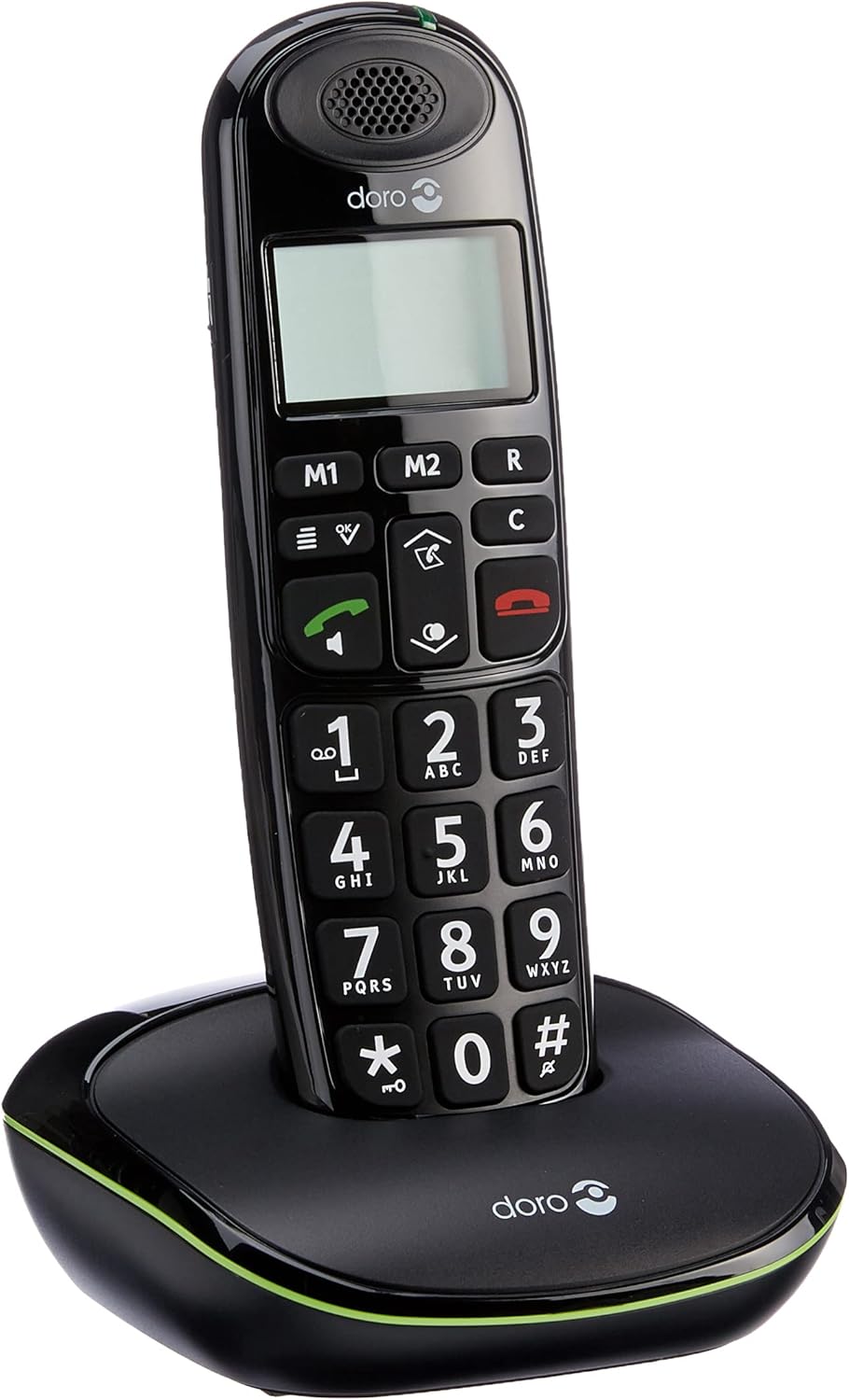
Figure 2: Handset correctly placed on the base station for charging.
2.5 Initial Power On
After the initial charge, the handset will power on automatically. The display will show basic information. If prompted, follow any on-screen instructions for initial setup, such as setting the date and time.
3. Operating Instructions
3.1 Making a Call
- Enter the desired phone number using the large numeric keypad.
- Press the green call button (
 ) to initiate the call.
3.2 Receiving a Call
When the phone rings, press the green call button () to answer the incoming call. The display will show the caller's name if stored in your phonebook.
3.3 Ending a Call
Press the red end call button ( ) or place the handset back on the base station to terminate the call.
3.4 Volume Adjustment
During a call, use the up/down navigation keys to adjust the earpiece volume to a comfortable level.
3.5 Sound Amplification
For an even stronger and clearer sound during a call, press the amplifier button (located on the right side of the handset). This boosts the sound by up to +10 dB. The maximum reception amplification is 30 dB, and the maximum ringer volume at 1 meter is 90 dB.
3.6 Hands-free Speakerphone
To activate the hands-free speakerphone during a call, press the dedicated speakerphone button.
3.7 Phonebook (Contacts)
The phone can store up to 20 contacts. Access the phone's menu to add, edit, or delete entries. When an incoming call matches a stored contact, the name will appear on the display.
3.8 Speed Dial (M1/M2 Keys)
Use the M1 and M2 keys to configure one-touch dialing for your favorite contacts. Refer to the phone's menu for instructions on programming these keys.
3.9 Redial Function
Press the down arrow key to access a list of the last 5 most frequently called contacts. Select a number from the list and press the green call button to redial.
3.10 Clock and Alarm
The phone includes clock and alarm functions. Access the phone's menu to set the current time and configure alarm settings as needed.
3.11 GAP Compatibility
The Doro PhoneEasy 100W is GAP compatible. This allows the handset to be registered with other GAP-compatible base stations, or for up to 5 additional GAP-compatible handsets to be registered to its base station.
3.12 Hearing Aid Compatibility
This phone is compatible with hearing aids. To enable this feature for clearer sound, select the 'T' mode on your hearing aid device.
4. Maintenance
4.1 Cleaning
Wipe the handset and base station with a soft, slightly damp cloth. Do not use abrasive cleaners, solvents, or strong chemicals, as these can damage the surfaces.
4.2 Battery Care
Use only the approved rechargeable NiMH AAA batteries. Replace batteries when their performance significantly decreases (e.g., shorter talk time, frequent low battery warnings). Do not expose batteries to extreme temperatures or dispose of them in fire.
5. Troubleshooting
If you encounter issues with your Doro PhoneEasy 100W, refer to the following common solutions:
- No Power: Ensure the power adapter is securely connected to the base station and a working wall outlet. Check that the batteries are correctly installed in the handset and fully charged.
- No Dial Tone: Verify that the telephone line cord is properly connected to both the base station and the telephone wall socket. Test the wall socket with another working phone if possible.
- Poor Sound Quality: Ensure the handset is within the operational range of the base station (up to 50m indoors, 300m outdoors). Check for potential interference from other electronic devices. Activate the sound amplification feature if needed.
- Handset Out of Range Warning: If the handset displays an 'out of range' message, move closer to the base station. If the issue persists, ensure the base station is powered on.
- Cannot Make/Receive Calls: Check all connections (power, phone line). Ensure the handset is registered to the base station. If necessary, re-register the handset according to the instructions in the full user manual (if provided separately).
6. Specifications
| Feature | Specification |
|---|---|
| Brand | Doro |
| Manufacturer | Doro |
| Model Name | PhoneEasy 100W |
| Model Year | 2011 |
| Part Number | PHONEEASY100WNOIR |
| Compatible Devices | DECT networks, GAP devices, PSTN networks |
| Special Features | Cordless |
| Number of Units | 1 |
| Display Technology | TFT |
| Display Type | TFT |
| Color Screen | No |
| Power Source Type | Cordless |
| Battery Type | AAA NiMH |
| Average Battery Life (Talk Time) | 10 Hours |
| Batteries Required | Yes (2x AAA NiMH) |
| Connector Type | DECT |
| Material Type | Plastic |
| Shape | Traditional |
| ASIN | B0043DUG86 |
| First Available Date | August 7, 2012 |
| Color | Black |
| Phone Type | Cordless |
| Dialer Type | Single Keypad |
| Multi-line Operation | Single line operation |
7. Warranty and Support
For detailed warranty information, please refer to the documentation included with your Doro PhoneEasy 100W purchase. For technical support, product registration, or to find additional resources, please visit the official Doro website or contact Doro customer service directly.


