
SECURAM ECSL-0601A
SecuRam Electronic Safe Lock User Manual
Model: ECSL-0601A
Brand: SECURAM
Introduction
This manual provides comprehensive instructions for the installation, operation, maintenance, and troubleshooting of your SecuRam Electronic Safe Lock, Model ECSL-0601A. Please read this manual thoroughly before using your new safe lock to ensure proper function and security.

Image: The SecuRam Electronic Safe Lock, showing both the digital keypad and the internal lock mechanism.
Setup and Initial Operation
Your SecuRam SafeLogic Basic Safe Lock comes with pre-programmed entry codes for initial setup. It is crucial to change these codes immediately after installation for security purposes.
Initial Codes:
- Manager Code: 1-1-1-1-1-1
- User Code: 1-2-3-4-5-6
Step 1: Open the Lock
- Enter either the Manager Code or the User Code.
- The lock will open.
This confirms the lock is operational with its default settings.
Step 2: Change the Manager Code
- Enter "0" six times. You will hear one beep.
- Enter the existing Manager Code (1-1-1-1-1-1). You will hear one beep.
- Enter a new 6-digit code. You will hear one beep.
- Re-enter the new 6-digit code to confirm. You will hear one beep.
Your Manager Code has now been successfully changed. Use your new Manager Code to open the lock.
Step 3: Change the User Code
- Enter "0" six times. You will hear one beep.
- Enter the existing User Code (1-2-3-4-5-6). You will hear one beep.
- Enter a new 6-digit code. You will hear one beep.
- Re-enter the new 6-digit code to confirm. You will hear one beep.
Your User Code has now been successfully changed. Use your new User Code to open the lock.

Image: Quick Start Guide for SecuRam SafeLogic Basic, detailing initial setup steps and code changes.
Operating Instructions
Once the codes are set, operating your SecuRam Electronic Safe Lock is straightforward.
Opening the Lock:
- Ensure the safe door is closed and the handle is in the locked position.
- Enter your valid 6-digit code (either Manager or User code) on the keypad.
- Listen for a series of beeps, indicating the code has been accepted.
- Within 4 seconds of the last beep, turn the safe handle to the open position.
- Pull the door open.
If an incorrect code is entered, the lock will not open, and you may hear an error tone. Wait 10 seconds before attempting to enter the code again.
Closing and Locking the Safe:
- Close the safe door.
- Turn the safe handle to the locked position. The lock will automatically re-lock.
- Verify the safe is locked by attempting to turn the handle without entering a code.
Maintenance
Proper maintenance ensures the longevity and reliable operation of your SecuRam Electronic Safe Lock.
Battery Replacement:
The SecuRam lock is powered by a 9-volt alkaline battery, typically located within the keypad assembly or a dedicated battery compartment. When the battery is low, the keypad may emit a series of warning beeps during operation, or the display may dim.
- Locate the battery compartment, usually on the underside or rear of the keypad.
- Carefully remove the old 9-volt battery.
- Insert a new, high-quality 9-volt alkaline battery, ensuring correct polarity.
- Replace the battery compartment cover.
It is recommended to replace the battery annually, regardless of usage, to prevent unexpected power loss.
Cleaning:
Clean the keypad surface with a soft, dry cloth. Avoid using abrasive cleaners, solvents, or excessive moisture, as these can damage the electronic components or the keypad finish.
Troubleshooting
If you encounter issues with your SecuRam Electronic Safe Lock, refer to the following common problems and solutions:
Problem: Lock does not open after entering a valid code.
- Solution 1: Ensure you are turning the safe handle within 4 seconds of the last beep after entering the code.
- Solution 2: Replace the 9-volt battery. A low battery can cause intermittent operation or failure to open.
- Solution 3: Verify you are entering the correct 6-digit code. Try both the Manager and User codes if you have access to both.
Problem: Keypad is unresponsive or beeps continuously.
- Solution 1: Replace the 9-volt battery. This is the most common cause of keypad unresponsiveness.
- Solution 2: Check the cable connection between the keypad and the lock body. Ensure it is securely plugged in.
Problem: Lock beeps multiple times after an incorrect code entry.
- Solution: This is normal behavior. The lock indicates an invalid code. Wait 10-20 seconds before attempting to enter the code again. Repeated incorrect entries may trigger a lockout period.
Specifications
Detailed specifications for the SecuRam Electronic Safe Lock, Model ECSL-0601A:
| Feature | Detail |
|---|---|
| Part Number | ECSL-0601A |
| Model Number | ECSL-0601A |
| Lock Type | Electronic |
| Power Source | 9-volt Alkaline Battery (not included) |
| Style | Modern |
| Shape | Rectangular (lock body) |
| Item Weight | 680 g (1.5 Pounds) |
| Parcel Dimensions | 18.54 x 11.43 x 4.57 cm |
| Number of Pieces | 1 (complete lock assembly) |
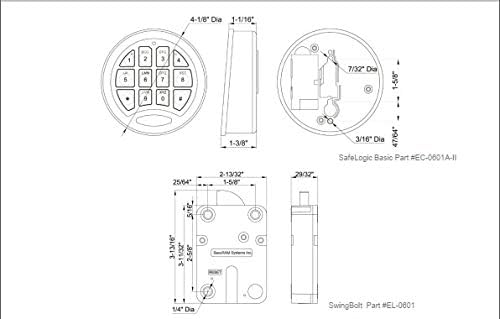
Image: Technical drawing illustrating the dimensions and components of the SafeLogic Basic keypad and SwingBolt lock mechanism.
Warranty and Support
For detailed warranty information regarding your SecuRam Electronic Safe Lock, please refer to the warranty card included with your product or visit the official SecuRam website. Warranty terms and conditions may vary.
If you require technical assistance, have questions about installation, or need further operating instructions, please contact SecuRam customer support. You can find comprehensive operating instructions and contact information on the official SecuRam website: www.securamsys.com.
Related documentsECSL-0601A


Ask a question about this manual
Ask about setup, troubleshooting, compatibility, parts, safety, or missing instructions. Manuals+ will review the question and use this page’s manual context to help answer it.