
Introduction
This instruction manual provides detailed guidance for the setup, operation, and maintenance of your Clicker C-01CB 2-in-1 Universal TV Remote and Bottle Opener. This device combines the functionality of a universal remote control for up to 8 devices with a convenient integrated bottle opening feature.
Product Overview
The Clicker C-01CB is designed to simplify your entertainment experience by consolidating multiple remote controls into one, while also offering a practical bottle opening feature. It is engineered for durability and universal compatibility with various electronic devices.
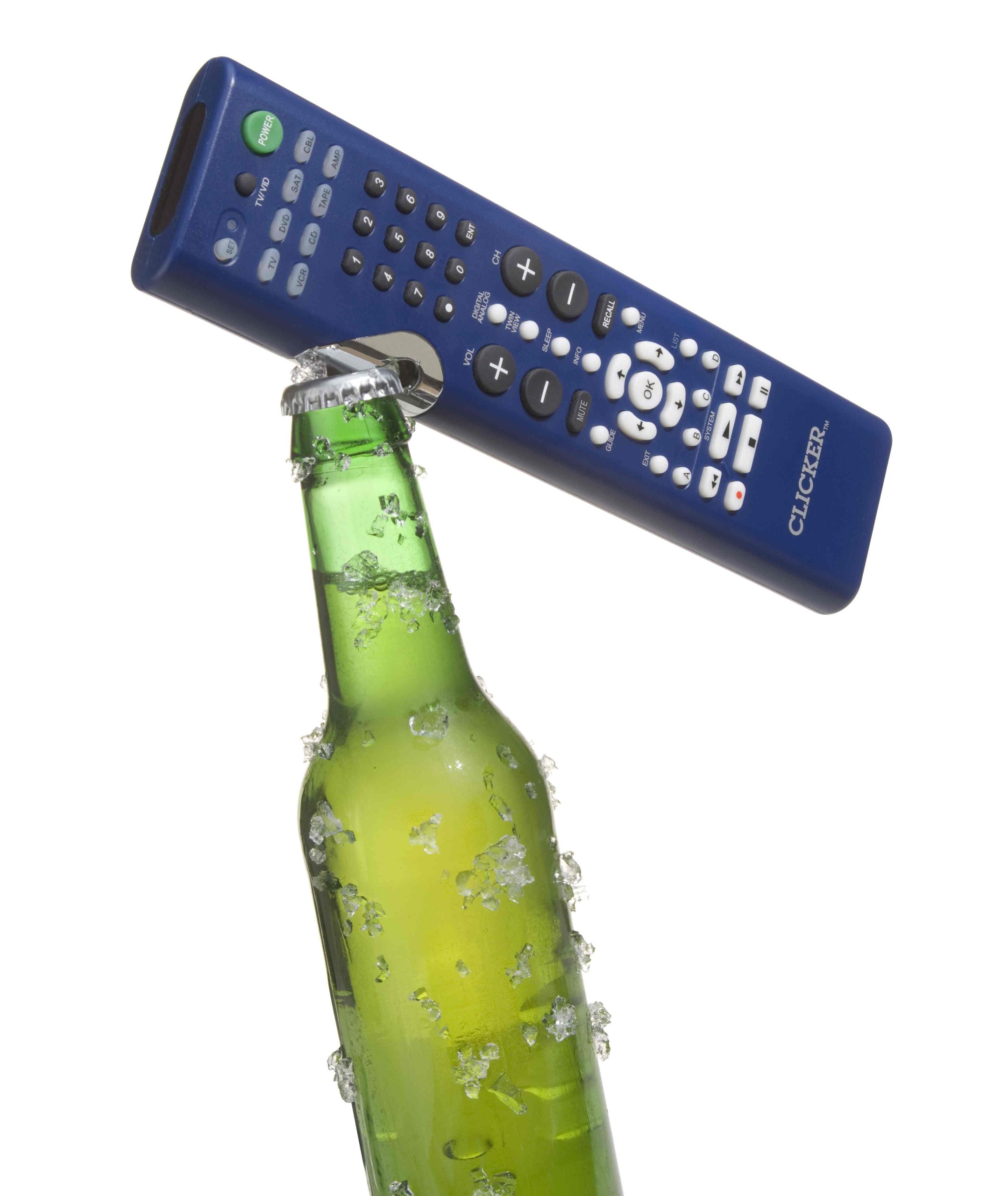
Image: The Clicker C-01CB device, featuring its remote control buttons and the integrated bottle opener at the top. This image illustrates the product's dual functionality.
Setup
1. Battery Installation
- Locate the battery compartment cover on the back of the remote.
- Slide the cover off in the direction indicated by the arrow.
- Insert two AAA batteries (not included), ensuring correct polarity (+ and -) as marked inside the compartment.
- Replace the battery compartment cover until it clicks securely into place.
2. Device Programming (Learning Function)
The Clicker C-01CB features a learning function to program it with commands from your original remote controls. This allows it to control up to 8 different devices.
- Select Device: Press the desired device button (e.g., TV, DVD, AUX) once on the Clicker remote for the device you intend to program. The device indicator light will flash once. Alternatively, press the OK key; the device indicator light will flash once.
- Enter Learning Mode: Press and hold the LEARN key for 3 seconds. The device indicator light will start blinking, indicating it is in learning mode.
- Position Remotes: Point your original remote control and the Clicker remote at each other, maintaining a distance of 1 to 3 inches.
- Teach a Key: Press the key on the Clicker remote that you wish to program. The device indicator light will illuminate steadily. While it is illuminated, press and hold the corresponding key on your original remote control. Release the key on the original remote only when the Clicker's device indicator light starts blinking, signifying that the learning function for this button is complete.
- Repeat for More Keys: Repeat step 4 for any additional keys you wish to program.
- Exit Learning Mode: Press the LEARN key to exit the learning function.
Important Notes:
- If no key is pressed after entering learning mode, the indicator will blink twice and exit learning mode automatically.
- Any function key on the Clicker (except LEARN, SET, ALL OFF, FAV, and device keys) can be reprogrammed multiple times. The remote will retain the data from the latest successful learning attempt for that specific key.
Operating Instructions
Remote Control Functions
Once programmed, the Clicker remote operates like your original device remotes. Select the desired device using the device buttons (e.g., TV, DVD) and then use the corresponding function keys.
- Power: Turns the selected device on or off.
- Volume Up/Down: Adjusts the volume of the selected audio device.
- Channel Up/Down: Changes channels on the selected TV or cable box.
- Mute: Mutes the audio.
- Number Pad (0-9): For direct channel entry or other numerical inputs.
- Menu/Guide: Accesses device menus or program guides.
- Directional Arrows & OK: Navigates menus and confirms selections.
Bottle Opener Use
The integrated bottle opener is located at the top of the Clicker device.
- Grip the Clicker remote firmly.
- Position the metal lip of the bottle opener under the cap of a bottle.
- Apply upward pressure to the remote while holding the bottle steady to remove the cap.
Maintenance
- Cleaning: Wipe the remote with a soft, dry cloth. Do not use liquid cleaners or abrasive materials.
- Battery Replacement: Replace batteries when the remote's performance diminishes or the indicator light fails to illuminate.
- Storage: Store the remote in a dry place away from extreme temperatures and direct sunlight.
- Avoid Drops: While designed for durability, excessive drops or impacts can damage the internal components or the bottle opener mechanism.
Troubleshooting
| Problem | Possible Cause | Solution |
|---|---|---|
| Remote not responding. | Dead or incorrectly inserted batteries. | Check battery polarity or replace batteries. |
| Learning function fails. | Remotes too far apart, not aligned, or original remote batteries low. | Ensure remotes are 1-3 inches apart and aligned. Replace original remote batteries if needed. Repeat learning steps carefully. |
| Only some functions work after programming. | Specific keys were not successfully programmed. | Re-enter learning mode and reprogram the non-working keys. Ensure the original remote's button is held until the Clicker's light blinks. |
| Bottle opener not working effectively. | Incorrect positioning or insufficient force. | Ensure the opener is fully engaged under the bottle cap and apply firm, steady pressure. |
Specifications
- Model Number: C-01CB
- Brand: Clicker
- Material: Metal (for bottle opener component), Plastic (for remote casing)
- Color: Blue
- Product Dimensions: 11.6 x 4.3 x 1.5 inches
- Item Weight: 8.2 ounces (0.51 Pounds)
- Special Feature: Universal Remote Control, Integrated Bottle Opener
- Power Source: 2 x AAA Batteries (not included)
- UPC: 855526002003
Warranty and Support
For warranty information or technical support, please refer to the documentation included with your purchase or contact Clicker customer service directly. Contact details are typically available on the manufacturer's official website.


