
Introduction
The Zmodo W-VPA2030 is a 99-foot pre-made plug-n-play cable designed for surveillance systems. This cable integrates video, power, and audio lines into a single Siamese cable, simplifying the installation process for security cameras. It features BNC connectors for video, 5.5mm barrel connectors for power, and RCA connectors for audio, ensuring compatibility with a wide range of surveillance equipment.
Product Features
- Length: 99 feet (approximately 30 meters) for extended reach.
- Integrated Design: Siamese cable combines video, power, and audio into one jacket.
- Video Connection: BNC connectors for reliable video signal transmission.
- Power Connection: 5.5mm barrel connectors for standard power input/output.
- Audio Connection: RCA connectors for audio signal transmission.
- Video Cable Type: 95% copper shielded coax for minimal interference.
- Power Cable Type: 22AWG twisted pair for efficient power delivery.
- Durability: Suitable for both indoor and outdoor surveillance applications.
Setup and Installation
This section provides general guidelines for connecting the Zmodo W-VPA2030 cable to your surveillance system. Always refer to your camera and DVR/NVR's specific instructions for detailed connection diagrams.
- Identify Connectors:
- Video: BNC connectors (twist-lock type).
- Power: 5.5mm barrel connectors (one male, one female).
- Audio: RCA connectors (push-on type).
- Connect to Camera:
- Connect the BNC video connector from the cable to the video output port on your surveillance camera.
- Connect the male 5.5mm power connector from the cable to the power input port on your surveillance camera.
- If your camera supports audio, connect the RCA audio connector from the cable to the audio output port on your camera.
- Route the Cable: Carefully route the 99-foot cable from the camera location to your Digital Video Recorder (DVR) or power source, avoiding sharp bends or excessive tension. Ensure the cable is secured to prevent accidental disconnections or damage.
- Connect to DVR/Power Source:
- Connect the other end's BNC video connector to a video input channel on your DVR/NVR.
- Connect the female 5.5mm power connector to a compatible power adapter (not included) or a power distribution box.
- If using audio, connect the other end's RCA audio connector to an audio input channel on your DVR/NVR.
- Power On: Once all connections are secure, power on your surveillance camera and DVR/NVR system. Verify that video, power, and audio signals are being transmitted correctly.
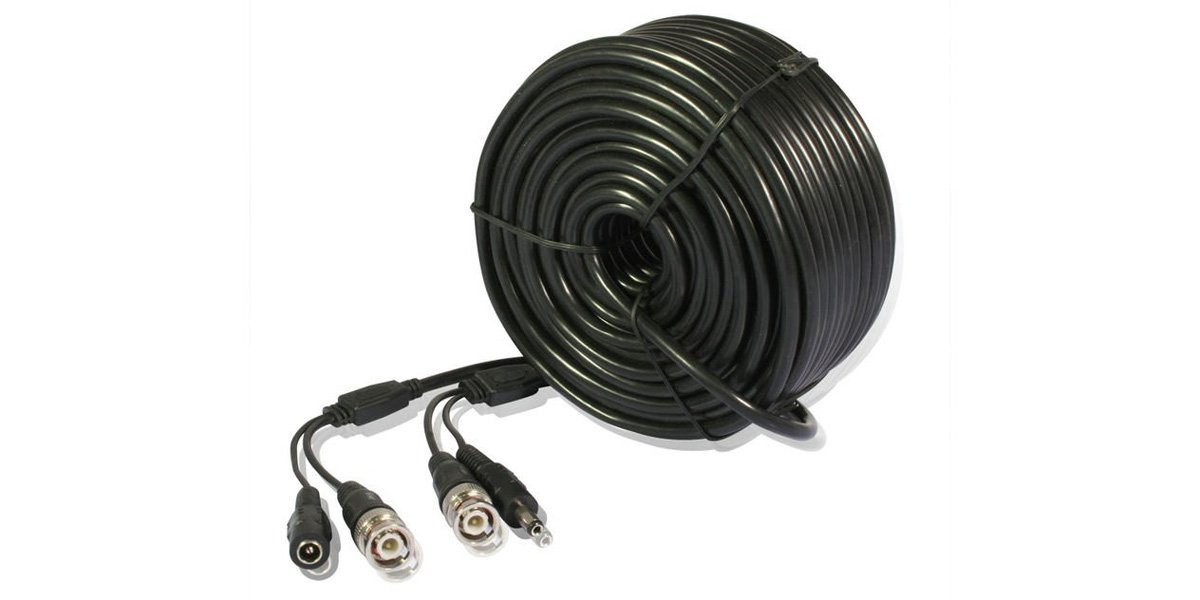
Image: Zmodo W-VPA2030 99-foot pre-made surveillance cable. This image displays the Zmodo W-VPA2030 cable, highlighting its integrated video, power, and audio lines. The cable features BNC connectors for video, RCA connectors for audio, and a 5.5mm barrel connector for power, designed for surveillance camera systems.
Operation
The Zmodo W-VPA2030 cable is a passive component designed to transmit signals. Its operation is directly tied to the proper functioning of the connected surveillance camera and recording device (DVR/NVR).
- Ensure all connectors are securely fastened to maintain stable video, power, and audio signals.
- Verify that the power adapter connected to the cable provides the correct voltage and amperage for your camera.
- Monitor your DVR/NVR for continuous video feed and audio input (if applicable) to confirm proper signal transmission.
Maintenance
Proper maintenance ensures the longevity and reliable performance of your Zmodo W-VPA2030 cable.
- Regular Inspection: Periodically inspect the cable for any signs of physical damage, such as cuts, kinks, or frayed insulation, especially in outdoor installations.
- Connector Check: Ensure all BNC, RCA, and power connectors remain clean and free of corrosion. Loose or dirty connections can lead to signal loss or degradation.
- Environmental Protection: If installed outdoors, ensure the cable is protected from extreme weather conditions where possible. While designed for outdoor use, minimizing direct exposure to harsh elements can extend its lifespan.
- Cleaning: Use a soft, dry cloth to gently wipe down the cable if it becomes dirty. Avoid using harsh chemicals or abrasive cleaners.
Troubleshooting
If you encounter issues with your surveillance system after installing the Zmodo W-VPA2030 cable, consider the following troubleshooting steps:
- No Video Signal:
- Check both ends of the BNC video connection to ensure they are securely twisted and locked.
- Verify that the camera is receiving power.
- Test the camera with a shorter, known-good cable if available.
- Ensure the DVR/NVR input channel is correctly configured and functioning.
- Poor Video Quality (Flickering, Lines, Distortion):
- Inspect the BNC connectors for any damage or corrosion.
- Ensure the cable is not running parallel to high-voltage power lines or other sources of electromagnetic interference.
- Check for kinks or severe bends in the cable that could damage the internal coax.
- No Power to Camera:
- Confirm the power adapter is plugged into a working outlet and is supplying power.
- Check the 5.5mm power connections at both the camera and the power source for secure fit.
- Ensure the power adapter's voltage and amperage match the camera's requirements.
- No Audio Signal:
- Verify that your camera has an audio output and that it is enabled.
- Check both ends of the RCA audio connection for secure fit.
- Ensure the DVR/NVR audio input channel is correctly configured and functioning.
Specifications
| Brand | Zmodo |
| Model | W-VPA2030 |
| Length | 99 feet |
| Cable Type | Siamese (Video, Power, Audio) |
| Video Connector | BNC (Male-to-Male) |
| Power Connector | 5.5mm Barrel (Male-to-Female) |
| Audio Connector | RCA (Male-to-Male) |
| Video Cable Construction | 95% Copper Shielded Coax |
| Power Cable Gauge | 22 AWG Twisted Pair |
| Compatible Devices | Surveillance Cameras |
| Recommended Use | Surveillance Systems |
| Indoor/Outdoor Usage | Indoor, Outdoor |
| Item Weight | 3.2 pounds |
| Color | Black |
| UPC | 132018332665, 872182773450, 803983027534, 846655001548, 320127545926 |
Warranty and Support
For information regarding product warranty, technical support, or service, please refer to the official Zmodo website or contact Zmodo customer service directly. Keep your purchase receipt for warranty claims.
You can typically find support contact information on the manufacturer's official website: www.zmodo.com