1. Introduction
The Nokia C6 is a versatile smartphone designed to keep you connected. It features a responsive touchscreen display and a convenient side-sliding QWERTY keyboard for efficient typing and messaging. With its customizable home screen and access to a wide range of applications through the Ovi Store, the Nokia C6 offers a personalized and engaging mobile experience. This manual provides essential information for setting up, operating, and maintaining your device.
2. What's in the Box
Upon unboxing your Nokia C6, ensure all the following components are present:
- Nokia C6 Handset
- Rechargeable Battery
- Compact Travel Charger
- 2 GB microSD Memory Card (pre-loaded with Ovi Maps data for the US, Ovi Suite, music tracks, and wallpapers)
- Stereo Headset
- Connectivity Cable
- Quick Start Guide
- User Manual (this document)
3. Physical Features and Components
The Nokia C6 combines a sleek design with practical features for daily use.

Figure 3.1: Front view of the Nokia C6, showcasing its 3.2-inch touchscreen display and physical call/end buttons.

Figure 3.2: Rear view of the Nokia C6, highlighting the 5.0 megapixel camera lens.
The device features a 3.2-inch HD touchscreen display for intuitive navigation. Below the screen are dedicated call and end buttons, along with a menu button.

Figure 3.3: The Nokia C6 with its full QWERTY keyboard slid out, ideal for fast typing.
A key feature is the side-sliding full QWERTY keyboard, which is revealed by sliding the touchscreen sideways. This physical keyboard allows for fast and accurate text input for messaging and email.

Figure 3.4: Top edge of the Nokia C6, featuring the USB port and 3.5 mm audio jack.
The top edge of the device houses the standard 3.5 mm audio jack for headphones and a USB port for charging and data transfer.
4. Setup and Initial Use
4.1. Inserting the SIM Card and Battery
The Nokia C6 is an unlocked GSM phone, meaning it can be used with various GSM network service providers. To begin, remove the back cover of the phone. Insert your SIM card into the designated slot. SIM cards are typically found under the battery. Next, insert the rechargeable battery, ensuring the contacts align correctly. Replace the back cover.
Video 4.1: An overview of the Nokia C6, demonstrating its physical features and general operation. This video provides a visual guide to the phone's design and functionality.
4.2. Powering On and Basic Setup
Press and hold the power button until the phone vibrates and the Nokia logo appears. Follow the on-screen prompts to complete the initial setup, including language selection, date, and time.
4.3. Easy E-mail Setup
The Nokia C6 supports easy setup for various email services, including Gmail, Yahoo!, Hotmail, and Ovi Mail. Navigate to the messaging settings and select "Set up e-mail" to configure your accounts. The customizable home screen allows for quick access to your email and instant messaging services.
5. Operating System (Symbian)
The Nokia C6 runs on the Symbian operating system, offering a user-friendly interface.
5.1. Home Screen Customization
Personalize your home screen with widgets that provide live updates from your favorite social networks (e.g., Facebook, MySpace). You can arrange your favorite contacts and applications for one-touch access.
5.2. Ovi Store
Access thousands of available apps, games, videos, and more from the Ovi Store to expand your phone's capabilities and customize your experience.
Video 5.1: This video explains the general benefits of unlocked phones, including the freedom to choose your carrier and customize your device.
6. Connectivity
The Nokia C6 offers robust connectivity options to keep you connected to the internet and other devices.
- Cellular Network: Unlocked quad-band GSM (850/900/1800/1900 MHz) and 3G (850/1900/2100 UMTS/HSDPA) capabilities for voice and data.
- Wi-Fi: Integrated 802.11b/g Wi-Fi for accessing home, corporate networks, and hotspots.
- Bluetooth: Version 2.0 with A2DP profile for wireless audio streaming to compatible headphones or speakers.
- Messaging: Supports SMS, MMS, and various IM services (Yahoo! Messenger, Google Talk, AIM, ICQ).
- Web Browser: Full HTML Web browser with support for JavaScript, Flash Lite 3.1, and Flash video.
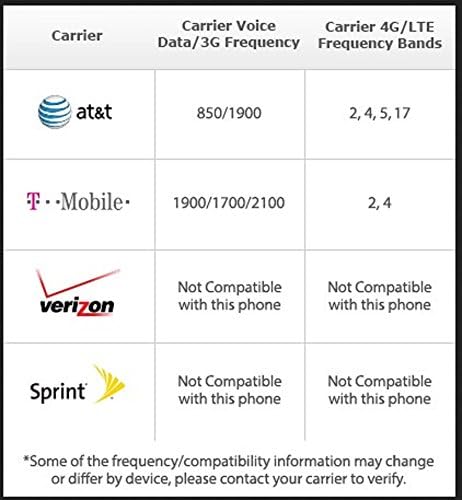
Figure 6.1: Carrier compatibility for the Nokia C6, indicating support for AT&T and T-Mobile frequencies, while noting incompatibility with Verizon and Sprint.
7. Camera and Multimedia
Capture moments and enjoy entertainment with the Nokia C6's integrated camera and multimedia features.
- Camera: 5-megapixel camera with 4x digital zoom, LED flash, automatic location tagging (Geotagging), and auto-focus lens.
- Video Capture: Record videos up to 640 x 480 pixels at up to 30 frames per second.
- Media Player: Supports MP3, WMA, and AAC/eAAC+ audio formats.
- FM Radio: Listen to FM radio (requires headset to be attached).
9. Troubleshooting
If you encounter issues with your Nokia C6, try the following basic troubleshooting steps:
- Device Unresponsive: If the phone is frozen or unresponsive, press and hold the power button for about 10 seconds to force a restart.
- Network Connectivity Issues:
- Ensure your SIM card is correctly inserted.
- Check if Airplane mode is off.
- Verify your network settings and ensure you have signal coverage.
- Battery Life: To optimize battery life, reduce screen brightness, close unused applications, and disable unnecessary connectivity features like Bluetooth or Wi-Fi when not in use.
- Application Performance: If an application is slow or crashing, try restarting the application or the phone. Ensure you have sufficient free memory.
For more complex issues, refer to the detailed user manual available on Nokia's official support website or contact Nokia customer support.
10. Technical Specifications
| Feature | Specification |
|---|---|
| Product Dimensions | 6.5 x 1.81 x 3.54 inches |
| Item Weight | 5.3 ounces |
| Operating System | Nokia Symbian |
| Display Size | 3.2 Inches |
| Display Resolution | 330 x 103 pixels |
| Camera | 5 Megapixel (Rear) |
| Talk Time (3G) | Up to 5 Hours |
| Standby Time | Up to 384 Hours (16 days) |
| Memory Expansion | microSD card slot (supports up to 16 GB) |
| Connectivity | Bluetooth 2.0, Wi-Fi (802.11b/g), USB |
| Audio Jack | 3.5 mm |
| Form Factor | Slider |
| Color | Black |
11. Warranty and Support
The Nokia C6 comes with a full manufacturer's warranty. For detailed information regarding warranty terms, service, and support, please refer to the warranty card included in your product packaging or visit the official Nokia support website.
For technical assistance, troubleshooting, or to find authorized service centers, please contact Nokia customer support.


