
BLACK+DECKER RC450
BLACK+DECKER RC450 1.5 Liter Rice Cooker User Manual
Model: RC450
Introduction
Thank you for purchasing the BLACK+DECKER RC450 1.5 Liter Rice Cooker. This manual provides important information regarding the safe operation, maintenance, and troubleshooting of your appliance. Please read all instructions thoroughly before first use and retain this manual for future reference.
Important Safety Instructions
When using electrical appliances, basic safety precautions should always be followed to reduce the risk of fire, electric shock, and/or injury, including the following:
- Read all instructions.
- Do not touch hot surfaces. Use handles or knobs.
- To protect against electrical shock, do not immerse cord, plugs, or appliance in water or other liquid.
- Close supervision is necessary when any appliance is used by or near children.
- Unplug from outlet when not in use and before cleaning. Allow to cool before putting on or taking off parts.
- Do not operate any appliance with a damaged cord or plug, or after the appliance malfunctions or has been damaged in any manner. Contact customer service for examination, repair, or adjustment.
- The use of accessory attachments not recommended by the appliance manufacturer may cause injuries.
- Do not use outdoors.
- Do not let cord hang over edge of table or counter, or touch hot surfaces.
- Do not place on or near a hot gas or electric burner, or in a heated oven.
- Extreme caution must be used when moving an appliance containing hot oil or other hot liquids.
- Always attach plug to appliance first, then plug cord into the wall outlet. To disconnect, turn any control to "off", then remove plug from wall outlet.
- Do not use appliance for other than intended use.
- This appliance is for household use only.
Parts and Features
Familiarize yourself with the components of your BLACK+DECKER RC450 Rice Cooker:
- Glass Lid: Allows monitoring of cooking progress.
- Non-stick Cooking Pot: Removable pot for cooking rice.
- Rice Cooker Base: Main unit housing the heating element and controls.
- Indicator Lights: "Cook" and "Warm" indicators.
- Control Switch: To initiate cooking.
- Measuring Cup: For accurate rice and water measurements.
- Rice Paddle: For stirring and serving rice.
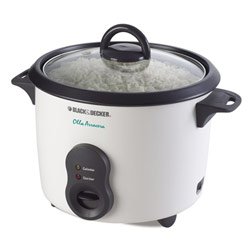
This image displays the BLACK+DECKER RC450 1.5 Liter Rice Cooker, featuring its main unit, removable non-stick cooking pot, glass lid, and included measuring cup and rice paddle.
Setup and First Use
- Unpack: Carefully remove all packaging materials and labels from the rice cooker.
- Wash Components: Wash the non-stick cooking pot, glass lid, measuring cup, and rice paddle in warm, soapy water. Rinse thoroughly and dry completely.
- Wipe Base: Wipe the exterior of the rice cooker base with a damp cloth. Do not immerse the base in water.
- Placement: Place the rice cooker on a stable, level, heat-resistant surface, away from walls and cabinets to allow for proper ventilation.
Operating Instructions
Cooking Rice
- Measure Rice: Use the provided measuring cup to measure the desired amount of rice. One full cup of uncooked rice typically yields two cups of cooked rice.
- Rinse Rice: Rinse the rice under cold water until the water runs clear. This helps remove excess starch.
- Add to Pot: Place the rinsed rice into the non-stick cooking pot.
- Add Water: For most types of white rice, use a 1:1 ratio of rice to water (e.g., 1 cup rice to 1 cup water). Adjust water quantity based on rice type and desired consistency.
- Place Pot: Insert the cooking pot into the rice cooker base, ensuring it is seated properly.
- Cover: Place the glass lid securely on the cooking pot.
- Plug In: Plug the power cord into a standard 115V electrical outlet.
- Start Cooking: Press the control switch down to the "Cook" position. The "Cook" indicator light will illuminate.
- Automatic Keep Warm: Once the rice is cooked, the cooker will automatically switch to the "Warm" setting, and the "Warm" indicator light will illuminate. For best results, allow rice to rest on "Warm" for 5-10 minutes before serving.
- Serve: Use the provided rice paddle to fluff and serve the rice.
- Unplug: Always unplug the rice cooker from the outlet when cooking is complete and before cleaning.
Using the Keep Warm Function
The rice cooker automatically switches to the "Warm" function after cooking. This function is designed to keep rice at an optimal serving temperature for a limited time. Do not keep rice on "Warm" for extended periods (more than 1-2 hours) as it may affect texture and quality.
Care and Maintenance
Proper care ensures the longevity and performance of your rice cooker.
- Unplug and Cool: Always unplug the appliance and allow it to cool completely before cleaning.
- Wash Removable Parts: The non-stick cooking pot, glass lid, measuring cup, and rice paddle are dishwasher safe or can be washed by hand in warm, soapy water. Avoid abrasive cleaners or scouring pads that may damage the non-stick coating.
- Clean Exterior: Wipe the exterior of the rice cooker base with a damp cloth. Do not use abrasive cleaners. Never immerse the rice cooker base in water or any other liquid.
- Storage: Ensure all parts are clean and dry before storing. Store the rice cooker in a cool, dry place.
Troubleshooting
| Problem | Possible Cause | Solution |
|---|---|---|
| Rice is too dry or hard. | Not enough water; lid not sealed properly; rice not allowed to steam on "Warm". | Add a small amount of water (1-2 tablespoons) for the next batch. Ensure lid is secure. Allow rice to rest on "Warm" for 5-10 minutes after cooking. |
| Rice is too wet or mushy. | Too much water; rice not rinsed. | Reduce water slightly for the next batch. Rinse rice thoroughly before cooking. |
| Rice sticks to the bottom of the pot. | Not enough water; pot not properly cleaned; rice not rinsed. | Ensure correct water ratio. Clean pot thoroughly. Rinse rice to remove excess starch. |
| Cooker does not turn on. | Not plugged in; power outage; faulty outlet. | Check if the power cord is securely plugged into a working outlet. Test the outlet with another appliance. |
Specifications
- Model: RC450
- Brand: BLACK+DECKER
- Capacity: 1.5 Liters
- Voltage: 115V
- Color: Black
Warranty and Customer Support
This product comes with a limited warranty. For detailed warranty information, product registration, or customer support, please visit the official BLACK+DECKER website or contact their customer service department.
Website: www.blackanddecker.com
Please note: Warranty terms may vary by region. Keep your proof of purchase.
Related documentsRC450


Ask a question about this manual
Ask about setup, troubleshooting, compatibility, parts, safety, or missing instructions. Manuals+ will review the question and use this page’s manual context to help answer it.