
1. Introduction
The Kaito KA500 Voyager is a versatile portable receiver designed for both daily use and emergency preparedness. This radio offers multiple power options, comprehensive band reception, and integrated emergency features, making it a reliable tool for various situations, including home use, travel, camping, and outdoor activities.

Image 1.1: The Kaito KA500 Voyager Emergency Radio in yellow, showcasing its solar panel, hand crank, and a phone connected for charging.
2. Product Features
The Kaito KA500 Voyager is equipped with a range of features to ensure functionality in diverse environments:
- 6-Way Power Options: Includes a hand crank generator, solar panel, compartment for 3 AA batteries (not included), 5V USB input, 5V AC/DC input (adapter sold separately), and a built-in NiMH replaceable and rechargeable battery pack.
- Comprehensive Radio Reception: Covers AM, FM, 2-band shortwave (SW1, SW2), and 7 pre-programmed NOAA weather channels.
- NOAA Weather Alert: Features Public Emergency Alert System (PEAS) for 24/7 real-time weather forecasts and automatic activation when alert signals are received.
- Emergency Mobile Charger: Built-in standard DC 5V USB output port for charging mobile devices such as smartphones, GPS units, MP3 players, and digital cameras.
- Integrated Lighting: Includes a 5-LED reading lamp, an LED flashlight, and a red LED S.O.S. beacon light.
- Enhanced Reception: Telescopic antenna extends up to 14.5 inches for high sensitivity reception, supported by advanced semiconductor circuitry and an LED signal strength indicator.
- Durable Construction: Made from strong, impact-resistant, and water-resistant ABS material, suitable for both indoor and outdoor use.

Image 2.1: Diagram illustrating the various power input options for the Kaito KA500, including solar panel, dynamo crank, micro-USB, DC-in, built-in rechargeable Ni-MH battery, and optional AA batteries.
3. Setup
3.1 Battery Installation
- Built-in NiMH Battery: The radio comes with a built-in rechargeable NiMH battery pack. Ensure it is charged before first use.
- AA Batteries (Optional): For additional power or backup, open the battery compartment on the back of the radio and insert 3 AA batteries, observing correct polarity.
3.2 Initial Charging
Before first use, it is recommended to fully charge the internal NiMH battery using one of the following methods:
- USB Input: Connect the radio to a 5V USB power source using a compatible USB cable.
- AC/DC Input: Use an optional 5V AC/DC wall power adapter (sold separately) to connect to a wall outlet.
- Solar Panel: Place the radio with the solar panel facing direct sunlight. The solar panel charges the internal battery and can power the radio directly.
- Hand Crank: Rotate the hand crank clockwise or counter-clockwise for several minutes to generate power and charge the internal battery.
3.3 Antenna Extension
For optimal radio reception, extend the telescopic antenna fully. For AM reception, rotate the radio for best signal.
4. Operating Instructions
4.1 Powering the Radio
Use the 'POWER' switch to select the desired power source:
- OFF: Turns the radio off.
- BATT: Operates the radio using the internal NiMH battery or installed AA batteries.
- SOLAR/DC: Operates the radio using solar power or an external DC input (USB/AC adapter).
- ALERT: Activates the NOAA Weather Alert function. The radio will remain in standby and activate automatically upon receiving an alert signal.
4.2 Radio Tuning
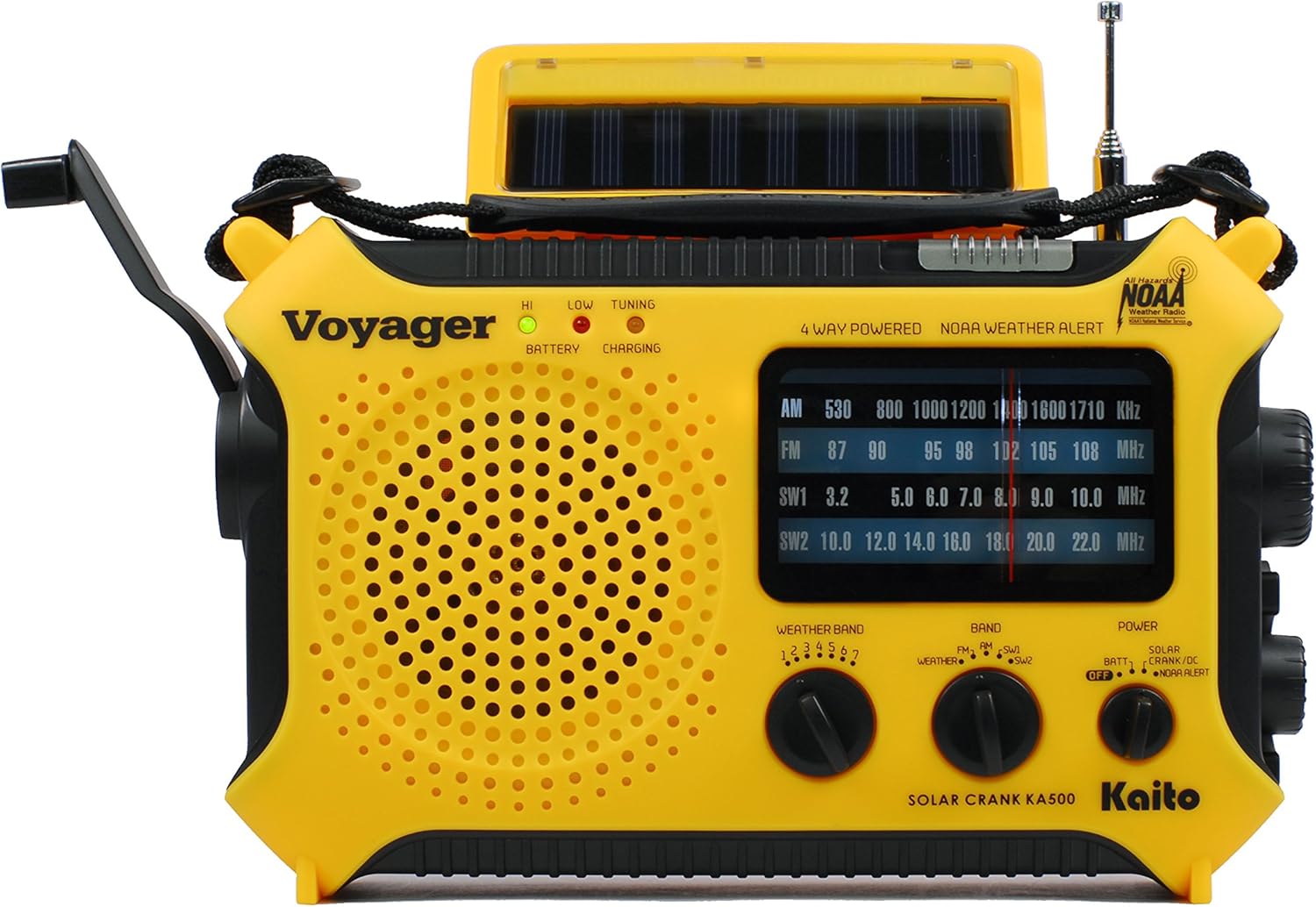
Image 4.1: Front panel of the Kaito KA500 radio, highlighting the tuning dial, band selector, and power controls.
- Band Selection: Use the 'BAND' switch to select between AM, FM, SW1, SW2, or WEATHER.
- Tuning: Rotate the large 'TUNING' knob to scan for stations. The LED signal strength indicator will illuminate when a strong signal is detected.
- NOAA Weather Channels: When 'WEATHER' band is selected, use the 'WEATHER BAND' knob to select one of the 7 pre-programmed NOAA channels (1-7).
4.3 Using the Lights
- Flashlight: Press the dedicated flashlight button to turn the LED flashlight on or off.
- Reading Lamp: Flip up the solar panel to reveal the 5-LED reading lamp. Use the switch located near the lamp to turn it on or off.
- S.O.S. Beacon: Activate the red LED S.O.S. beacon light for emergency signaling. Refer to the specific button or switch in your owner's manual for activation.

Image 4.2: The Kaito KA500 radio with its multi-LED reading lamp extended and illuminated, providing ambient light.
4.4 Charging External Devices
The KA500 can charge external devices via its 5V USB output port:
- Connect your mobile device to the USB output port using a compatible USB cable.
- The radio's internal battery will provide power for charging. For more efficient charging, ensure the radio's internal battery is sufficiently charged or use the hand crank while charging.
- Note that hand cranking or solar charging directly for external devices may be slow and is primarily intended for emergency power top-ups.

Image 4.3: The Kaito KA500 radio connected to a smartphone via its USB output port, demonstrating its emergency charging capability.
5. Maintenance
- Cleaning: Wipe the radio with a soft, damp cloth. Do not use abrasive cleaners or solvents.
- Battery Care: If using AA batteries, remove them if the radio will not be used for an extended period to prevent leakage. The internal NiMH battery should be periodically charged to maintain its capacity.
- Storage: Store the radio in a cool, dry place away from direct sunlight and extreme temperatures.
6. Troubleshooting
| Problem | Possible Cause | Solution |
|---|---|---|
| No power | Internal battery depleted; AA batteries depleted or incorrectly installed; power switch in 'OFF' position. | Charge internal battery via crank, solar, USB, or AC/DC. Replace AA batteries or check polarity. Ensure power switch is set to 'BATT' or 'SOLAR/DC'. |
| Poor radio reception | Antenna not extended; weak signal; interference. | Extend telescopic antenna fully. For AM, rotate the radio. Try tuning to a different frequency or moving to an open area. |
| External device not charging | Radio's internal battery too low; incompatible cable; device requires more power than supplied. | Ensure radio's internal battery is fully charged. Use the hand crank while charging. Verify USB cable compatibility. Note that high-power devices may charge slowly or not at all. |
| NOAA Alert not activating | Radio not in 'ALERT' mode; no alert signal received; out of NOAA broadcast range. | Ensure power switch is set to 'ALERT'. Verify you are within a NOAA broadcast area. |
7. Specifications
| Feature | Detail |
|---|---|
| Product Dimensions | 8.3"L x 2.3"W x 5.3"H (21.1 cm x 5.8 cm x 13.5 cm) |
| Item Weight | 1.5 pounds (0.68 kg) |
| Power Sources | Battery Powered (NiMH, 3xAA), Solar Powered, Dynamo Crank, USB, AC/DC |
| Radio Bands Supported | AM, FM, Shortwave (SW1, SW2), NOAA Weather (7 Channels) |
| Connectivity Technology | USB (for charging external devices) |
| Headset Jack Socket | 3.5 mm |
| Sensitivity | FM <10uV, MW <1mV/m, SW <30uV |
| Included Components | Owner's Manual |

Image 7.1: The Kaito KA500 radio with its dimensions clearly indicated: 11.1 inches wide, 3.3 inches deep, and 5.8 inches high, with a net weight of 1.6 lbs.
8. Warranty and Support
For detailed warranty information and customer support, please refer to the owner's manual included with your Kaito KA500 Voyager Emergency Radio. You may also visit the official Kaito website for further assistance and product registration.


