Introduction
The Razer DeathAdder is a high-performance gaming mouse designed for precision and comfort during extended gaming sessions. It features an ergonomic right-handed form factor and a 3500dpi Razer Precision 3.5G infrared sensor for accurate tracking. This manual provides essential information for setting up, operating, maintaining, and troubleshooting your Razer DeathAdder mouse.

Image: The Razer Deathadder Infrared Gaming Mouse, showcasing its ergonomic design and illuminated Razer logo.
Key Features
- Ergonomic Right-Handed Design: Provides optimal comfort for intense, extended gameplay.
- 3500dpi Razer Precision™ 3.5G Infrared Sensor: Offers 4x more precision than a standard 800dpi mouse.
- 1000Hz Ultrapolling™ / 1ms Response Time: Ensures instantaneous execution of commands.
- Five Independently Programmable Hyperesponse™ Buttons: Customize functions for enhanced control.
- On-The-Fly Sensitivity™ Adjustment: Allows for quick DPI changes during gameplay.
- Always-On™ Mode: Maintains sensor activity for immediate response.
- Ultra-Large Non-Slip Buttons: Designed for comfortable and secure clicking.
- 7-Foot Lightweight, Braided Fiber Cable: Durable and tangle-resistant for unrestricted movement.
- Gold-Plated USB Connector: Ensures optimal signal integrity.
- Scroll Wheel with 24 Individual Click Positions: Provides tactile feedback for precise scrolling.
Package Contents
Upon unboxing your Razer DeathAdder, please ensure all the following items are present:
- Razer DeathAdder 3500 dpi Gaming Mouse
- Certificate of Authenticity
- Quick Start Guide
- Master Guide

Image: Front view of the Razer Deathadder product packaging, showing the mouse inside.
Setup
System Requirements
- PC with a USB port
- Windows® 7 / Windows Vista® / Windows® XP or Mac OS X (v10.4 or higher)
- Internet connection (for driver installation and software updates)
- 100MB of free hard disk space
Installation
- Connect the Mouse: Plug the gold-plated USB connector of the Razer DeathAdder into an available USB port on your computer.
- Driver Installation: Your operating system should automatically detect the mouse and install basic drivers. For full functionality and customization, it is recommended to download and install the latest Razer Synapse software from the official Razer website (www.razer.com).
- Software Configuration: Once Razer Synapse is installed, launch the application to configure mouse settings, button assignments, DPI levels, and create profiles.

Image: Side view of the Razer Deathadder, highlighting the illuminated scroll wheel and side buttons.
Operating the Mouse
Button Functions
The Razer DeathAdder features five independently programmable Hyperesponse™ buttons. By default, these buttons perform standard mouse functions:
- Left Click: Primary action.
- Right Click: Secondary action/context menu.
- Scroll Wheel Click: Middle click, often used for opening links in new tabs or auto-scrolling.
- Scroll Up/Down: Vertical scrolling.
- Side Buttons (Forward/Back): Navigation in web browsers or other applications.
You can customize these button assignments using the Razer Synapse software to suit your gaming or productivity needs.
On-The-Fly Sensitivity™ Adjustment
The Razer DeathAdder allows for real-time sensitivity adjustments. By default, this feature is often mapped to specific button combinations or can be assigned to a dedicated button via Razer Synapse. This enables you to quickly switch between different DPI settings for various in-game scenarios, such as precise aiming or rapid movement.

Image: Top-down view of the Razer Deathadder, showing the main buttons and scroll wheel.
Maintenance
Cleaning Your Mouse
To ensure optimal performance and longevity of your Razer DeathAdder, regular cleaning is recommended:
- Exterior: Use a soft, lint-free cloth lightly dampened with water or a mild cleaning solution. Avoid harsh chemicals or abrasive materials.
- Sensor Lens: Gently clean the infrared sensor lens on the underside of the mouse with a cotton swab or a soft, dry cloth. Do not use liquids directly on the sensor.
- Cable: Wipe the braided fiber cable with a dry cloth to remove dust.
Always ensure the mouse is disconnected from your computer before cleaning.
Troubleshooting
Mouse Not Responding
- Check USB Connection: Ensure the USB cable is securely plugged into a working USB port on your computer. Try a different USB port.
- Restart Computer: A simple restart can often resolve connectivity issues.
- Test on Another Computer: If possible, test the mouse on another computer to determine if the issue is with the mouse or your system.
- Reinstall Drivers: Uninstall the Razer Synapse software and any related drivers, then reinstall them from the official Razer website.
Tracking Issues / Jittery Cursor
- Clean Sensor: Dust or debris on the infrared sensor can cause tracking problems. Refer to the "Maintenance" section for cleaning instructions.
- Mouse Surface: Ensure you are using the mouse on a clean, uniform, and non-reflective surface. Highly reflective or uneven surfaces can interfere with the sensor.
- DPI Settings: Adjust the DPI settings in Razer Synapse. Very high DPI settings can sometimes make the cursor appear jittery on certain surfaces.
Specifications
| Feature | Detail |
|---|---|
| Model Number | RZ01-00151400-R3U1 |
| Movement Detection Technology | Optical (Infrared) |
| Sensor Resolution | 3500 dpi (dots per inch) |
| Polling Rate | 1000Hz Ultrapolling / 1ms response |
| Buttons | Five independently programmable Hyperesponse™ buttons |
| Acceleration | Up to 15g |
| Tracking Speed | 60-120 inches per second |
| Connectivity | Wired USB (Gold-Plated Connector) |
| Cable Length | 7-foot lightweight, braided fiber cable |
| Approximate Dimensions (L x W x H) | 128mm x 70mm x 42.5mm (5.04" x 2.76" x 1.67") |
| Item Weight | 1 pound (approx. 453g) |
| Color | Black |
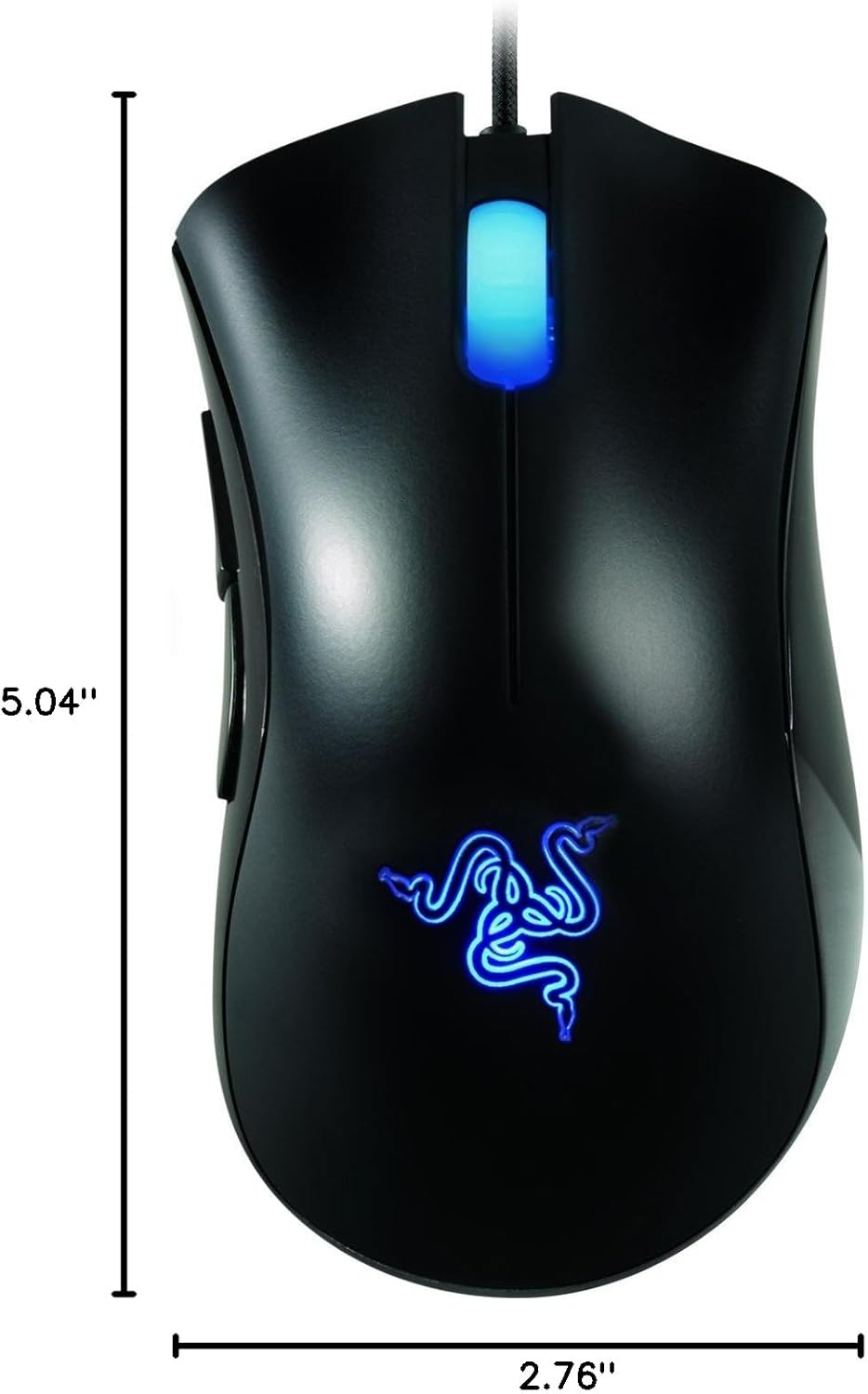
Image: Diagram showing the approximate dimensions of the Razer Deathadder mouse.
Important Notes
Please be aware of the following:
- No Returns: As per the product's legal disclaimer, this item may not be eligible for returns. Please verify return policies with your retailer at the time of purchase.
Support
For further assistance, technical support, or to download the latest drivers and software, please visit the official Razer support website:
You can also find more information about Razer products and accessories on the official Razer store:


