
Nokia N900
Nokia N900 Mobile Computer User Manual
Comprehensive Guide for Your Nokia N900 Device
Introduction
Welcome to the user manual for your Nokia N900 Mobile Computer. This guide provides detailed instructions on setting up, operating, maintaining, and troubleshooting your device. The Nokia N900 combines the functionality of a mobile computer, cell phone, high-quality camera, and portable media player, running on the Linux-based Maemo operating system.
Please read this manual carefully to ensure optimal performance and longevity of your Nokia N900.
1. Setup
1.1 Unboxing and Initial Components
Upon opening your Nokia N900 package, verify that all components are present:
- Handset
- Battery
- Travel Charger
- Stereo Headset (WH-205)
- Video Out Cable (CA-75U)
- Cleaning Cloth
- Operating Instructions (this manual)
1.2 Battery Installation and Charging
To install the battery, remove the back cover of the device. Align the battery contacts with the terminals inside the compartment and gently press down until it clicks into place. Replace the back cover.
Before first use, fully charge the battery using the provided travel charger. Connect the charger to the device's charging port and plug it into a power outlet. The charging indicator will show the charging status.
1.3 SIM Card Insertion
The Nokia N900 is an unlocked GSM phone. It requires a SIM card from your chosen service provider for cellular voice and messaging capabilities. Locate the SIM card slot, typically under the battery or on the side of the device. Insert your SIM card with the gold contacts facing down and the cut corner aligned correctly.
1.4 Network Compatibility
This device is compatible with GSM carriers such as AT&T and T-Mobile. It will not work with CDMA carriers like Verizon Wireless, Alltel, and Sprint. Please refer to the table below for general compatibility information. Note that not all carrier features may be supported.
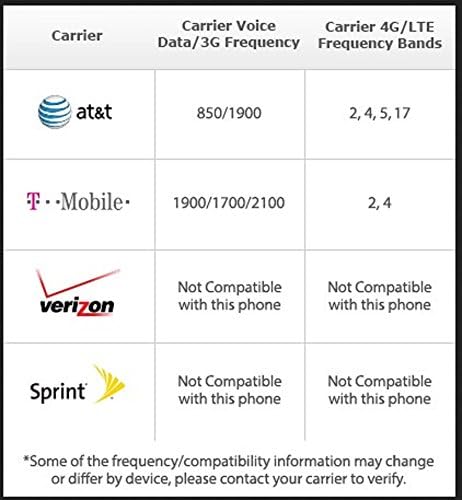
Image: Carrier compatibility table for Nokia N900, indicating supported and unsupported networks like AT&T, T-Mobile, Verizon, and Sprint.
| Carrier | Carrier Voice Data/3G Frequency | Carrier 4G/LTE Frequency Bands |
|---|---|---|
| AT&T | 850/1900 | 2, 4, 5, 17 |
| T-Mobile | 1900/1700/2100 | 2, 4 |
| Verizon | Not Compatible with this phone | Not Compatible with this phone |
| Sprint | Not Compatible with this phone | Not Compatible with this phone |
*Some of the frequency/compatibility information may change or differ by device. Please contact your carrier to verify.
2. Operating Your Nokia N900
2.1 Powering On/Off and Basic Navigation
To power on your device, press and hold the power button until the Nokia logo appears. To power off, press and hold the power button and select "Power off" from the options.
The Nokia N900 features a 3.5-inch touchscreen display with 800x480 pixel resolution. Navigate the interface by tapping, swiping, and pinching. The device also includes a slide-out full QWERTY keyboard for efficient text input.
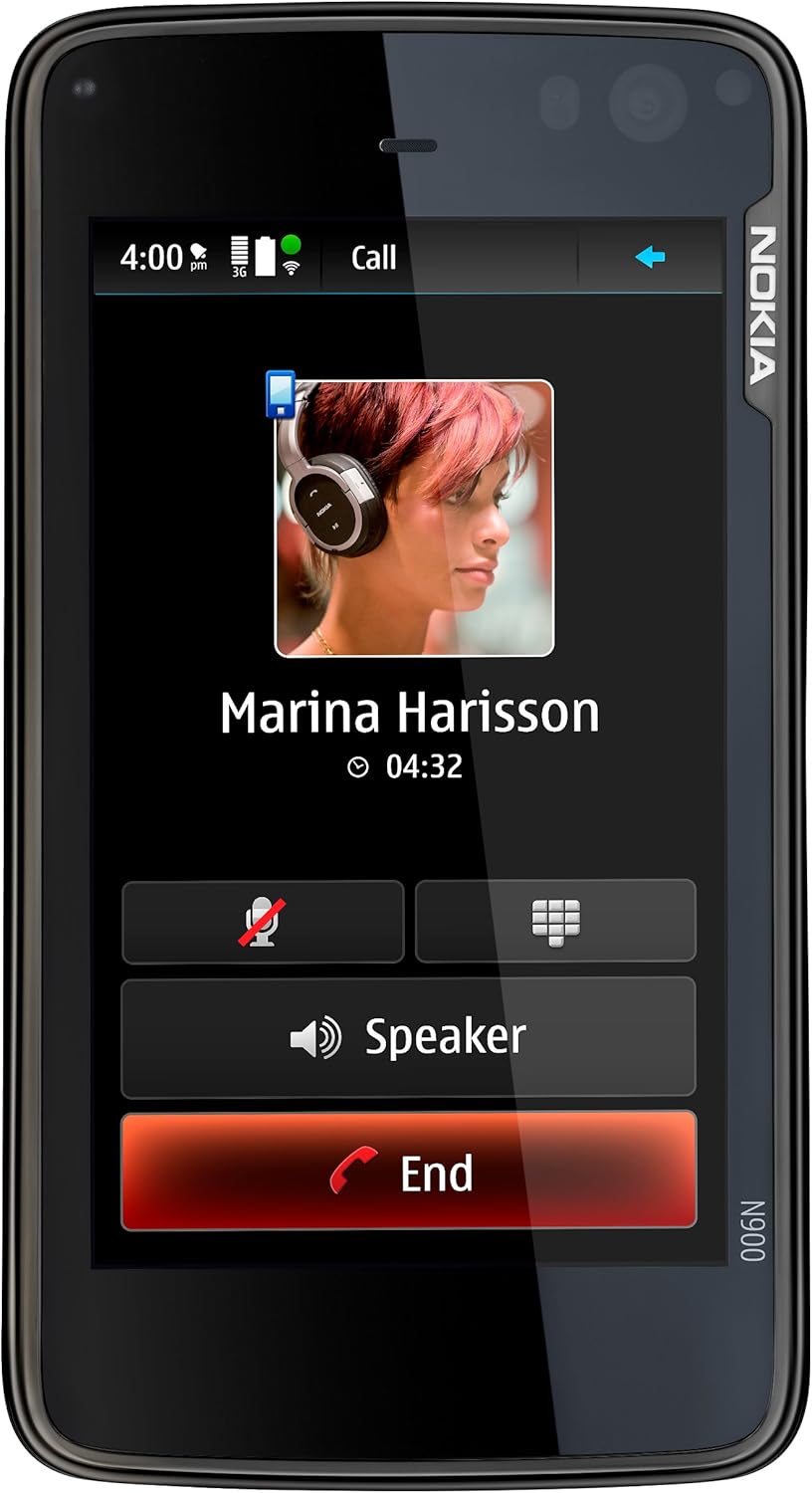
Image: Front view of the Nokia N900 displaying an active call screen with contact information and call controls.
2.2 Maemo 5 Operating System and Multitasking
The Nokia N900 runs on the Linux-based Maemo 5 software, designed for a PC-like experience. It supports true multitasking, allowing multiple applications to run simultaneously. The panoramic home screen can be fully personalized with favorite shortcuts, widgets, and applications.

Image: Nokia N900 in landscape orientation, showcasing its multitasking capabilities with several application windows open on the screen, including Ovi, chat, images, and contacts.
Switching between applications is simple, as all running content is constantly available through the dashboard.
Video: An introduction to the Nokia N900, demonstrating its key features and user interface, including multitasking and navigation.
2.3 Web Browsing and Connectivity
Experience the full web with the Maemo browser, powered by Mozilla technology, offering full Flash 9.4 and AJAX support. The device supports fast wireless broadband via Wi-Fi (802.11b/g) and HSPA data (10/2.0 Mbps).
To connect to Wi-Fi, go to Settings, then Wireless and select your desired network. Enter the password if required.
2.4 Communication Features
The Nokia N900 allows you to chat with voice calls, internet calls, instant messages, and SMS. Merge your phone book, Skype contacts, and other contacts into an all-in-one address book. Share your status, location, and mood with your friends. Keep multiple IM and SMS conversations going and move easily between them.

Image: Nokia N900 displaying a contact's profile with various communication options like phone, email, and chat, along with their status and location.

Image: Nokia N900 with its slide-out QWERTY keyboard extended, showing an instant messaging conversation on the screen, highlighting the ease of typing.
Email on the go with rich HTML and the full QWERTY keyboard. Pre-installed Nokia Messaging mobilizes up to 10 personal email accounts, supporting protocols like Mail for Exchange, IMAP, POP3, and SMTP.
2.5 Camera and Multimedia
Capture high-quality photos and widescreen videos using the 5-megapixel camera with Carl Zeiss optics. The camera features autofocus, dual LED flash, and a sliding lens cover for protection and activation.
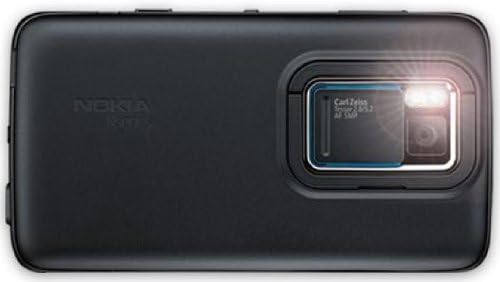
Image: Rear view of the Nokia N900, highlighting the 5-megapixel Carl Zeiss optics camera with its lens cover and dual LED flash.
Tag photos with keyword clouds for easy organization and retrieval. Automatic geotagging records the location where photos were taken. Share your media to Ovi Share & Flickr or store it in the massive 32 GB internal storage.
The N900 supports digital audio and video playback with multi-format compatibilities (.mp3, .wma, .aac, .m4a, .wav for audio; .mp4, .avi, .wmv, .3gp for video). It also includes TV output (cable included) and FM radio (requires headset).

Image: Nokia N900 in landscape orientation, showing its media player interface with album art and playback controls, resting on its kickstand.
Video: A promotional video showcasing various features and user experiences with the Nokia N900, including its camera, web browsing, and communication capabilities.
2.6 GPS and Navigation
With the integrated A-GPS sensor, the device intuitively understands its location, enabling you to search maps for addresses and points of interest using the Ovi Maps application. You can route a path to your destination and switch between rich 3D, satellite, and hybrid map views.
2.7 Bluetooth Connectivity
The Nokia N900 includes Bluetooth 2.1 + Enhanced Data Rate (EDR) capabilities, allowing connection to a wide variety of peripherals, including stereo headphones. It supports profiles such as A2DP (stereo music streaming), AVRC (remote control), HFP (hands-free car kits), HSP (communication headsets), FTP (file transfer), and OPP (object push for business cards, calendar items, and pictures).
3. Maintenance
3.1 Cleaning Your Device
Use the provided cleaning cloth or a soft, lint-free cloth to gently wipe the screen and body of your Nokia N900. Avoid using abrasive cleaners, solvents, or aerosol sprays, as these can damage the device's surfaces.
3.2 Software Updates
Maemo software updates happen automatically over the Internet. Ensure your device is connected to a reliable Wi-Fi network to download and install updates. Regular software updates provide performance improvements, new features, and security enhancements.
3.3 Memory Expansion
The Nokia N900 comes with 32 GB of internal memory, which can be expanded up to 48 GB via optional microSD cards (up to 16 GB in size). To insert a microSD card, locate the memory card slot and gently push the card in until it locks.
4. Troubleshooting
If you encounter issues with your Nokia N900, try the following common troubleshooting steps:
- Device Not Responding: If the device is unresponsive, press and hold the power button for approximately 10 seconds to force a restart.
- Network Connectivity Issues:
- Ensure your SIM card is properly inserted and activated with your carrier.
- Verify that you are within network coverage.
- Check your Wi-Fi connection settings and ensure the password is correct.
- Remember that the device is not compatible with CDMA networks (Verizon, Sprint, Alltel).
- Battery Draining Quickly:
- Reduce screen brightness.
- Close unused applications running in the background.
- Disable Wi-Fi, Bluetooth, or GPS when not in use.
- Ensure the battery is fully charged.
- Application Issues: If an application is not working correctly, try closing it and reopening it. If the problem persists, consider reinstalling the application.
- Sound Problems: Check the volume settings and ensure the device is not in silent mode. If using a headset, ensure it is properly connected.
For more detailed troubleshooting or persistent issues, please refer to the official Nokia N900 User Manual (PDF) available online or contact Nokia support.
5. Specifications
| Feature | Detail |
|---|---|
| Brand | Nokia |
| Model Name | N900 |
| Operating System | Maemo 5 |
| CPU Speed | 600 MHz ARM Cortex-A8 |
| Display Size | 3.5 Inches |
| Resolution | 800 x 480 pixels |
| Internal Storage | 32 GB (expandable up to 48 GB via microSD) |
| Application Memory | Up to 1 GB (256 MB RAM + 768 MB virtual memory) |
| Camera | 5-megapixel with Carl Zeiss optics, autofocus, dual LED flash |
| Video Recording | WVGA 16:9 at 30 fps |
| Wireless Technologies | Wi-Fi (802.11b/g), Bluetooth 2.1 + EDR, HSPA (900/1700/2100 MHz) |
| Cellular Technology | 3G (WCDMA 900/1700/2100), Quad-band EGSM (850/900/1800/1900) |
| GPS | Integrated A-GPS sensor |
| Audio Jack | 3.5 mm |
| Dimensions | 4.37 x 2.35 x 0.77 inches (111 x 59.7 x 18.2 mm) |
| Weight | 6.38 ounces (181 g) with battery |
| Phone Talk Time | Up to 6.3 hours |
| Phone Standby Time | Up to 278 hours (with data) |
6. Warranty and Support
6.1 Manufacturer's Warranty
Your Nokia N900 comes with a full manufacturer's warranty. Please refer to the warranty card included in your product packaging for specific terms, conditions, and duration of coverage. Keep your proof of purchase for warranty claims.
6.2 Additional Resources and Support
For further assistance, detailed guides, or to download the official User Manual (PDF), please visit the Nokia support website or refer to the following link:
Official Nokia N900 User Manual (PDF)
You can also contact Nokia customer support for personalized assistance with your device.
Ask a question about this manual
Ask about setup, troubleshooting, compatibility, parts, safety, or missing instructions. Manuals+ will review the question and use this page’s manual context to help answer it.