
Important Safety Instructions
When using an electrical appliance, basic precautions should always be followed, including the following:
- Read all instructions before using this hand vacuum.
- To reduce the risk of electric shock, do not use outdoors or on wet surfaces.
- Do not allow to be used as a toy. Close attention is necessary when used by or near children.
- Use only as described in this manual. Use only manufacturer's recommended attachments.
- Do not use with damaged cord or plug. If appliance is not working as it should, has been dropped, damaged, left outdoors, or dropped into water, return it to a service center.
- Do not pull or carry by cord, use cord as a handle, close a door on cord, or pull cord around sharp edges or corners. Do not run appliance over cord. Keep cord away from heated surfaces.
- Do not unplug by pulling on cord. To unplug, grasp the plug, not the cord.
- Do not handle plug or appliance with wet hands.
- Do not put any object into openings. Do not use with any opening blocked; keep free of dust, lint, hair, and anything that may reduce air flow.
- Keep hair, loose clothing, fingers, and all parts of body away from openings and moving parts.
- Do not pick up anything that is burning or smoking, such as cigarettes, matches, or hot ashes.
- Do not use to pick up flammable or combustible liquids, such as gasoline, or use in areas where they may be present.
- Do not use without dust cup and/or filters in place.
- Turn off all controls before unplugging.
- Use extra care when cleaning on stairs.
- Do not use to pick up toxic material (e.g., chlorine bleach, ammonia, drain cleaner).
- Do not charge the unit outdoors.
- Use only the charger supplied by the manufacturer to recharge.
- Do not incinerate the appliance even if it is severely damaged. Batteries can explode in a fire.
SAVE THESE INSTRUCTIONS
Product Overview
The Shark Cordless 14.4V Pet Perfect Hand Vac SV70 is designed for convenient and efficient cleaning, especially for pet hair and small messes. Its compact design and powerful suction make it ideal for quick clean-ups around the home or in your vehicle.
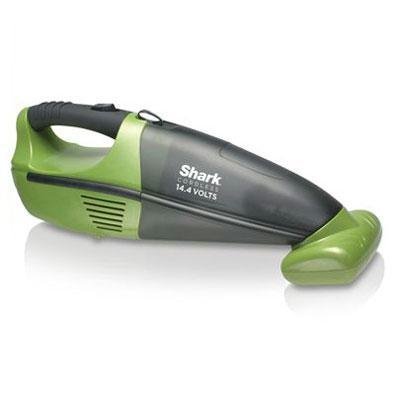
Figure 1: Shark Cordless 14.4V Pet Perfect Hand Vac SV70. This image shows the main unit of the handheld vacuum cleaner, highlighting its ergonomic design and nozzle.
Key Features:
- Detachable Motorized Brush: Effectively removes pet hair and ground-in dirt from upholstery and carpets.
- Twister Cyclonic Technology: Maintains strong suction power for longer cleaning sessions.
- Bagless Design: Eliminates the need for replacement bags, offering convenience and cost savings.
- Washable Filter: Easily detachable and washable for simple maintenance.
- LED Charging Indicator: Provides clear status of the battery charge level.
Setup
1. Initial Charging
Before first use, fully charge your Shark SV70 hand vac. This typically takes approximately 16 hours. The LED charging indicator will illuminate during charging and change or turn off when fully charged.
- Insert the charger plug into the charging port on the hand vac.
- Plug the charger into a standard electrical outlet.
- Allow the unit to charge until the LED indicator signals a full charge.
Visual Aid: An image showing the hand vac connected to its charging adapter would typically be placed here.
2. Attaching Accessories
The SV70 comes with a detachable motorized brush and a crevice tool. These can be attached to the nozzle for specialized cleaning tasks.
- Motorized Brush: Align the brush attachment with the vacuum's nozzle and push firmly until it clicks into place. Ensure the electrical contacts are properly aligned.
- Crevice Tool: Slide the crevice tool onto the vacuum's nozzle until it fits snugly.
Visual Aid: An image demonstrating how to attach the motorized brush to the vacuum nozzle would typically be placed here.
Operating Instructions
1. Powering On/Off
To turn the vacuum on, slide the power switch located on the handle to the "ON" position. To turn off, slide the switch to the "OFF" position.
2. General Cleaning
For general dry debris, use the vacuum without any attachments or with the crevice tool for tight spaces. Move the nozzle slowly over the surface to allow the vacuum to pick up dirt effectively.
3. Pet Hair and Deep Cleaning
Attach the motorized brush for removing pet hair from upholstery, carpets, and car mats. The rotating brush helps agitate and lift embedded hair and dirt. Apply light pressure and move the vacuum back and forth over the area.
Visual Aid: An image showing the motorized brush attachment in use on upholstery would typically be placed here.
4. Battery Indicator
The LED indicator light will show the battery status. A solid light typically indicates sufficient charge, while a blinking light or no light may indicate a low battery or that charging is required.
Maintenance
Regular maintenance ensures optimal performance of your Shark SV70 hand vac.
1. Emptying the Dust Cup
Empty the dust cup after each use or when debris reaches the MAX fill line.
- Ensure the vacuum is turned off.
- Press the dust cup release button (usually located near the nozzle) and pull the dust cup away from the main unit.
- Hold the dust cup over a trash receptacle.
- Press the dust cup empty button to open the bottom flap and release debris.
- Close the flap and reattach the dust cup to the main unit until it clicks securely.
Visual Aid: An image illustrating the process of detaching and emptying the dust cup would typically be placed here.
2. Cleaning the Filter
The foam filter should be cleaned regularly, ideally after every 1-3 uses, depending on usage intensity.
- With the dust cup removed, carefully pull out the foam filter.
- Tap off loose dirt over a trash can.
- Rinse the filter under cold running water until the water runs clear.
- Allow the filter to air dry completely for at least 24 hours before reinserting. Do not use a hairdryer or other heating methods.
- Once dry, place the filter back into the dust cup and reattach the dust cup to the vacuum.
Visual Aid: An image showing the foam filter being rinsed under water would typically be placed here.
3. Cleaning the Motorized Brush Roll
Periodically check the motorized brush roll for tangled hair or debris. If necessary, clean it to maintain effective performance.
- Ensure the vacuum is off and the motorized brush attachment is detached.
- Use scissors to carefully cut away any hair or string wrapped around the brush roll.
- Remove any debris from the brush roll housing.
- Reattach the motorized brush to the vacuum.
Visual Aid: An image demonstrating how to remove tangled hair from the motorized brush roll would typically be placed here.
Troubleshooting
If your Shark SV70 hand vac is not performing as expected, consult the following troubleshooting guide:
| Problem | Possible Cause | Solution |
|---|---|---|
| Vacuum does not turn on. | Battery is not charged. | Ensure the unit is fully charged. Refer to "Initial Charging" section. |
| Power switch is in the "OFF" position. | Slide the power switch to the "ON" position. | |
| Low suction power. | Dust cup is full. | Empty the dust cup. |
| Filter is dirty or clogged. | Clean or replace the foam filter. Ensure it is completely dry before reinserting. | |
| Nozzle or hose is blocked. | Check for and remove any blockages in the nozzle or attachments. | |
| Motorized brush not spinning. | Brush roll is jammed with debris. | Clean the brush roll, removing any tangled hair or fibers. |
| Brush attachment not properly connected. | Ensure the motorized brush attachment is securely clicked into place. |
Specifications
- Model: SV70
- Voltage: 14.4 Volts
- Battery Type: Lithium-Ion
- Power Source: Battery Powered
- Form Factor: Handheld
- Special Features: Bagless, Cordless, Washable Filter, Cyclonic Technology, Pet Hair Removal
- Filter Type: Foam
- Recommended Uses: Carpet, Upholstery, Car, Sofa
- Item Weight: 4.82 Pounds
- Color: Green/Gray
Warranty and Support
Limited Warranty
The Shark Cordless 14.4V Pet Perfect Hand Vac SV70 comes with a 1-year limited warranty from the date of purchase. This warranty covers original defects in material and workmanship. It does not cover normal wear and tear, parts that require regular replacement (such as filters), or damage caused by misuse, neglect, or unauthorized repairs.
For full warranty terms and conditions, please refer to the warranty card included with your product or visit the official Shark website.
Customer Support
For assistance with your product, troubleshooting, or to inquire about warranty service, please contact Shark Customer Service. Have your model number (SV70) and purchase date ready when contacting support.
- Online Support: Visit the official Shark website for FAQs, replacement parts, and online support resources.
- Telephone Support: Refer to your product packaging or the official Shark website for the most current customer service telephone number.


