
1. Introduction
The Technaxx FMT300BT is a versatile Bluetooth FM transmitter designed to enhance your in-car audio experience. It allows you to stream music wirelessly from your mobile device, play audio from USB drives or SD cards, and make hands-free calls through your car's sound system. This manual provides comprehensive instructions to help you set up, operate, and maintain your device effectively.
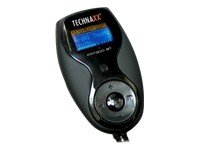
The Technaxx FMT300BT Bluetooth FM Transmitter with its flexible neck and LCD display.
2. Package Contents
Please check the package for the following items:
- Technaxx FMT300BT Unit
- Steering Wheel Remote Control
- Handheld Remote Control
- Audio Cable (3.5mm to 2.5mm jack)
- Fuse
- User Manual (this document)
3. Product Features
The Technaxx FMT300BT offers a range of features for convenient in-car entertainment and communication:
- MP3 FM Transmitter for car with Bluetooth hands-free function.
- Compatible with most Bluetooth mobile devices.
- CVC (Clear Voice Capture) technology for noise and echo reduction.
- Excellent sound quality with Duplex Communication.
- Prioritized audio sources: Bluetooth calls > Bluetooth music > AUX Input > SD/USB.
- Ability to play music from your mobile device via Bluetooth.
- Mute function for pleasant conversations.
- Recall and voice functions (requires compatible mobile device).
- Automatic Bluetooth connection and memory saving.
- Equalizer mode and repeat mode.
- File creation and selection function.
- Includes both a simple handheld remote and a steering wheel remote control for safe operation while driving.
- Flexible and easy to maneuver design.
- Features an AUX-In port.
- Transmits audio to car speakers via FM frequency (assuming an existing car radio).
- Charger output: 5V DC, 1.5A.
4. Setup
Follow these steps to set up your FMT300BT:
- Power Connection: Insert the FMT300BT into your vehicle's 12V-24V cigarette lighter socket. The device will power on automatically, and the LCD screen will illuminate.
- FM Frequency Selection:
- Tune your car radio to an unused FM frequency (e.g., 88.1 MHz or 107.9 MHz). Choose a frequency with minimal static.
- On the FMT300BT, use the frequency adjustment buttons (CH+ / CH-) to match the frequency of your car radio.
- Bluetooth Pairing:
- Ensure Bluetooth is enabled on your mobile device.
- Search for available Bluetooth devices and select "FMT300BT".
- If prompted, enter the pairing code (usually "0000").
- The device will automatically connect to your paired phone upon subsequent power-ons.
- Media Insertion:
- For USB playback: Insert a USB flash drive into the designated USB port.
- For SD/SDHC/MMC playback: Insert a compatible memory card into the SD card slot.

Close-up view of the Technaxx FMT300BT showing the USB port with a USB drive inserted.

Side view of the Technaxx FMT300BT showing the SD card slot with an SD card inserted.
- Remote Control Setup: The handheld remote is ready for use. For the steering wheel remote, ensure it has a clear line of sight to the FMT300BT for infrared communication.

Detailed view of the 12V cigarette lighter plug of the Technaxx FMT300BT.

The compact handheld remote control for the Technaxx FMT300BT, displaying various function buttons.

Technaxx FMT300BT installed in a car's cigarette lighter socket, showing its flexible arm and display.
5. Operating Instructions
Once set up, operate your FMT300BT using the device buttons or remote controls:
- Playing Music:
- From USB/SD Card: Once a USB drive or SD card is inserted, the device will automatically start playing MP3 files. Use the remote or device buttons to navigate tracks (Previous/Next), adjust volume, or change folders.
- Via Bluetooth: After successful Bluetooth pairing, play music from your mobile device. The audio will be transmitted to your car speakers.
- Via AUX-In: Connect an external audio device (e.g., MP3 player) to the 2.5mm AUX-In port using the provided audio cable. Select AUX input on the FMT300BT.
- Hands-Free Calling:
- When a call comes in, the music will pause, and the call will be routed through your car speakers.
- Press the "Answer" button on the device or remote to accept the call.
- Use the integrated microphone for communication.
- Press the "End Call" button to hang up.
- Volume Adjustment: Adjust the volume using the volume buttons on the FMT300BT or the remote control. You may also need to adjust your car radio's volume.
- Equalizer (EQ) Mode: Press the EQ button on the remote to cycle through different equalizer presets.
- Repeat Mode: Use the repeat button on the remote to select playback modes (e.g., repeat all, repeat one, random).
- Folder Navigation: Use the folder buttons on the remote to browse through music folders on USB or SD cards.
6. Maintenance
To ensure the longevity and optimal performance of your FMT300BT, follow these maintenance guidelines:
- Keep the device clean and free from dust. Use a soft, dry cloth for cleaning.
- Avoid exposing the device to extreme temperatures, direct sunlight, or moisture.
- Do not attempt to disassemble or repair the device yourself. This will void the warranty.
- Replace the fuse only with a fuse of the same type and rating if necessary.
7. Troubleshooting
If you encounter issues with your FMT300BT, refer to the following troubleshooting steps:
- No Power:
- Ensure the FMT300BT is securely plugged into the cigarette lighter socket.
- Check the vehicle's cigarette lighter fuse and the fuse within the FMT300BT's plug.
- Poor Audio Quality / Static:
- Ensure your car radio and the FMT300BT are tuned to an unused FM frequency. Try different frequencies.
- Adjust the volume on both the FMT300BT and your car radio.
- Move your mobile device closer to the FMT300BT if using Bluetooth.
- Ensure the AUX cable is fully inserted and not damaged.
- Bluetooth Connection Issues:
- Make sure Bluetooth is enabled on your mobile device and the FMT300BT is in pairing mode (if applicable, usually automatic).
- Delete "FMT300BT" from your phone's paired devices list and try pairing again.
- Restart both your phone and the FMT300BT.
- Remote Control Not Responding:
- Check the battery in the remote control and replace if necessary.
- Ensure there is a clear line of sight between the remote and the FMT300BT (especially for the steering wheel remote).
- Music Not Playing from USB/SD:
- Ensure the USB drive or SD card contains compatible MP3 files.
- Check that the storage device is properly inserted.
- Try a different USB drive or SD card.
8. Specifications
| Bluetooth Interface | Version 2.1, Class 2 |
| Bluetooth Frequency | 2.402 - 2.480 GHz |
| Supported Bluetooth Profiles | HSHF, Headset, A2DP |
| FM Transmission Frequency | 88.1 - 107.9 MHz |
| Voltage | DC 12V - 24V (cigarette lighter power) |
| Charger Output | 5V DC, 1.5A |
| Microphone | Integrated noise elimination |
| Supported Memory Formats | SD/SDHC/MMC/USB |
| Display | LCD screen with blue backlight |
| Audio In/Out | 2.5 mm jack |
| DSP Technology | Echo elimination and noise reduction |
| Device Weight | 105g |
| Device Dimensions | 45 x 260 x 30mm |
| Package Weight | 275g |
| Package Dimensions | 180 x 200 x 35mm |
9. Warranty and Support
Warranty: This Technaxx product comes with a 1-year warranty from the date of purchase. Please retain your proof of purchase for any warranty claims. The warranty covers manufacturing defects but does not cover damage caused by misuse, accidents, unauthorized modifications, or normal wear and tear.
Support: For technical assistance, troubleshooting beyond the scope of this manual, or warranty inquiries, please contact Technaxx customer support or your authorized retailer. Contact information can typically be found on the Technaxx website or on your product packaging.


