
1. Introduction
Thank you for purchasing the Edifier M1550 5.1 Speaker System. This manual provides essential information for setting up, operating, and maintaining your speaker system to ensure optimal performance and longevity. The M1550 system is designed to deliver immersive surround sound for your computer or other audio sources.
2. Package Contents
Please check the contents of your package to ensure all items are present:
- 1x Subwoofer Unit
- 5x Satellite Speakers
- 1x Wired Remote Control
- 1x Audio Input Cable (3.5mm to 3.5mm)
- 1x User Manual (this document)
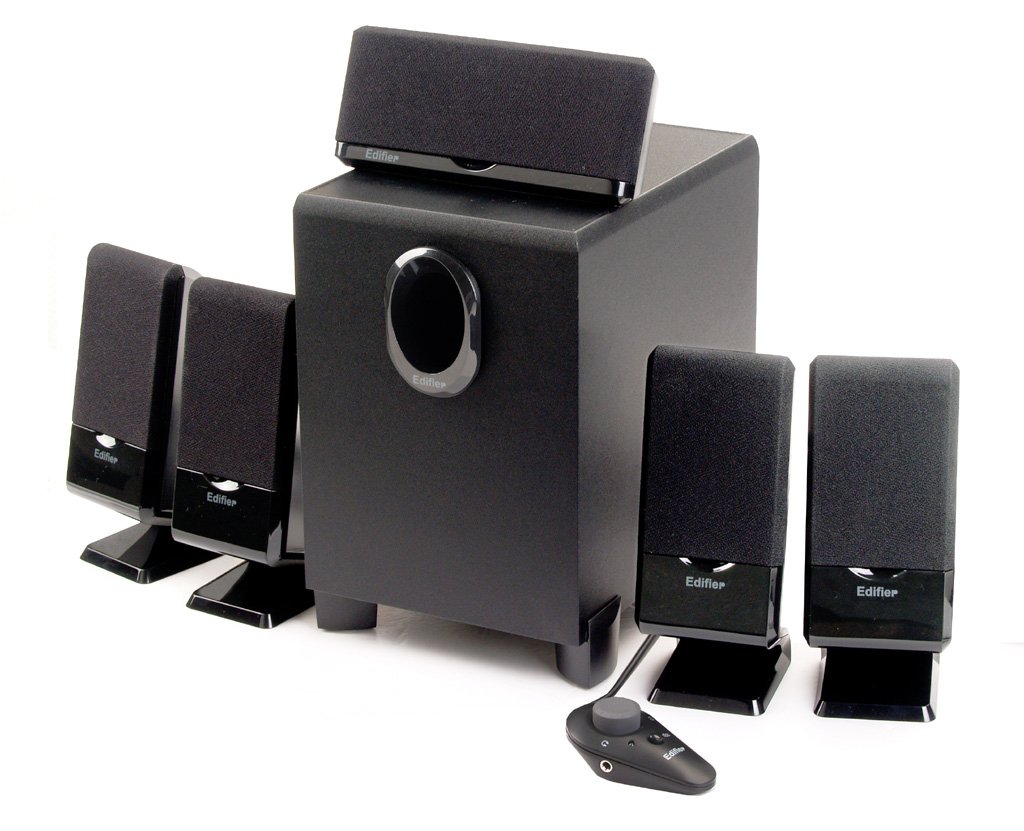
Figure 2.1: Overview of the Edifier M1550 5.1 Speaker System, showing the subwoofer, five satellite speakers, and the wired remote control.
3. Setup Instructions
Follow these steps to correctly set up your Edifier M1550 5.1 Speaker System:
3.1 Speaker Placement
- Subwoofer: Place the subwoofer on the floor, preferably near a wall or in a corner for enhanced bass response. Ensure adequate ventilation around the unit.
- Front Satellite Speakers (Left, Right): Position these speakers on either side of your monitor or listening area, facing towards you.
- Center Satellite Speaker: Place this speaker directly above or below your monitor, centered with your listening position.
- Rear Satellite Speakers (Left, Right): Position these speakers behind your listening area, ideally at ear level, to create an immersive surround sound experience.
3.2 Connections
- Connect Satellite Speakers: Connect each of the five satellite speakers to their corresponding output jacks on the rear of the subwoofer unit. Ensure correct polarity if applicable.
- Connect Wired Remote Control: Plug the wired remote control cable into the designated port on the subwoofer.
- Connect Audio Source: Use the provided 3.5mm audio cable to connect the 'AUDIO INPUT' jack on the subwoofer (or wired remote, if available) to the audio output of your computer or other audio device. For 5.1 surround sound, ensure your audio source has a 5.1 output and use appropriate cables (not included) to connect all channels.
- Connect Power: Plug the power cord from the subwoofer into a standard electrical outlet.
Figure 3.1: Rear view of the M1550 subwoofer, illustrating the various connection ports for satellite speakers, audio input, and power.
4. Operating Instructions
Once the system is set up, follow these steps for operation:
4.1 Power On/Off
- Locate the power switch on the rear of the subwoofer unit.
- Flip the switch to the 'ON' position to power on the system. An indicator light on the wired remote or subwoofer will illuminate.
- Flip the switch to the 'OFF' position to power off the system.
4.2 Volume Control
- Master Volume: Use the rotary knob on the wired remote control to adjust the overall system volume. Turn clockwise to increase volume, counter-clockwise to decrease.
- Bass Control: A dedicated bass control knob is located on the subwoofer unit. Adjust this knob to fine-tune the bass level to your preference.
4.3 Mute Function
- Press the mute button on the wired remote control to temporarily silence the audio output.
- Press the mute button again to resume audio playback.
4.4 Headphone Jack
- A headphone jack is integrated into the wired remote control.
- Plug your headphones into this jack to listen privately. The speaker output will automatically mute when headphones are connected.
5. Maintenance
Proper maintenance ensures the longevity and performance of your speaker system:
- Cleaning: Use a soft, dry cloth to clean the surfaces of the speakers and subwoofer. Do not use liquid cleaners or abrasive materials, as they may damage the finish or internal components.
- Placement: Avoid placing the speakers in direct sunlight, near heat sources, or in areas with high humidity. Ensure good air circulation around the subwoofer.
- Cable Management: Keep cables tidy and untangled to prevent damage and ensure stable connections.
- Power Off When Not in Use: For extended periods of inactivity, it is recommended to power off the system using the main power switch.
6. Troubleshooting
If you encounter issues with your Edifier M1550 system, refer to the following common problems and solutions:
| Problem | Possible Cause | Solution |
|---|---|---|
| No sound from speakers |
|
|
| Distorted or unclear sound |
|
|
| No bass sound |
|
|
If the problem persists after trying these solutions, please contact Edifier customer support for further assistance.
7. Specifications
| Model Name | M1550 |
| Speaker Type | 5.1 Computer Speaker System |
| Audio Output Mode | Surround |
| Total Power Output | 26 Watts RMS |
| Subwoofer Material | Wood |
| Connectivity Technology | Auxiliary (3.5mm) |
| Control Method | Wired Remote, Subwoofer Bass Control |
| Compatible Devices | Computers, Devices with 3.5mm audio output, Headphones (via remote) |
| Product Dimensions (Subwoofer) | 33.3 x 21 x 31.7 cm (LxWxH) |
| Item Weight | 4.45 kg (approx. 9.8 lbs) |
8. Warranty and Support
Edifier products are designed for reliability and performance. For specific warranty information, please refer to the warranty card included with your product or visit the official Edifier website. Keep your purchase receipt as proof of purchase.
For technical support, service, or inquiries, please contact Edifier customer service through their official channels. Contact information can typically be found on the Edifier website or in your product packaging.


