Introduction
This manual provides detailed instructions for the setup, operation, and maintenance of your Moshi Voice Controlled Talking Alarm Clock. Please read this manual thoroughly before using the device to ensure proper functionality and to maximize your user experience.
Product Features
- Voice-controlled operation for various functions.
- Talking clock announces time, date, and temperature.
- Digital display with temperature indication in Fahrenheit or Centigrade.
- Three distinct alarm sounds: chime, chirp, or bell.
- Sleep sound feature with options like water, birds, or waterfall for 5 minutes.
- Integrated night light.
- "Help" feature for guidance.
- Operates on AC/DC power or 3 "AAA" batteries (not included).
Package Contents
- Moshi Voice Controlled Talking Alarm Clock Unit
- AC/DC Power Adapter
- User Manual (this document)
Setup
1. Powering the Device
The Moshi Alarm Clock can be powered using the included AC/DC adapter or 3 AAA batteries (not included).
- AC/DC Power: Connect the AC/DC adapter to the power input jack on the back of the clock and plug it into a standard wall outlet.
- Battery Power: Open the battery compartment on the bottom of the clock and insert 3 new AAA batteries, ensuring correct polarity (+/-). Battery power is recommended for backup during power outages or for portable use.

Image: Rear view of the Moshi Alarm Clock, illustrating the power input port and various control buttons.
2. Initial Time and Date Setting
Upon first power-up or after a complete power loss (without batteries), the clock may require initial time and date setting. This can typically be done via voice command or manual buttons on the back of the unit.
- Voice Command: Gently touch the top of the clock to wake it up. Once it acknowledges, say "Set Time" or "Set Date" and follow the voice prompts.
- Manual Setting: Refer to the buttons on the back of the unit. Typically, there are buttons for "Mode", "Up", and "Down" to navigate and adjust settings. Press the "Mode" button repeatedly until the time or date setting is highlighted, then use "Up" or "Down" to adjust.
Operating Instructions
1. Voice Control Activation
To activate voice control, gently touch the top surface of the clock once. The clock will respond, indicating it is ready to receive commands.
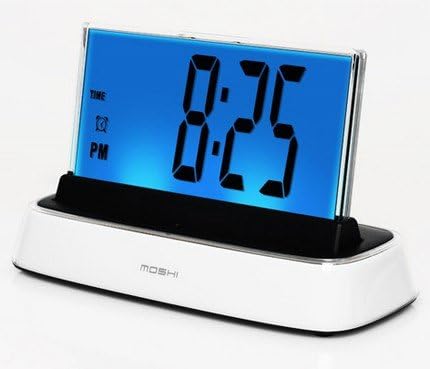
Image: Front view of the Moshi Alarm Clock, showing the digital display with current time.
2. Available Voice Commands
After activating voice control, you can use the following commands:
- "What time is it?" or "Time": Announces the current time.
- "What day is it?" or "Date": Announces the current date.
- "What's the temperature?" or "Temperature": Announces the indoor temperature and displays it.
- "Set Alarm": Initiates the alarm setting process. Follow the voice prompts to set the desired alarm time and sound.
- "Turn off the Alarm": Deactivates the currently set alarm.
- "Sleep Sound": Activates the sleep sound feature. You can choose between water, birds, or waterfall sounds. The sound will play for 5 minutes.
- "Night Light": Toggles the night light feature on or off.
- "Help": Provides guidance on available commands and features.
3. Setting an Alarm
- Wake the clock by touching it.
- Say "Set Alarm".
- The clock will prompt you to state the desired alarm time (e.g., "Set alarm for 7 AM").
- Confirm the time.
- The clock may then ask you to choose an alarm sound (chime, chirp, or bell). State your preference.
- The alarm is now set.
4. Snooze Function
When the alarm sounds, gently touch the top of the clock to activate the snooze function. The alarm will temporarily pause and sound again after a short interval (typically 9 minutes).
5. Temperature Display
The indoor temperature is displayed on the screen and announced when requested. The display color may change to correspond with different temperature ranges.
Maintenance
1. Cleaning
To clean the clock, gently wipe the surfaces with a soft, dry cloth. Do not use abrasive cleaners, solvents, or spray directly onto the unit, as this may damage the finish or internal components.
2. Battery Replacement
If using battery power, replace the 3 AAA batteries when the display dims or the voice commands become unresponsive. Ensure correct polarity when inserting new batteries.
Troubleshooting
| Problem | Possible Cause | Solution |
|---|---|---|
| Clock is unresponsive or display is blank. | No power or low batteries. | Ensure AC/DC adapter is securely plugged in, or replace AAA batteries. |
| Voice control does not respond. | Clock not activated, background noise, or speaking too softly/loudly. | Gently touch the clock to activate. Speak clearly and at a normal volume. Reduce background noise. |
| Alarm does not sound. | Alarm not set or volume too low. | Verify alarm settings using voice command "Set Alarm" or manual buttons. Check volume settings. |
| Incorrect time or date displayed. | Time/date not set correctly after power loss. | Reset time and date using voice commands or manual buttons as described in the Setup section. |
Specifications
- Model: 247519
- Dimensions: 7.5 inches (W) x 4.5 inches (H) x 3 inches (D)
- Power Source: AC/DC Adapter (included) or 3 x AAA Batteries (not included)
- Display Type: Digital
- Features: Voice Control, Talking Clock, Alarm, Calendar Display, Thermometer, Night Light, Sleep Sounds
- Material: Plastic
Warranty and Support
This product is manufactured by MAGNIFYING AIDS. For warranty information or technical support, please refer to the contact details provided with your purchase documentation or visit the manufacturer's official website.
Please retain your proof of purchase for any warranty claims.


