
1. Introduction
This manual provides essential instructions for the safe and efficient use of your Elite Screens Tripod 100-Inch 16:9 Portable Projector Screen, Model T100UWH. Please read this manual thoroughly before setup and operation to ensure optimal performance and longevity of your product.
2. Safety Information
- Always handle the screen with care to prevent damage to the screen material or frame.
- Ensure the tripod legs are fully extended and stable on a flat, level surface before raising the screen.
- Do not attempt to operate the screen in windy conditions if used outdoors, as this may cause instability and damage.
- Keep the screen away from heat sources, open flames, and sharp objects.
- Children should be supervised when near the projector screen.
3. Product Components
The Elite Screens Tripod Series projector screen (Model T100UWH) includes the following main components:
- Projector Screen with MaxWhite 2 material
- Integrated Tripod Stand
- Telescoping Support Pole
- Built-in Keystone Eliminator
- Carrying Handle & Screen Height Adjustment Lock/Release Tab
- Durable Carrying Case

Figure 3.1: Elite Screens Tripod Series 100-inch projector screen with tripod stand.
4. Setup Instructions
Follow these steps to set up your projector screen:
- Unpack the Screen: Remove the screen from its carrying case.
- Position the Tripod: Place the tripod stand on a flat, stable surface. Extend the legs fully to ensure stability.
- Extend the Support Pole: Extend the telescoping support pole to your desired height. Secure it using the locking mechanism.
- Attach the Screen: Hook the screen housing onto the top of the extended support pole.
- Raise the Screen Material: Gently pull the screen material upwards from the housing. Hook the top bar of the screen material onto the keystone eliminator at the top of the support pole.
- Adjust Height and Aspect Ratio: Use the vertical locking sleeve ring and the screen height adjustment lock/release tab to fine-tune the screen's height and desired aspect ratio (e.g., 1:1, 4:3, 16:9).
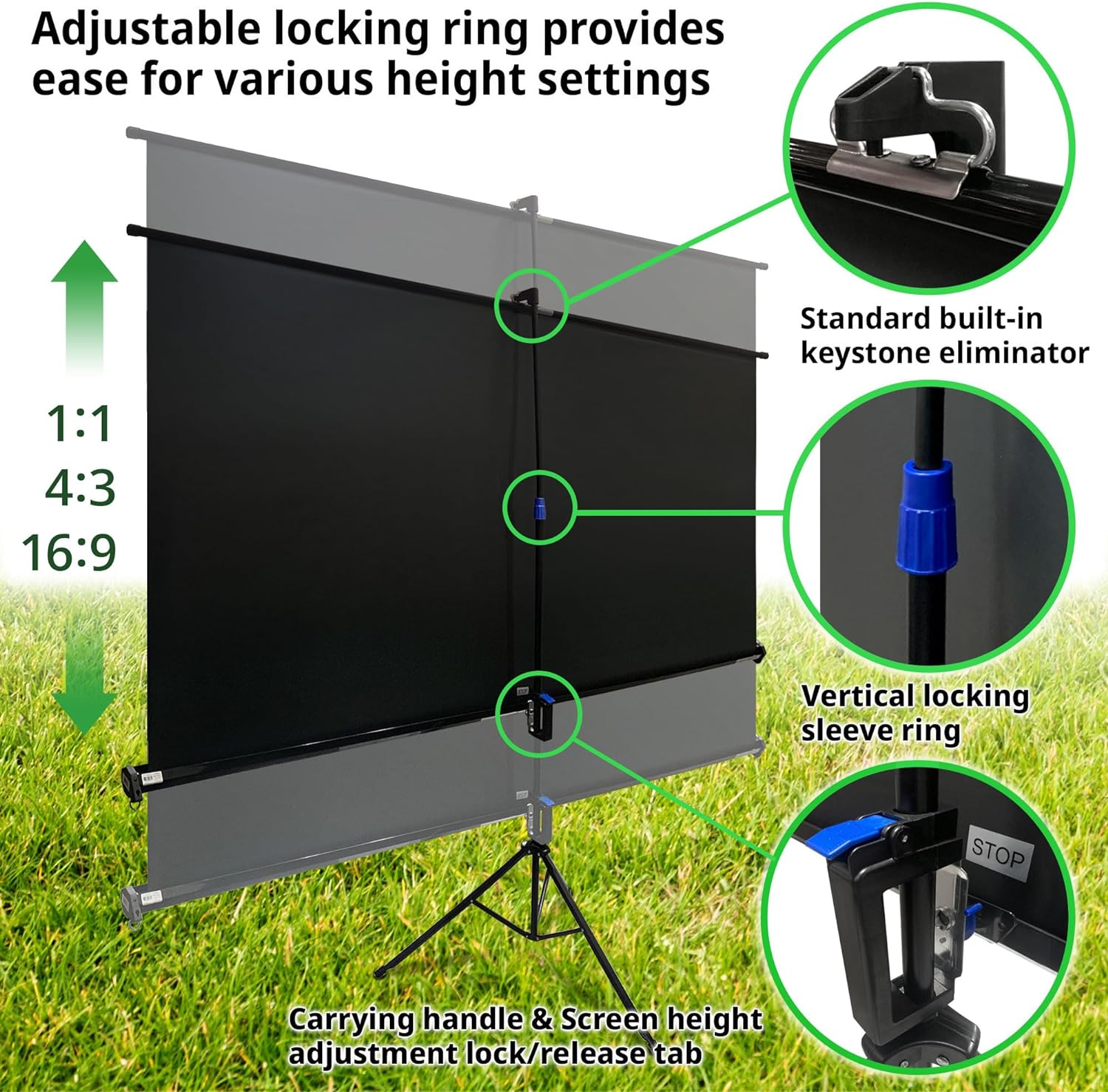
Figure 4.1: Adjustable locking ring and keystone eliminator for height and aspect ratio settings.
Video 4.1: Official Elite Screens demonstration of the Tripod Series setup and features, including keystone eliminator and height adjustments.
5. Operation
The Elite Screens Tripod Series is designed for ease of use and versatility:
- Height Adjustment: The auto-locking mechanism allows for a wide range of view height settings. Simply pull the screen up or down to the desired position and the mechanism will lock it in place.
- Aspect Ratio Adjustment: The screen can be adjusted to various aspect ratios (e.g., 1:1, 4:3, 16:9) by controlling how much of the screen material is pulled up. The black masking borders help define the viewing area for different ratios.
- Keystone Eliminator: The standard keystone eliminator helps correct image distortion (trapezoid shape) that can occur when the projector is not perfectly aligned with the screen. Adjust the angle of the keystone eliminator to achieve a rectangular image.
- Wide Viewing Angle: The MaxWhite 2 screen material offers a 180-degree viewing angle, ensuring a clear image from various seating positions.

Figure 5.1: Illustration of adjustable height and aspect ratio settings.
6. Maintenance and Care
Proper maintenance ensures the longevity and optimal performance of your projector screen:
- Cleaning the Screen Surface: The MaxWhite 2 screen material is easy to clean. Use a soft, damp cloth with mild soap and water. Do not use abrasive cleaners or harsh chemicals, as these can damage the screen surface.
- Cleaning the Frame and Stand: Wipe down the metal frame and tripod stand with a dry or slightly damp cloth to remove dust and dirt.
- Storage: When not in use, retract the screen fully into its housing and store it in the provided carrying case. Store in a cool, dry place away from direct sunlight and extreme temperatures.
- Handling: Avoid touching the screen surface directly with your fingers to prevent smudges.

Figure 6.1: MaxWhite 2 screen material features and certifications.
7. Troubleshooting
If you encounter any issues with your projector screen, consider the following:
- Screen Not Retracting Smoothly: Ensure there are no obstructions in the screen housing. Gently guide the screen back into the housing. If the issue persists, contact customer support.
- Unstable Stand: Verify that all tripod legs are fully extended and locked, and the screen is placed on a flat, stable surface.
- Image Distortion (Keystone Effect): Adjust the keystone eliminator at the top of the screen to correct the image shape. Also, ensure your projector is as perpendicular to the screen as possible.
- Wrinkles or Creases: While the MaxWhite 2 material is designed to be flat, minor wrinkles can occur if stored improperly. Ensure the screen is fully retracted when stored. If persistent, contact customer support.
8. Product Specifications
| Feature | Specification |
|---|---|
| Model Number | T100UWH |
| Screen Size (Diagonal) | 100 inch |
| Aspect Ratio | 16:9 |
| View Size (H x W) | 49.0" H x 87.2" W |
| Overall Size (H x W x D) | 102.4" H x 94.1" W x 43.3" D |
| Screen Material | MaxWhite 2 (Matte White) |
| Gain | 1.1 |
| Viewing Angle | 180 Degrees |
| Operation Mode | Manual Pull Up |
| Mounting Type | Tripod Mount |
| Color | Black Case |
| Item Weight | 20.7 Pounds |
| Certifications | GREEN GUARD, GREENGUARD GOLD, ISF Certified |
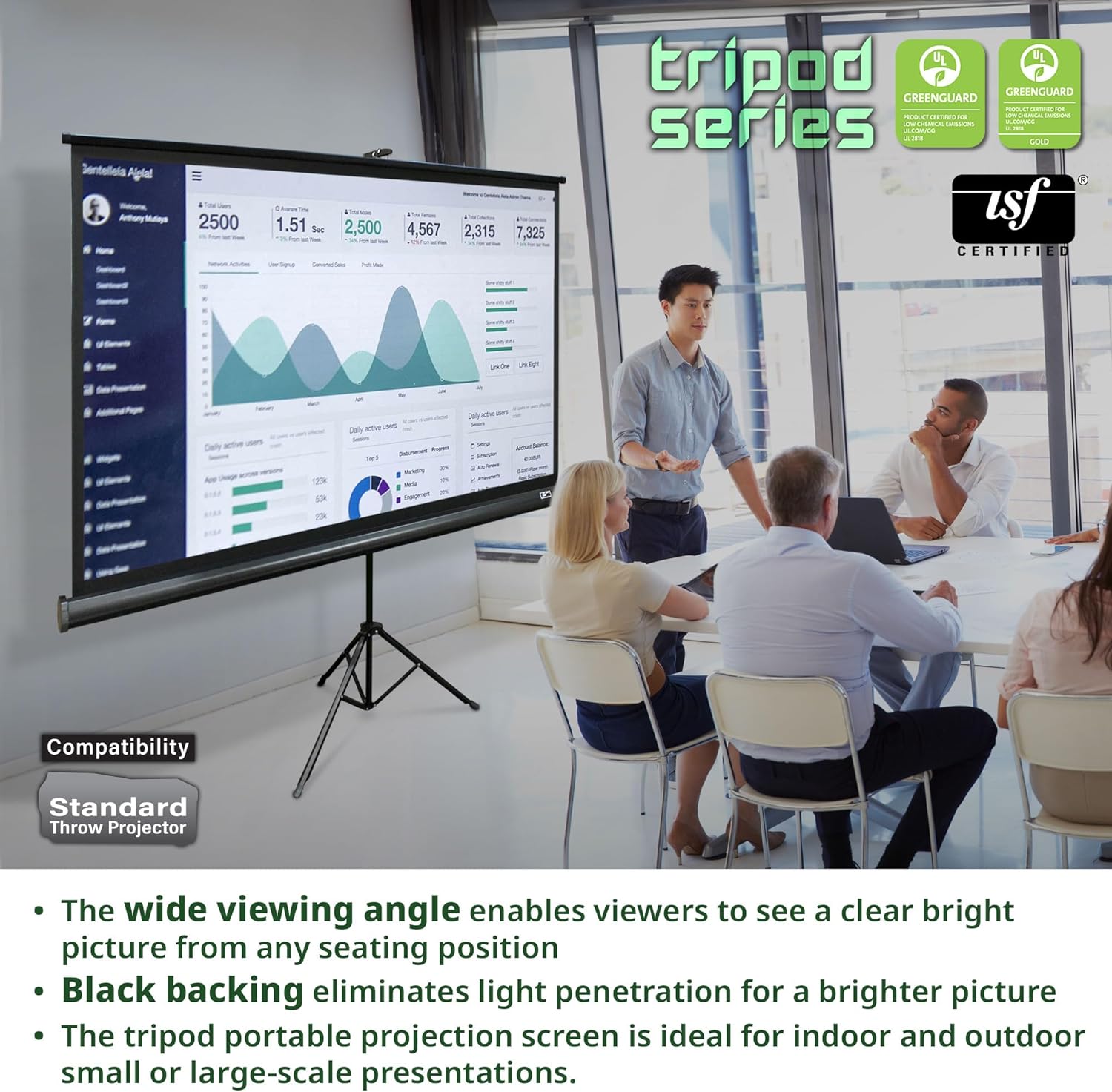
Figure 8.1: Elite Screens Tripod Series T100UWH dimensions.
9. Warranty and Support
Elite Screens provides comprehensive support for its products:
- Manufacturer Warranty: A 2-Year Manufacturer Warranty is provided for new purchases.
- Extended Warranty: A 3-Year ENR-G Manufacturer Warranty is available for educational, non-profit, religious, government, and military purchases.
- Technical Support: Lifetime Technical Support is available via email, web chat, or toll-free phone call from Elite Screens' professional service team.
For further assistance or to claim warranty, please contact Elite Screens directly through their official website or customer service channels.


