
1. Introduction
Thank you for choosing the Behringer HM300 Heavy Metal Distortion Effects Pedal. This manual provides essential information for the safe and optimal use of your new guitar pedal. The HM300 is designed to deliver ultra-high gain circuitry for thick, sustained distortion, perfect for heavy metal and hard rock genres.
2. Safety Instructions
- Read these instructions carefully before use.
- Keep this manual for future reference.
- Do not use this apparatus near water.
- Clean only with dry cloth.
- Do not block any ventilation openings.
- Only use attachments/accessories specified by the manufacturer.
- Refer all servicing to qualified service personnel.
3. Features
- Distortion pedal for electric guitar.
- Ultra-high gain circuitry for thick and sustained distortion.
- Status LED for effect on/off and battery check.
4. Controls and Connections
The Behringer HM300 pedal features intuitive controls for shaping your heavy metal tone:
- LEVEL: Controls the overall output volume of the effect.
- LOW: Adjusts the bass frequencies (low-end).
- MID: Controls the mid-range frequencies.
- DIST (Distortion): Adjusts the amount of distortion.
- IN Jack: Connect your guitar or the output of another effects pedal here.
- OUT Jack: Connect this to your amplifier's input or the input of another effects pedal.
- DC IN: Connect a 9V DC power adapter (not included).
- ON/BATT LED: Indicates when the effect is active and also serves as a battery check indicator.
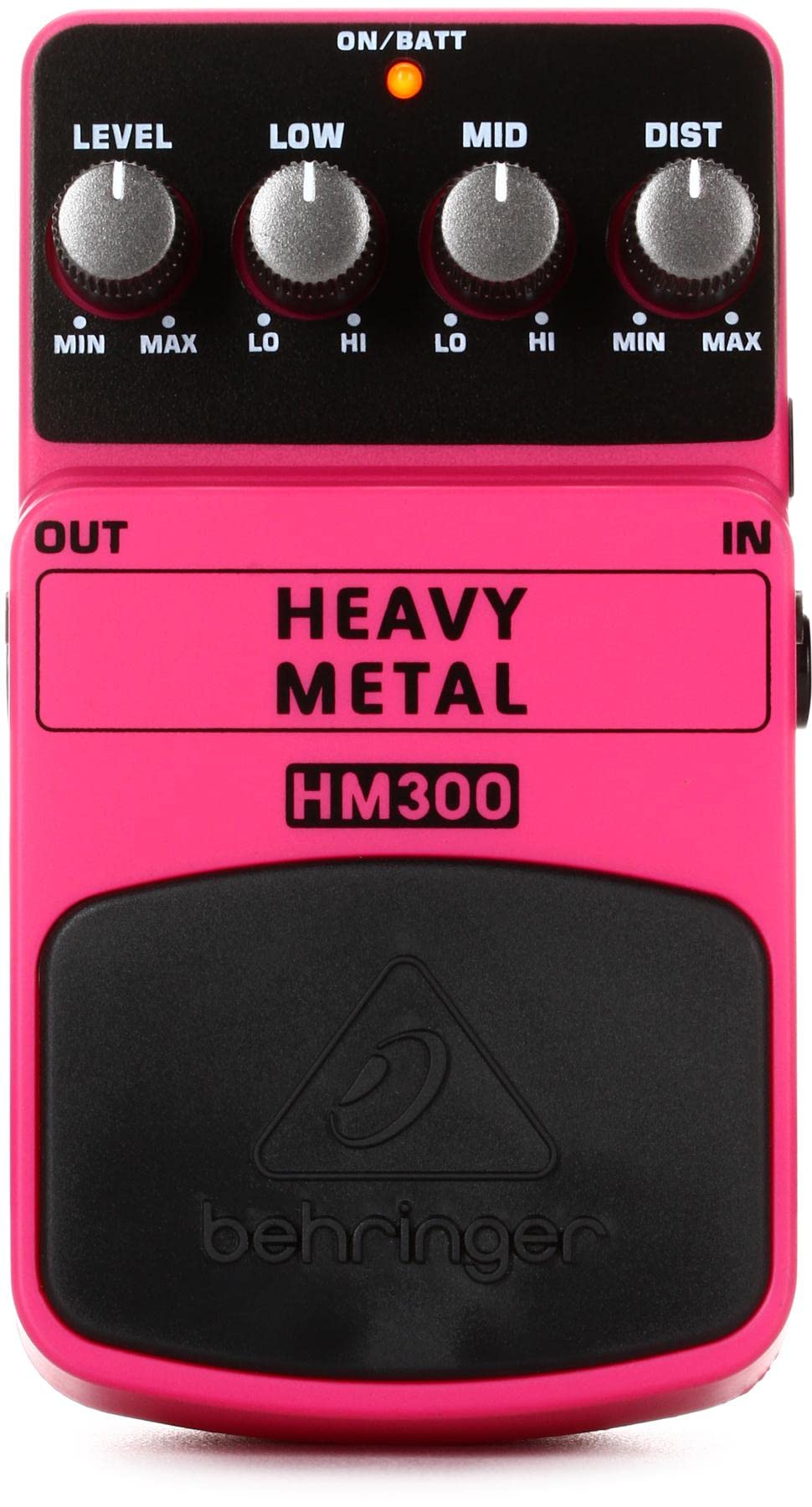
Figure 1: Behringer HM300 Heavy Metal Distortion Effects Pedal. This image shows the pedal's top panel with its four control knobs (Level, Low, Mid, Dist), the footswitch, and the input/output jacks on the sides. The ON/BATT LED is visible at the top.
Video 1: Behringer HM300 Heavy Metal Distortion Pedal Demo. This video showcases the Behringer HM300 Heavy Metal Distortion Pedal in action, demonstrating its sound characteristics and the effect of adjusting its Level, Low, Mid, and Dist controls. A guitarist plays various riffs to illustrate the pedal's capabilities.
5. Setup
5.1 Power Supply
The HM300 can be powered by a 9V battery or an optional 9V DC power adapter (Behringer PSU-SB recommended, not included). To install a 9V battery:
- Press the rear part of the footswitch down and lift the front part to open the pedal.
- Connect the 9V battery to the battery clip.
- Close the pedal, ensuring the battery is securely in place.
The ON/BATT LED will light up when the effect is engaged. If the LED dims or does not light up, the battery needs to be replaced.
5.2 Connections
- Connect your electric guitar to the IN jack of the HM300 using a standard 1/4-inch instrument cable.
- Connect the OUT jack of the HM300 to your amplifier's input (or the input of the next pedal in your signal chain) using another 1/4-inch instrument cable.
- Ensure all connections are secure before powering on your amplifier.
6. Operating
To operate the Behringer HM300:
- Turn on your guitar amplifier.
- Press the footswitch to engage the distortion effect. The ON/BATT LED will illuminate.
- Adjust the DIST knob to control the amount of distortion. Turn clockwise for more intense distortion.
- Use the LOW and MID knobs to sculpt the bass and mid-range frequencies of your distorted tone. Experiment with these controls to find your desired sound.
- Adjust the LEVEL knob to set the overall output volume of the effect. Ensure it is balanced with your amplifier's clean volume.
- Press the footswitch again to bypass the effect. The ON/BATT LED will turn off.
7. Maintenance
- Keep the pedal clean by wiping it with a dry, soft cloth.
- Avoid exposing the pedal to extreme temperatures, humidity, or direct sunlight.
- When not in use for extended periods, remove the battery to prevent leakage.
8. Troubleshooting
- No Sound: Check all cable connections. Ensure the guitar, pedal, and amplifier are powered on. Verify the battery is charged or the power adapter is connected correctly.
- Weak Sound/LED Dims: Replace the 9V battery.
- Excessive Noise: Ensure all cables are properly shielded. Try using a different power supply or battery. Reduce the DIST setting if the noise is feedback-related.
- Effect Not Engaging: Ensure both input and output cables are inserted. The LED indicator will not glow if only one is connected, even with power.
9. Specifications
| Feature | Specification |
|---|---|
| Model Number | HM300 |
| Item Weight | 14.1 ounces (0.88 Pounds) |
| Product Dimensions | 2.76 x 2.13 x 4.84 inches |
| Power Source | Battery Powered (1 x 9V battery required) or 9V DC adapter |
| Voltage | 9V |
| Body Material | Metal |
| Color | Pink |
| Connector Type | 1/4-inch Audio Jack |
| Signal Format | Analog |
10. What's in the Box
Your Behringer HM300 package should include:
- Behringer HM300 Heavy Metal Distortion Effects Pedal
- User's Manual
11. Warranty and Support
For warranty information and technical support, please refer to the documentation included with your product or visit the official Behringer website. You can also find additional resources and contact information through the Behringer Store on Amazon.


