
1. Product Overview
The ICC 24-Port CAT5e Patch Panel is engineered for high-performance connectivity in Gigabit Ethernet networks. Constructed from durable 16-gauge cold-rolled steel, this panel ensures maximum speed and bandwidth while maintaining backward compatibility with lower-rated category components. It features gold-plated contacts for reliable connections and supports Power over Ethernet (PoE++) up to 90W. The panel includes 110 IDC termination blocks for efficient installation and is designed for repeated re-terminations. Numbered ports and color-coded TIA-568A/B wiring diagrams simplify setup. This product is UL listed and designed to exceed ANSI/TIA-568 Category 5e standards, enhancing crosstalk cancellation for superior network performance.
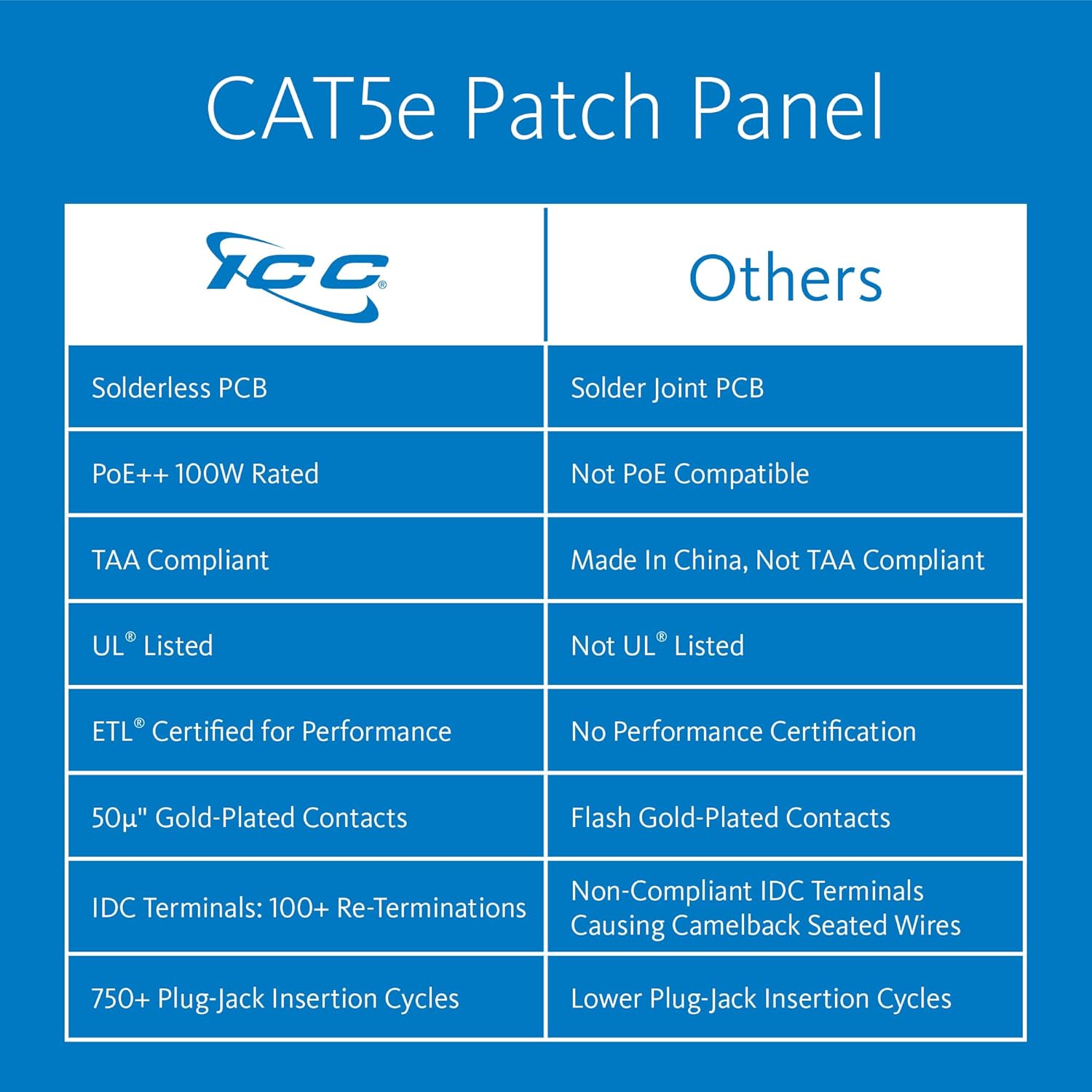
Figure 1.1: Feature comparison highlighting ICC's advantages in PCB type, PoE rating, compliance, certification, contact plating, IDC terminals, and insertion cycles.

Figure 1.2: Visual comparison showing the solderless PCB design of the ICC patch panel against a traditional soldered PCB, indicating a cleaner and potentially more reliable connection.

Figure 1.3: Illustration indicating the TAA compliance of the ICC patch panel, making it suitable for government and military projects.
2. Installation and Setup
2.1 Mounting the Patch Panel
The ICC CAT5e Patch Panel is designed for standard 19-inch EIA rack mounting, occupying 1U (1.75 inches) of rack space. Secure the panel to the rack using appropriate rack screws (not included) through the mounting holes on the panel's flanges.
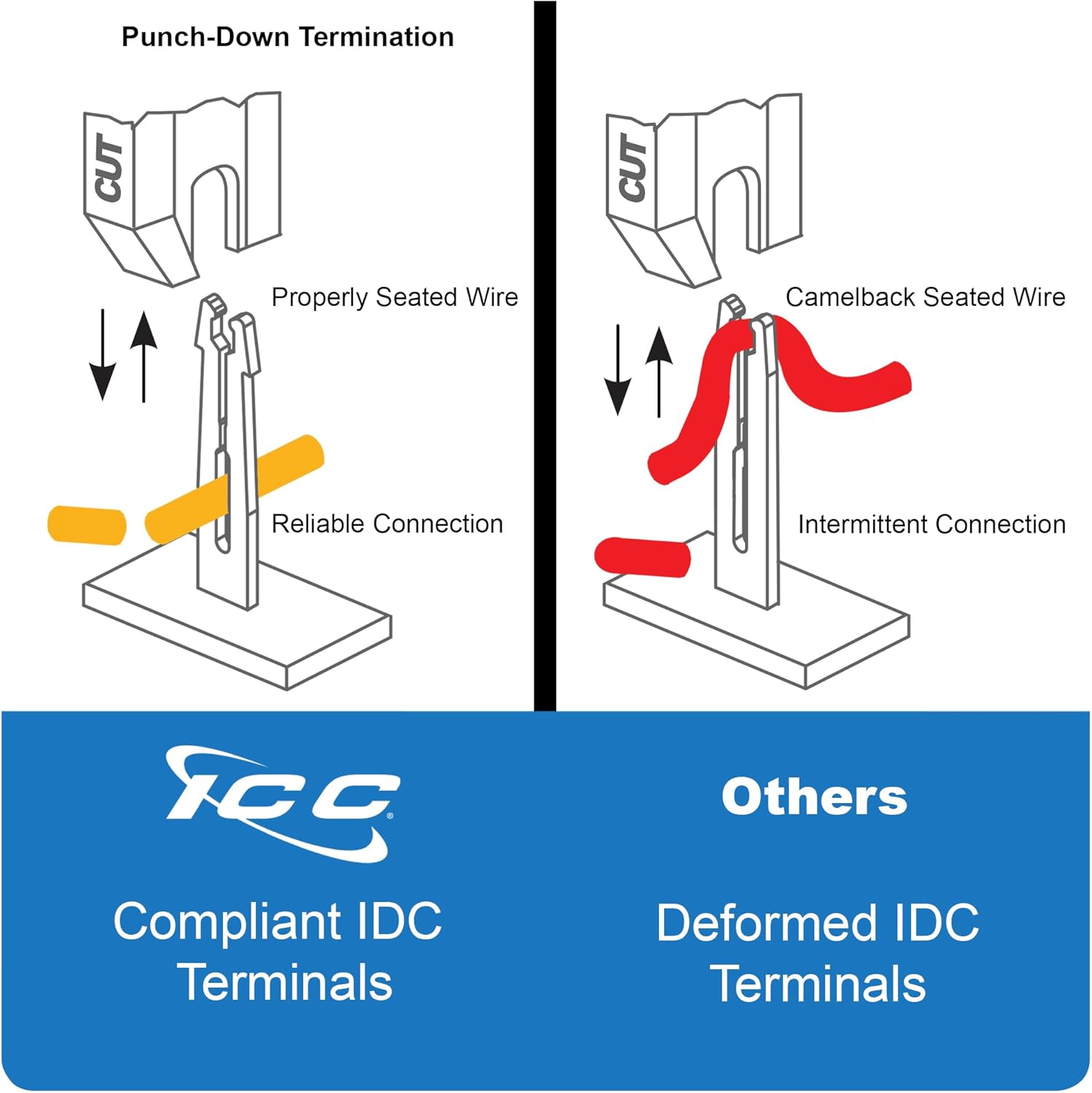
Figure 2.1: Comparison illustrating the robust heavy-duty steel frame of the ICC patch panel, which prevents misalignment during punch-down termination, unlike thinner metal frames.
2.2 Wiring and Termination
This patch panel utilizes 110 IDC (Insulation Displacement Connector) termination blocks on the rear for connecting network cables. Each port is numbered on the front for easy identification. Refer to the color-coded TIA-568A and TIA-568B wiring diagrams provided on the panel for correct wire placement. Use a standard 110 punch-down tool for termination.
- Ensure proper wire seating into the IDC terminals for a reliable connection.
- The 110 IDC terminals are designed to be re-terminated over 100 times.
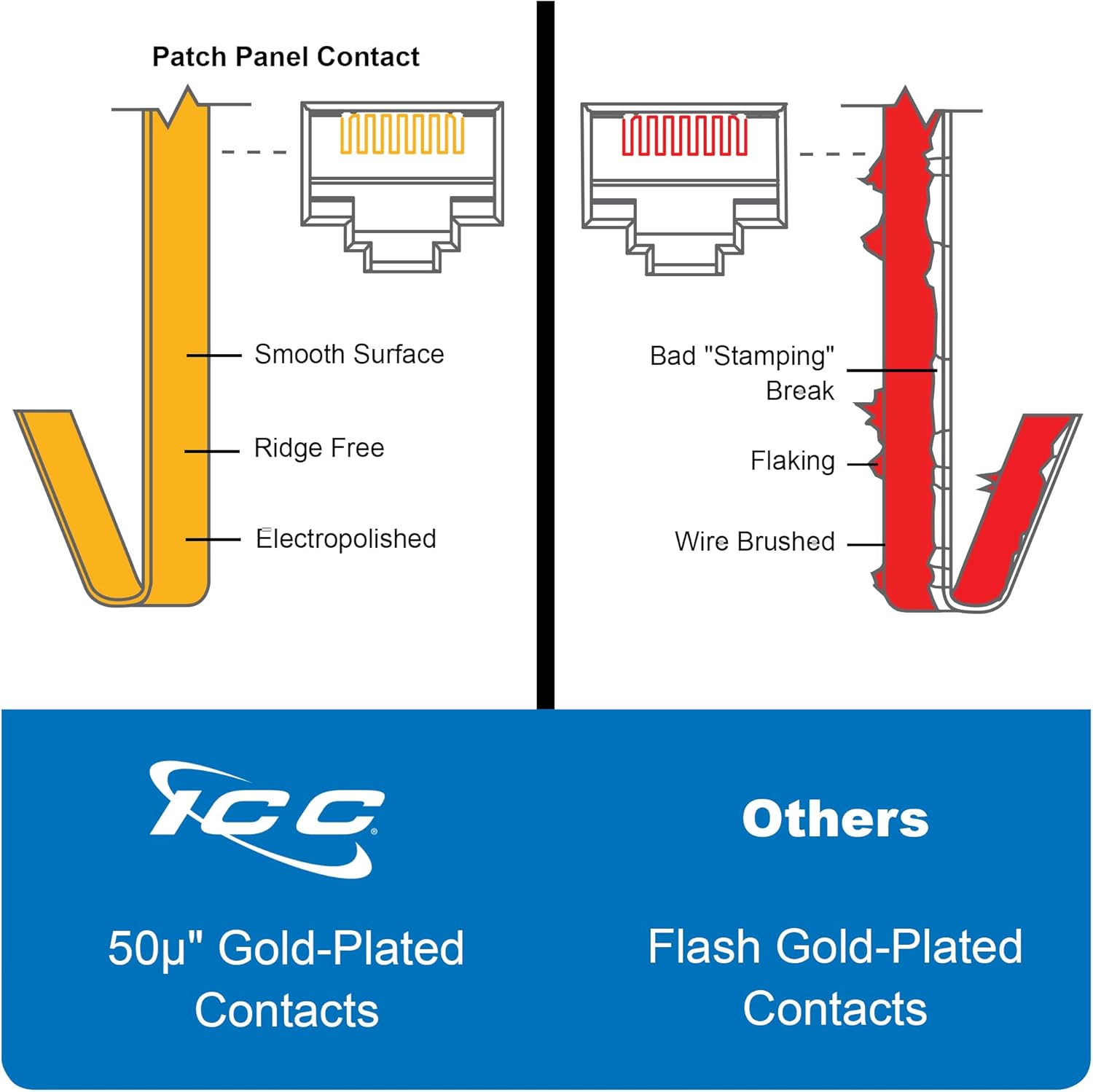
Figure 2.2: Illustration demonstrating the correct method of punch-down termination with compliant IDC terminals, ensuring a reliable connection, contrasted with deformed IDC terminals that lead to intermittent connections.
3. Operating Instructions
Once installed and terminated, the patch panel provides a centralized connection point for your network infrastructure. Connect your network devices (e.g., computers, switches, security cameras) to the front RJ45 ports using standard Ethernet patch cables.
3.1 Gigabit Ethernet and PoE++ Support
This patch panel is designed for Gigabit Ethernet applications, supporting data transfer rates up to 1000 Megabits Per Second. It is also PoE++ rated, capable of delivering up to 90W of power to compatible devices over the Ethernet cable.

Figure 3.1: Diagram illustrating the difference between a PoE++ rated patch panel, which safely delivers power, and a non-PoE rated panel, which can cause short circuits when power is applied.
3.2 Connection Reliability
The RJ45 jacks are constructed with durable phosphor bronze spring wire and are designed to accept over 750 plug to jack insertion cycles. The 50 micro-inches of gold plating over 100 micro-inches of nickel on the contacts ensure a correction-free connection.

Figure 3.2: Detailed view comparing the smooth, ridge-free, electropolished surface of 50µ gold-plated contacts with the flaking and wire-brushed appearance of flash gold-plated contacts, highlighting superior connection quality.
4. Maintenance
The ICC CAT5e Patch Panel requires minimal maintenance. Regular inspection of connections and cables is recommended to ensure optimal network performance.
- Cleaning: Keep the patch panel free from dust and debris. Use a soft, dry cloth for cleaning. Avoid liquid cleaners directly on the ports.
- Re-termination: If a connection issue arises due to improper termination, the 110 IDC blocks can be re-terminated over 100 times. Ensure proper technique as described in Section 2.2.
- Cable Management: Utilize proper cable management practices to reduce strain on the ports and maintain an organized network environment.
5. Troubleshooting
If you experience network connectivity issues, consider the following troubleshooting steps:
- No Connectivity: Verify that all cables are securely plugged into both the patch panel and the connected devices. Check for proper termination at the IDC blocks on the rear of the panel, ensuring wires are fully seated.
- Slow Network Speed: Ensure all components in your network chain (cables, switches, network cards) are rated for Gigabit Ethernet. Inspect cables for damage.
- Intermittent Connection: This can often be caused by improper wire termination. Re-terminate any suspicious connections, referring to the TIA-568A/B diagrams.
- PoE Device Failure: Confirm that your connected device is PoE++ compatible and that the power source is functioning correctly. Ensure the patch panel is indeed PoE++ rated (as this model is).
- Crosstalk Issues: The panel is engineered with enhanced crosstalk cancellation. If crosstalk is suspected, ensure all cabling meets Category 5e standards and is properly installed.

Figure 5.1: NEXT (Near-End Crosstalk) performance graphs. The left graph shows a passing result for a CAT5e patch panel, indicating minimal signal interference. The right graph shows a failing result, with significant crosstalk spikes, which can lead to network performance degradation.
6. Specifications
| Feature | Detail |
|---|---|
| Brand | ICC |
| Model Name | ICC-ICMPP0245E |
| Connector Type | RJ45 Female Ports |
| Cable Type | Component, Ethernet |
| Ethernet Cable Category | Cat 5e |
| Data Transfer Rate | 1000 Megabits Per Second (Gigabit Ethernet) |
| Special Feature | PoE++ Rated to Power Devices (up to 90W) |
| Compatible Devices | Ethernet Devices, Security Cameras |
| Number of Ports | 24 |
| Rack Unit (RU) | 1U |
| Rack Mount Width | 19-Inch EIA Standard |
| Termination Type | 110 IDC Terminal Blocks |
| Contact Plating | 50 micro-inches gold over 100 micro-inches nickel |
| Re-termination Cycles | 100+ (IDC) |
| Insertion Cycles | 750+ (RJ45 jack) |
| Outer Material | 16-gauge cold-rolled steel with a black finish |
| Jack Housing Material | High-impact, flame-retardant plastic (UL 94V-0 rated) |
| Item Weight | 1.5 Pounds |
| Product Dimensions (LxWxH) | 20 x 3.25 x 2.5 inches |
| Compliance | UL Listed, ANSI/TIA-568 Category 5e |
| Indoor/Outdoor Usage | Indoor, Outdoor |
7. Warranty Information
Specific warranty details for the ICC CAT5e 24-Port Rackmount Patch Panel are typically provided at the point of purchase or on the manufacturer's official website. Please refer to your purchase documentation or the ICC website for the most current warranty terms and conditions.
8. Support and Contact
For technical assistance, product inquiries, or support, please contact ICC directly through their official channels. Contact information can typically be found on the ICC website or within your product packaging.
- Online Resources: Visit the official ICC website for product documentation, FAQs, and support resources.
- Customer Service: Refer to the contact section of the ICC website for phone numbers or email addresses for customer support.


