
Introduction
This manual provides essential instructions for the safe and efficient operation of your Milwaukee M12 12.0V Li-Ion Battery Charger (Model 48-59-2401). This charger is designed to charge Milwaukee M12 series 12-Volt lithium-ion batteries. Please read this manual thoroughly before first use and retain it for future reference.
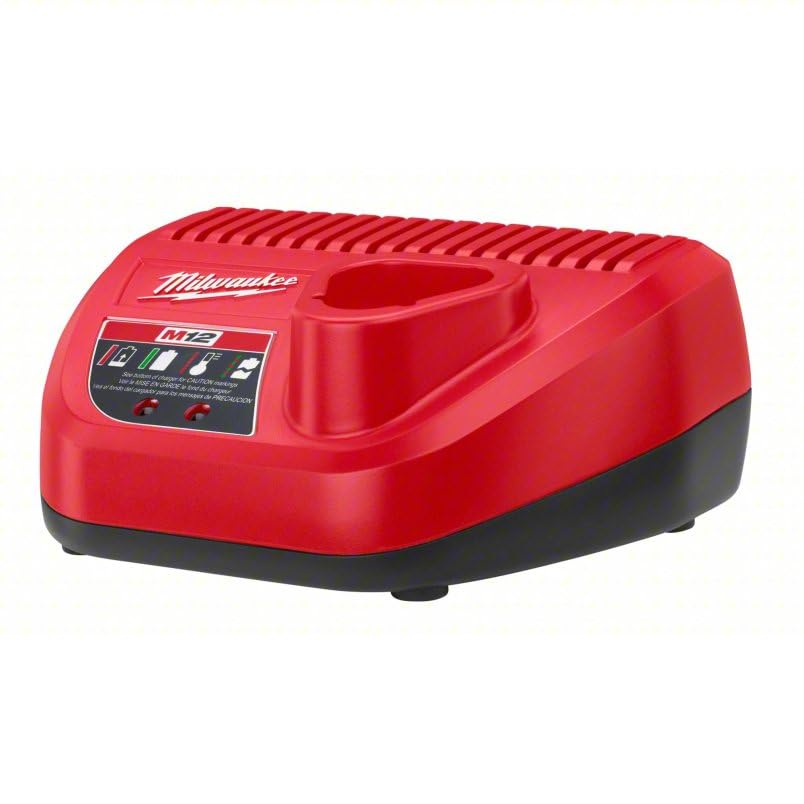
Image: The Milwaukee M12 12.0V Li-Ion Battery Charger. This red and black unit features a top-mounted battery slot and a control panel with indicator lights for charging status and warnings. The Milwaukee logo and "M12" branding are visible.
Safety Instructions
WARNING: To reduce the risk of injury, read and understand all instructions before using this charger.
- Electrical Safety: Ensure the power outlet voltage matches the charger's input voltage (120VAC). Do not use the charger if the cord or plug is damaged. Avoid using extension cords unless absolutely necessary and ensure they are properly rated.
- Battery Compatibility: This charger is designed exclusively for Milwaukee M12 12-Volt Li-Ion batteries. Do not attempt to charge non-rechargeable batteries or other battery types, as this may cause personal injury and damage.
- Environmental Conditions: Do not expose the charger to rain or wet conditions. Use the charger in a clean, dry area. Do not operate the charger in explosive atmospheres, such as in the presence of flammable liquids, gases, or dust.
- Ventilation: Ensure adequate ventilation around the charger during operation. Do not block ventilation openings.
- Physical Damage: Do not drop or strike the charger. Do not disassemble the charger; refer all servicing to qualified service personnel.
- Temperature: Charge batteries within the recommended temperature range. Extreme temperatures can affect charging performance and battery life.
- Caution Markings: Refer to the bottom of the charger for additional caution markings and warnings.
Setup
- Unpack: Carefully remove the charger from its packaging. Inspect for any shipping damage.
- Placement: Place the charger on a stable, flat, non-flammable surface. Ensure there is sufficient space for air circulation around the unit.
- Power Connection: Plug the charger's power cord into a standard 120VAC electrical outlet. The charger is now ready for use.
Operating Instructions
Charging a Battery
- Insert Battery: Slide the Milwaukee M12 Li-Ion battery pack into the charger's slot. Ensure it clicks securely into place.
- Monitor Indicator Lights:
- Solid Red Light: Indicates the battery is charging.
- Solid Green Light: Indicates the battery is fully charged.
- Flashing Red Light: Indicates a battery error or fault. Remove the battery and re-insert. If the issue persists, the battery or charger may be faulty.
- Flashing Green Light: May indicate the battery is too hot or too cold to charge. The charger will wait until the battery reaches an appropriate temperature before beginning to charge.
- Charging Time: A typical compact 12-Volt lithium-ion battery will charge in approximately 30 minutes. Larger capacity batteries may take longer.
- Remove Battery: Once the green indicator light is solid, the battery is fully charged. Press the release tab (if present) and slide the battery out of the charger.
Optimizing Battery Life
- Avoid fully discharging batteries before recharging.
- Store batteries in a cool, dry place away from direct sunlight and extreme temperatures.
- Do not store batteries on the charger for extended periods after they are fully charged.
Maintenance
- Cleaning: Disconnect the charger from the power outlet before cleaning. Use a soft, dry cloth to wipe the exterior of the charger. Do not use water or harsh cleaning agents. Keep the charging terminals free of dirt and debris.
- Storage: When not in use, store the charger in a clean, dry location, out of reach of children.
- Inspection: Periodically inspect the power cord and charger housing for any signs of damage. If damage is found, discontinue use and have it serviced by qualified personnel.
Troubleshooting
| Problem | Possible Cause | Solution |
|---|---|---|
| Charger not operating (no lights) | No power to the charger; faulty outlet; damaged cord. | Check power connection. Test outlet with another device. Inspect power cord for damage. |
| Battery not charging (flashing red light) | Battery error; battery too hot/cold; faulty battery or charger. | Remove and re-insert battery. Allow battery to reach room temperature. If issue persists, test with another battery or contact support. |
| Slow charging | Battery condition; ambient temperature. | Ensure battery is not excessively hot or cold. Older batteries may charge slower. |
Specifications
- Brand: Milwaukee
- Model Number: 48-59-2401
- Input Voltage: 120VAC
- Output Voltage: 12 Volts
- Compatible Battery Type: Milwaukee M12 Li-Ion (Lithium-Ion)
- Approximate Charging Time (Compact Battery): 30 minutes
- Item Weight: 1 pound
- Product Dimensions: 4 x 8 x 7 inches
- Material: Metal, Plastic
- Power Source: Corded-electric
Warranty Information
This Milwaukee M12 12.0V Li-Ion Battery Charger (Model 48-59-2401) comes with a 5-Year Limited Warranty. For detailed warranty terms and conditions, please refer to the official Milwaukee website or contact customer support. Keep your proof of purchase for warranty claims.
Support
For technical assistance, troubleshooting beyond this manual, or warranty service, please contact Milwaukee Customer Support. Visit the official Milwaukee website for contact information and service center locations.
Website: www.milwaukeetool.com


