
1. Introduction
Thank you for choosing the Casio WVQ-M610DE-1AVER Radio-Controlled Solar Chronograph Watch. This timepiece combines advanced radio-controlled timekeeping with solar power technology, ensuring accurate time and reliable operation. This manual provides essential information for the proper setup, operation, and maintenance of your watch.
2. Key Features
- Radio-Controlled Timekeeping (Wave Ceptor): Automatically receives time calibration signals for precise timekeeping across various regions.
- Solar Powered: Equipped with a solar panel that converts light into electrical power, eliminating the need for regular battery replacement.
- Chronograph: Stopwatch function for measuring elapsed time.
- World Time: Displays the current time in major cities and specific areas around the world.
- Daily Alarm: An audible alarm that sounds at a preset time each day.
- Day and Date Display: Shows the current day of the week and date.
- 24-Hour Indicator: A sub-dial or hand indicating time in a 24-hour format.
- Stainless Steel Case and Band: Durable and stylish construction.
- Water Resistance: Rated for 5 Bar (50 meters), suitable for everyday use and light splashes, but not for swimming or showering.
3. Initial Setup
3.1 Initial Charge
Upon first use or after prolonged storage in darkness, expose the watch face to bright light (e.g., sunlight or fluorescent light) for several hours to ensure a full charge. The watch may enter a power-saving mode if the charge is low, indicated by the second hand stopping or the display going blank.
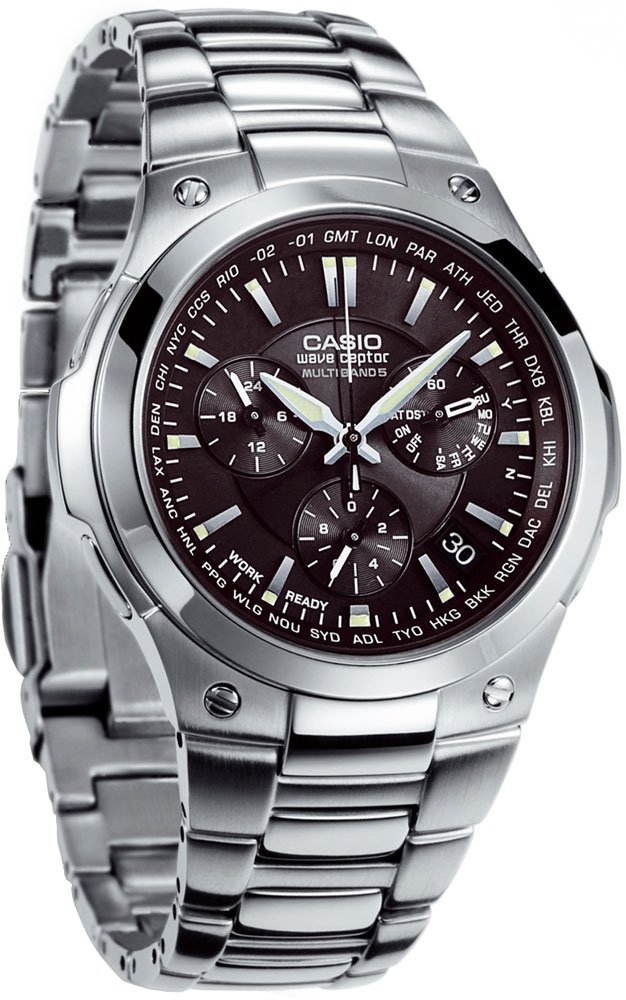
Image: The Casio WVQ-M610DE-1AVER watch, showcasing its black dial, stainless steel case, and metal band. This image illustrates the overall design and appearance of the product.
3.2 Setting Your Home City and Time Zone
The watch requires you to set your Home City (time zone) to correctly receive time calibration signals and display the correct local time. Refer to the detailed instructions in your watch's specific module manual for button operations, as this process involves navigating through various time zones.
- Enter the Timekeeping Mode.
- Press and hold the adjustment button (usually top-left) until the city code starts to flash.
- Use the appropriate buttons (usually top-right or bottom-right) to cycle through the city codes until your desired Home City is displayed.
- Confirm your selection by pressing the adjustment button again.
- Ensure Daylight Saving Time (DST) settings are correct for your region.
3.3 Time Signal Reception
After setting your Home City, the watch will attempt to receive a time calibration signal. For optimal reception, place the watch near a window at night. Manual reception can also be initiated by following the instructions in your specific module manual.
4. Operating the Watch
4.1 Timekeeping Mode
This is the default mode, displaying the current time, day, and date. The watch automatically adjusts for leap years and varying month lengths.
4.2 Using the Chronograph (Stopwatch)
The chronograph measures elapsed time. To use:
- Enter the Chronograph Mode (refer to your module manual for button sequence).
- Press the start/stop button (usually bottom-right) to begin and end timing.
- Press the reset button (usually top-right) to clear the measurement.
4.3 World Time Mode
This mode allows you to view the current time in a different time zone. To switch between World Time cities:
- Enter the World Time Mode.
- Use the designated buttons to scroll through the available city codes.
4.4 Daily Alarm
To set the daily alarm:
- Enter the Alarm Mode.
- Use the adjustment buttons to set the desired alarm time.
- Activate or deactivate the alarm as needed.
5. Maintenance
5.1 Charging
To maintain optimal performance, regularly expose the watch face to light. Avoid prolonged storage in dark places. The watch features a power-saving function that activates when the watch is left in darkness for an extended period, stopping the second hand to conserve power.
5.2 Cleaning
Wipe the watch case and band with a soft, dry cloth. For stubborn dirt, use a soft cloth dampened with water and a mild neutral detergent, then wipe dry. Avoid using volatile agents like thinner or benzine.
5.3 Water Resistance
Your watch is rated for 5 Bar (50 meters) water resistance. This means it is suitable for everyday use, such as hand washing, rain, or light splashes. It is not suitable for swimming, showering, or diving. Avoid operating buttons while the watch is wet.
6. Troubleshooting
- Time is incorrect: Ensure your Home City is set correctly. Check if the watch is receiving time calibration signals. If not, try manual reception or adjust the time manually.
- Watch is not charging: Expose the watch to bright light for an extended period. Ensure the solar panel is not obstructed.
- Hands are not moving: The watch may be in power-saving mode due to low charge or prolonged darkness. Expose it to light. If the issue persists, perform a manual hand alignment or reset (refer to your module manual).
- Watch enters World Time mode unexpectedly: Be careful not to accidentally press the World Time button (often the lower-left button) during daily activities.
7. Specifications
| Model Number | WVQ-M610DE-1AVER |
| Brand | Casio |
| Movement | Quartz, Radio-Controlled, Solar Powered |
| Case Material | Stainless Steel |
| Band Material | Stainless Steel |
| Display Type | Analog (Black Dial) |
| Water Resistance | 5 Bar (50 meters) |
| Battery Type | 1 Lithium-metal battery (included) |
8. Warranty and Support
For warranty information and customer support, please refer to the warranty card included with your purchase or visit the official Casio website for your region. Keep your proof of purchase for any warranty claims.
For further assistance or detailed instructions specific to your watch's module, please consult the comprehensive module manual available on the Casio support website. The module number is typically found on the watch's case back.


