
Introduction
The Schlage BE365 Plymouth Keypad Deadbolt offers keyless convenience and enhanced security for your home. This electronic deadbolt is designed for easy installation and provides a simple, secure way to manage access without traditional keys. It features a durable, lighted keypad, multiple user code capacity, and a reliable battery-powered operation with a low-battery indicator.
Video: Trust your home to Schlage - This video provides a general overview of Schlage's commitment to security and quality, highlighting the reliability of their products.
Package Contents
Before beginning installation, please ensure all components are present:
- Lockset (Exterior Keypad and Interior Thumbturn Assembly)
- Hardware (Mounting Screws, Latch, Strike Plate)
- Installation Instructions
- 9-volt Battery
- 2 Keys
Setup and Installation
The Schlage BE365 Keypad Deadbolt is designed for easy installation, typically requiring only a screwdriver and taking less than 30 minutes. It replaces an existing deadbolt without complex wiring.
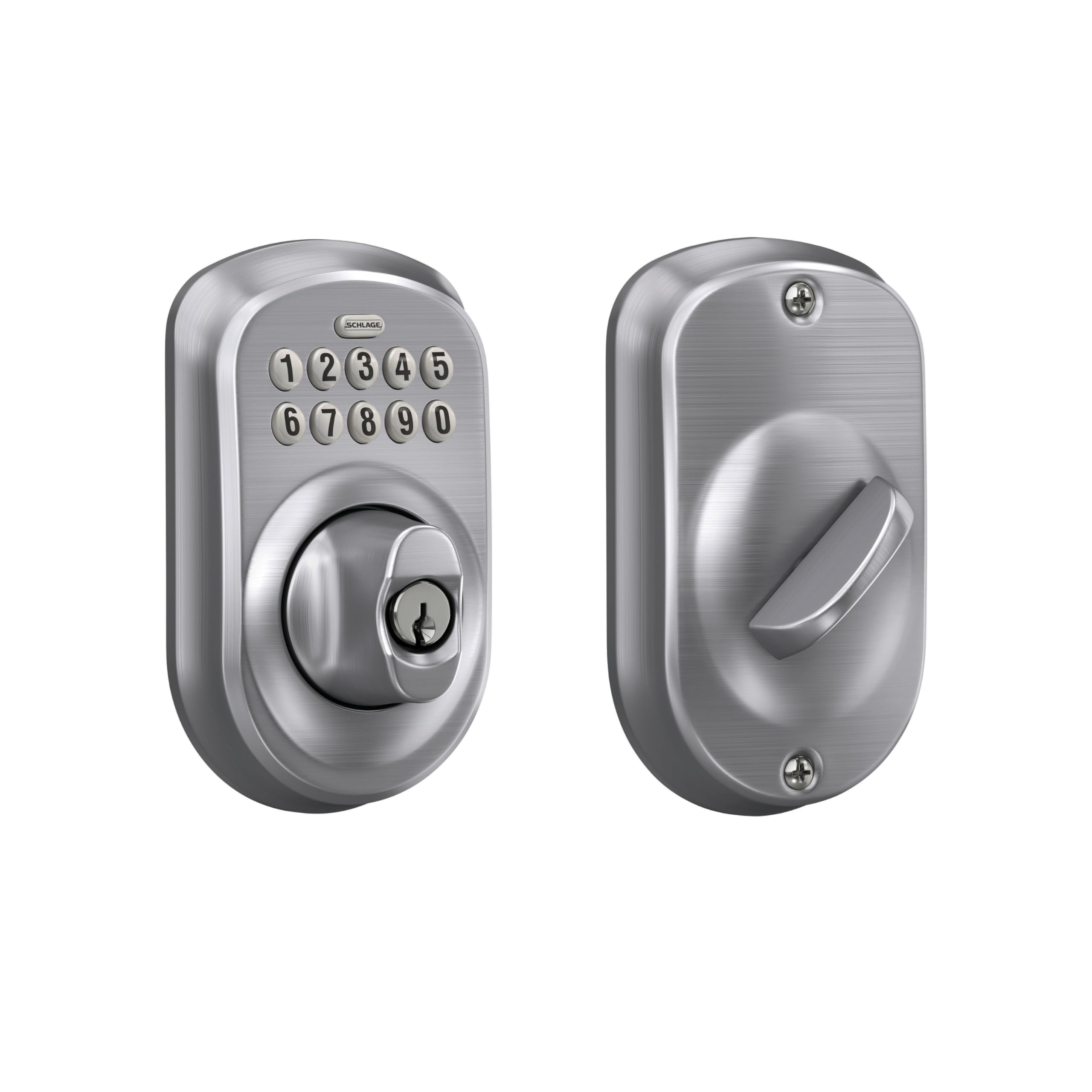
Image: Schlage BE365 Plymouth Keypad Deadbolt - A front view of the Schlage BE365 Plymouth Keypad Deadbolt in Satin Chrome, showcasing the keypad and keyhole.
Pre-Installation Check
- Measure your door's backset, cross bore, and thickness to ensure proper fit.
- Ensure the existing deadbolt hole is properly prepared.
Installation Steps
- Install the Latch: Insert the latch into the prepared door edge. Secure it with the provided 3/4-inch mounting screws. Ensure the deadbolt is retracted before proceeding.
- Align Keypad Assembly: Align the exterior keypad assembly with the door hole, ensuring the driver bar passes through the installed latch. The connector cable should pass over the top of the latch to the interior side.
- Install Interior Mounting Plate: Align the interior mounting plate with the interior door hole. Ensure the cam is in the down position. Thread the connector cable through the opening. Gently pull excess wire through so the plate lies flat against the door.
- Secure Mounting Plate: Insert the two 2-inch mounting screws on either side of the cam. Before fully tightening, ensure both assemblies are straight. Then, tighten the screws.
- Connect Battery: Connect the wire harness from the battery to the connector cable. Attach the 9-volt battery to the wire harness and place it into its compartment. Carefully tuck excess cable wire into the assembly to prevent pinching.
- Install Interior Cover: Rotate the interior thumbturn so it points towards the door hinges. Carefully place the interior lock assembly cover over the mounting plate, ensuring the driver bar fits into the center opening. Secure the cover with the two 3/4-inch mounting screws.
Video: BE365 and FE365 Installation - This official video demonstrates the step-by-step installation process for the Schlage BE365 Keypad Deadbolt, ensuring correct setup.
Operating Instructions
The Schlage BE365 offers simple and secure keyless operation.
Locking the Door
- From the outside: Press the Schlage button and turn the outside thumbturn to lock.
- From the inside: Use the thumbturn to lock.
Unlocking the Door
- From the outside: Enter a valid 4-digit user code on the keypad. The numbers illuminate for easy night access. Once the code is accepted, turn the outside thumbturn to unlock.
- From the inside: Use the thumbturn to unlock.
- Key Override: In case of battery failure or forgotten code, use one of the provided keys to unlock the deadbolt.
Video: Keyless Overview - All Models - This video provides a quick overview of the keyless operation for Schlage deadbolts, demonstrating how to lock and unlock the door using the keypad.
Video: Keypad Deadbolt Makes Keys Unnecessary - This video highlights the convenience of a keypad deadbolt, emphasizing the freedom from carrying or losing keys.
Programming Codes
The lock comes pre-set with one unique 6-digit programming code and two unique 4-digit user codes. You can add up to 19 different 4-digit user codes directly at the keypad.
Important Codes
- Programming Code (6-digits): Used only to program the lock (add/delete user codes, change programming code). It will not unlock the door.
- User Codes (4-digits): Used to unlock the door. Cannot match the first four consecutive digits of the programming code.
Adding a New User Code
- Enter your 6-digit Programming Code.
- Wait for the Schlage button to turn orange.
- Press the Schlage button, then immediately press the '1' key.
- Enter the new 4-digit User Code.
- Pause until the Schlage button blinks three times and you hear three beeps.
- Enter the same 4-digit User Code again to confirm.
- Success is indicated by a green light and a long beep. The lock will automatically exit programming mode.
Deleting a Single User Code
- Enter your 6-digit Programming Code.
- Wait for the orange backlight.
- Press the Schlage button, then immediately press the '2' key.
- Enter the 4-digit User Code you wish to delete.
- Pause, then enter the same 4-digit User Code again to confirm.
- Success is indicated by a green light.
Video: Programming BE365 and FE365 - This video guides you through the process of programming user codes for your Schlage BE365 Keypad Deadbolt.
Maintenance
To ensure optimal performance and longevity of your Schlage BE365 Keypad Deadbolt, follow these maintenance guidelines:
- Battery Replacement: The deadbolt operates on a 9-volt battery, offering up to 2 years of life with typical use. A dedicated low-battery indicator will alert you when replacement is needed. Replace the battery promptly to avoid lockouts.
- Cleaning: Clean the keypad and lock exterior with a soft, damp cloth. Avoid abrasive cleaners or solvents that could damage the finish or electronic components.
- Keypad Care: The silicone rubber, wear-resistant buttons are designed for durability. Avoid excessive force when pressing buttons.
Troubleshooting
If you encounter issues with your Schlage BE365 Keypad Deadbolt, consider the following common solutions:
- Lock Not Responding: Check the battery. If the low-battery indicator is on or the keypad is unresponsive, replace the 9-volt battery.
- Code Not Working: Ensure you are entering the correct 4-digit user code. If unsure, try one of the pre-set user codes or use the key override. Verify that the programming code has not been accidentally changed.
- Deadbolt Not Extending/Retracting: Ensure the latch is properly installed and not obstructed. Check for any pinched wires during installation. The driver bar must be correctly aligned with the latch mechanism.
- Keypad Lights Not Working: This typically indicates a low or dead battery. Replace the 9-volt battery.
For further assistance, refer to the detailed troubleshooting section in your printed manual or contact Schlage customer support.
Specifications
| Feature | Detail |
|---|---|
| Brand | SCHLAGE |
| Model Number | BE365VPLY626 |
| Lock Type | Keypad Deadbolt |
| Material | Metal |
| Finish Type | Brushed (Satin Chrome) |
| Item Dimensions (L x W x H) | 3 x 4.5 x 6.5 inches |
| Item Weight | 1.5 Pounds |
| Power Source | 9-volt Battery (included) |
| User Code Capacity | Up to 19 unique 4-digit codes |
| Security Rating | ANSI Grade 2/AAA |

Image: Schlage BE365 Plymouth Keypad Deadbolt Dimensions - An illustration detailing the height, width, and depth measurements of the Schlage BE365 deadbolt.
Warranty and Support
Schlage stands behind the quality of its products.
- Manufacturer Warranty: The Schlage BE365 Keypad Deadbolt is backed by a limited lifetime mechanical and finish warranty, and a 3-year electronics warranty. Please refer to the official Schlage warranty documentation for full details and terms.
- Customer Support: For technical assistance, warranty claims, or any questions regarding your product, please visit the official Schlage website or contact their customer service department.


