
Introduction
Thank you for choosing the Laney RB9 300 Watt Bass Head. This amplifier is designed to deliver powerful and versatile bass tones, suitable for a wide range of musical applications. The RB9 features a robust 300-watt output into a 4-ohm load, an award-winning preamp section, and essential controls for shaping your sound. This manual provides detailed instructions for the proper setup, operation, and maintenance of your RB9 bass head.
Key Features
- 300 Watt RMS output into a 4 Ohm minimum load.
- Integrated FX Loop for connecting external effects processors.
- DI Pre-EQ XLR output for direct connection to mixing consoles or recording interfaces.
- External Cabinet Jack for connecting compatible bass speaker cabinets.
- Built-in Compressor for dynamic control and sustain.
- Built-in Limiter with Enhance Function for preventing signal clipping and adding tonal richness.
- Comprehensive Equalization section including a 7-band graphic EQ, Bass, and Treble controls.
- Award-winning preamp section, shared with the RB8 model, ensuring high-quality tone.
Front Panel Controls and Connections
The front panel of your Laney RB9 provides all the necessary controls for input, tone shaping, and output level. Familiarize yourself with these controls before operation.
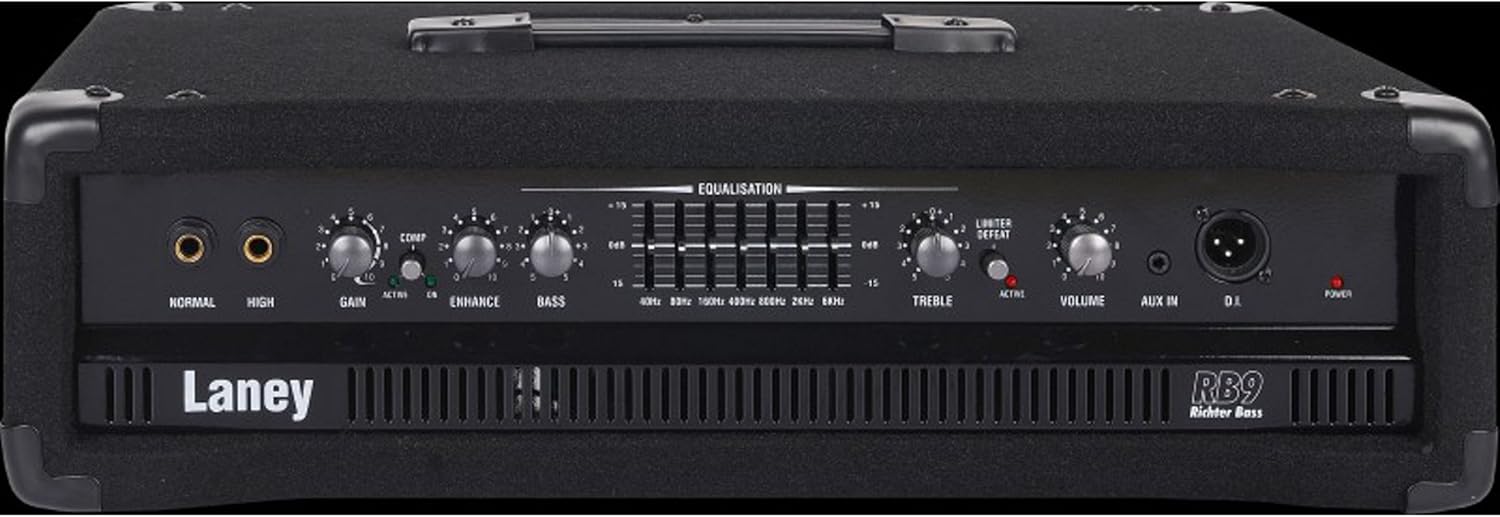
Figure 1: Front view of the Laney RB9 Bass Head, showing all input jacks, control knobs, and the equalization section.

Figure 2: Detailed view of the Laney RB9 front panel, highlighting the input jacks, gain, compression, equalization, and master volume controls.
- NORMAL Input: Standard 1/4" jack for passive bass guitars.
- HIGH Input: 1/4" jack with increased sensitivity, suitable for active bass guitars or instruments with higher output.
- GAIN Control: Adjusts the input sensitivity and overall preamp gain. Set to achieve desired signal level without clipping.
- COMP (Compressor) Control: Adjusts the amount of compression applied to the signal. Use to smooth out dynamics and increase sustain. An associated LED indicates compressor activity.
- ENHANCE Control: Provides a broad tonal shaping effect, typically boosting low and high frequencies while scooping mids.
- BASS Control: Adjusts the low-frequency response of the amplifier.
- EQUALISATION (Graphic EQ): A 7-band graphic equalizer allowing precise control over specific frequency bands (40Hz, 80Hz, 160Hz, 300Hz, 600Hz, 2KHz, 6KHz). Each slider can boost or cut frequencies by up to 15dB.
- TREBLE Control: Adjusts the high-frequency response of the amplifier.
- LIMITER DEFEAT Switch: Engages or disengages the built-in limiter. When engaged, the limiter prevents signal peaks from exceeding a certain level, protecting speakers and providing a smoother sound. An associated LED indicates limiter activity.
- VOLUME Control: Master volume control for the overall output level of the amplifier.
- AUX IN: 1/4" stereo input for connecting external audio sources like MP3 players or drum machines for practice.
- D.I. (Direct Injection) Output: XLR output for sending a balanced, pre-EQ signal directly to a mixing console or recording device.
- POWER Switch: Turns the amplifier on or off. An associated LED indicates power status.
Rear Panel Connections
The rear panel houses connections for speaker cabinets, effects loops, and power input.
- FX LOOP (SEND/RETURN): 1/4" jacks for connecting external effects pedals or processors. Connect the SEND to the input of your effect and the RETURN from the output of your effect.
- EXTERNAL CABINET Jack: 1/4" jack for connecting your bass speaker cabinet. Ensure the cabinet impedance is 4 Ohms minimum.
- AC POWER INPUT: Standard IEC power inlet for connecting the supplied power cord.
Setup
- Placement: Position the RB9 head on a stable surface, preferably on top of a compatible bass speaker cabinet. Ensure adequate ventilation around the unit.
- Speaker Connection: Connect your bass speaker cabinet to the "EXTERNAL CABINET" jack on the rear panel using a high-quality speaker cable. Ensure the total impedance of your cabinet(s) is not less than 4 Ohms. For optimal performance, Laney recommends pairing with the Laney RB410 and RB115 cabinets.
- Instrument Connection: Connect your bass guitar to either the "NORMAL" (for passive basses) or "HIGH" (for active basses) input jack on the front panel using a shielded instrument cable.
- Power Connection: Ensure the amplifier's POWER switch is in the OFF position. Connect the supplied IEC power cord to the "AC POWER INPUT" on the rear panel and then to a suitable grounded AC power outlet.
- Initial Settings: Before powering on, set the GAIN, BASS, TREBLE, and VOLUME controls to their minimum positions. Set all Graphic EQ sliders to the center (0dB) position.
Operating Instructions
- Power On: Flip the POWER switch to the ON position. The power LED will illuminate. Wait a few seconds for the amplifier to stabilize.
- Set Gain: While playing your bass, slowly increase the GAIN control until you achieve a strong signal without distortion. If the signal clips, reduce the GAIN.
- Adjust Volume: Gradually increase the VOLUME control to reach your desired listening level.
- Tone Shaping:
- Use the BASS and TREBLE controls for general low and high-frequency adjustments.
- Experiment with the ENHANCE control to add a broad tonal contour.
- Utilize the 7-band Graphic EQ for precise frequency sculpting. Boost or cut specific frequencies to tailor your sound to your instrument, room acoustics, or musical style.
- Compressor: Adjust the COMP control to add sustain and even out your playing dynamics. The COMP LED will light when the compressor is active.
- Limiter: Engage the LIMITER DEFEAT switch (LED will illuminate) to activate the built-in limiter. This helps prevent harsh clipping at high volumes.
- Using the FX Loop: If using external effects, connect them via the FX SEND and RETURN jacks on the rear panel.
- Using the DI Output: Connect the D.I. XLR output to a mixing console or audio interface for recording or live sound reinforcement. This output provides a pre-EQ signal.
- Power Off: Before disconnecting any cables or powering down, turn the VOLUME control to minimum. Then, flip the POWER switch to the OFF position.
Maintenance
- Cleaning: Disconnect the amplifier from power before cleaning. Use a soft, dry cloth to wipe down the exterior. Avoid abrasive cleaners or solvents.
- Ventilation: Ensure that the amplifier's ventilation openings are not obstructed. Proper airflow is essential to prevent overheating.
- Storage: When not in use, store the amplifier in a dry, temperate environment, away from direct sunlight or extreme temperatures.
- Transportation: Always transport the amplifier securely to prevent physical damage.
Troubleshooting
| Problem | Possible Cause | Solution |
|---|---|---|
| No sound output. |
|
|
| Distorted sound. |
|
|
| Hum or unwanted noise. |
|
|
If you continue to experience issues, please contact Laney customer support or a qualified service technician.
Specifications
| Model | RB9 |
| Output Power | 300 Watts RMS @ 4 Ohms minimum |
| Inputs | Normal (Passive), High (Active), Aux In |
| Outputs | External Cabinet (4 Ohm min), DI (XLR Pre-EQ), FX Send |
| Controls | Gain, Compressor, Enhance, Bass, 7-Band Graphic EQ, Treble, Limiter Defeat, Volume |
| FX Loop | Yes (Send/Return) |
| Dimensions (H x W x D) | 10 x 14 x 26 inches (25.4 x 35.56 x 66.04 cm) |
| Weight | 27.6 pounds (12.5 kg) |
| Power Source | Corded Electric |
| Compatible Devices | Bass Guitar, Double Bass |
Warranty and Support
Laney products are designed for reliability and performance. For information regarding warranty coverage, technical support, or service, please refer to the warranty card included with your product or visit the official Laney Amplification website. Keep your proof of purchase for warranty claims.
Laney Amplification Official Website: www.laney.co.uk


