
Behringer
Behringer ULTRATONE K3000FX User Manual
Ultra-Flexible 300 Watt 4 Channel PA System/Keyboard Amplifier with FX and FBQ Feedback Detection
Introduction
The Behringer ULTRATONE K3000FX is a versatile 300-Watt, 4-channel PA system and keyboard amplifier designed for robust sound reproduction. It features a powerful 15-inch BUGERA woofer and a custom-made 1-inch driver, an integrated digital effects processor, and the FBQ Feedback Detection System. This manual provides essential information for the proper setup, operation, and maintenance of your K3000FX amplifier.
Important Safety Instructions
- Read these instructions thoroughly before operating the unit.
- Keep these instructions for future reference.
- Heed all warnings on the product and in this manual.
- Follow all instructions for safe operation.
- Do not use this apparatus near water or in damp environments.
- Clean only with a dry cloth.
- Do not block any ventilation openings. Install in accordance with the manufacturer's instructions.
- Do not install near any heat sources such as radiators, heat registers, stoves, or other apparatus (including amplifiers) that produce heat.
- Do not defeat the safety purpose of the polarized or grounding-type plug. A polarized plug has two blades with one wider than the other. A grounding-type plug has two blades and a third grounding prong. The wide blade or the third prong are provided for your safety. If the provided plug does not fit into your outlet, consult an electrician for replacement of the obsolete outlet.
- Protect the power cord from being walked on or pinched, particularly at plugs, convenience receptacles, and the point where they exit from the apparatus.
- Only use attachments/accessories specified by the manufacturer.
- Use only with the cart, stand, tripod, bracket, or table specified by the manufacturer, or sold with the apparatus. When a cart is used, use caution when moving the cart/apparatus combination to avoid injury from tip-over.
- Unplug this apparatus during lightning storms or when unused for long periods of time.
- Refer all servicing to qualified service personnel. Servicing is required when the apparatus has been damaged in any way, such as power-supply cord or plug is damaged, liquid has been spilled or objects have fallen into the apparatus, the apparatus has been exposed to rain or moisture, does not operate normally, or has been dropped.
Setup
Unpacking and Inspection
Carefully unpack your K3000FX amplifier. Inspect the unit for any signs of damage that may have occurred during transit. If damage is found, contact your dealer immediately. Retain the original packing materials for future shipping or storage.
Placement
Place the amplifier on a stable, level surface. Ensure adequate ventilation around the unit. Avoid placing it in direct sunlight or near heat sources. The K3000FX also features an integrated 35-mm pole socket for stand mounting, allowing it to be used as a PA system.

Figure 1: Front view of the K3000FX amplifier.
Connections
The K3000FX offers multiple input and output options for various applications.
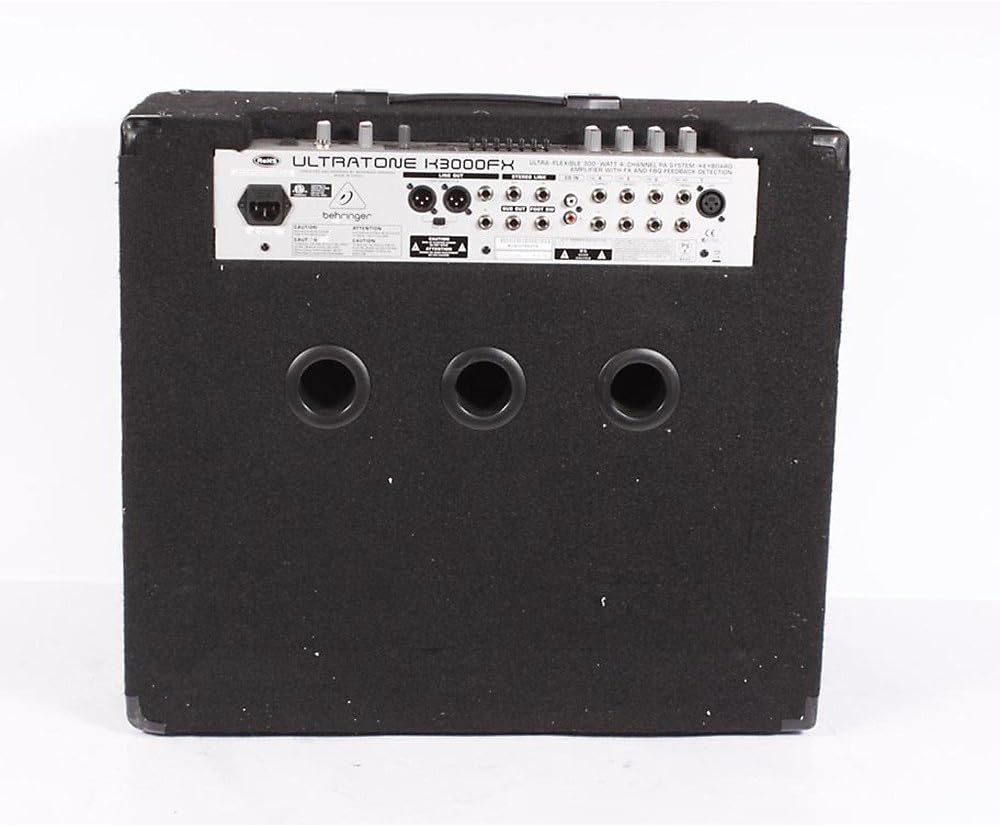
Figure 2: Rear panel connections of the K3000FX amplifier.
- Power Connection: Connect the supplied power cord to the AC inlet on the rear panel and then to a suitable power outlet.
- Channel Inputs (1-4): Each channel features 1/4" stereo inputs. Channel 1 also includes an additional XLR microphone input for direct connection of dynamic microphones.
- CD Input: Use the RCA (phono) inputs to connect an external audio source like a CD player or MP3 player for playback or practicing along.
- Headphone Output: Connect headphones to the dedicated 1/4" stereo headphone jack for quiet practicing.
- DI Output: The balanced stereo XLR DI output with a Ground Lift switch allows for direct connection to a mixing console or external PA system.
- Link Output: Connect this output to a slave amplifier (e.g., another K3000FX) for true stereo operation or to expand your sound system.
- Subwoofer Output: Connect an active subwoofer to this output for enhanced low-end power.
Operating Instructions
Powering On/Off
Ensure all connections are secure before powering on. Turn the MASTER VOLUME control to its minimum setting. Press the POWER switch to turn on the unit. Wait a few seconds for the amplifier to stabilize before increasing the volume. To power off, reverse this procedure.
Channel Operation
The K3000FX features four independent stereo channels, each with dedicated controls:
- Volume Control: Adjusts the input level for each channel.
- FX Send Control: Determines the amount of signal sent from each channel to the internal digital effects processor.
- Channel 1 XLR Input: For connecting dynamic microphones.
Digital Effects Processor
The integrated 24-bit digital FX processor offers 100 presets, including reverb, chorus, flanger, delay, pitch shifter, and various multi-effects. Use the FX program selector to choose your desired effect. The FX RETURN level in the Main section controls the overall wet/dry mix of the effects.
FBQ Feedback Detection System
The revolutionary FBQ Feedback Detection System instantly reveals critical frequencies that cause feedback. When feedback occurs, the corresponding LED on the 7-band graphic EQ will illuminate, indicating which frequency band needs adjustment to eliminate the feedback.
7-Band Graphic EQ
Use the dedicated 7-band graphic equalizer to shape your sound. Adjust the sliders for each frequency band to boost or cut specific frequencies, optimizing the amplifier's output for your instrument and acoustic environment. The FBQ system works in conjunction with this EQ.
Main Section Controls
- FX Return Level: Controls the overall level of the effects returned to the main mix.
- Master Volume: Adjusts the overall output volume of the amplifier.
- Phones Level: Controls the volume of the headphone output.
- Shape Switch: Engages a specific equalization curve for a quick tonal adjustment.
Maintenance
Cleaning
Clean the amplifier's exterior with a soft, dry cloth. Do not use abrasive cleaners, solvents, or waxes, as these can damage the finish. Ensure no liquids enter the unit.
Storage
If storing the amplifier for an extended period, ensure it is in a dry, dust-free environment. It is recommended to use the original packaging for protection.
Troubleshooting
| Problem | Possible Cause | Solution |
|---|---|---|
| No sound output. |
|
|
| Distorted sound. |
|
|
| Feedback (howling sound). |
|
|
Specifications
| Feature | Detail |
|---|---|
| Output Wattage | 300 Watts |
| Speaker Configuration | 15-inch BUGERA Woofer, 1-inch Custom Driver |
| Channels | 4 Stereo Channels |
| Digital FX Processor | 24-bit, 100 Presets (Reverb, Chorus, Flanger, Delay, Pitch Shifter, Multi-effects) |
| Equalizer | 7-band Graphic EQ with FBQ Feedback Detection System |
| Inputs | 1/4" Stereo (Channels 1-4), XLR Mic (Channel 1), RCA (CD Input) |
| Outputs | Balanced Stereo XLR DI, 1/4" Headphone, Link, Subwoofer |
| Power Source | Corded Electric |
| Dimensions (H x W x D) | 26.77 x 19.49 x 24.02 inches (approximate) |
| Weight | 70.11 Pounds (approximate) |
| Mounting Type | Pole Mount (35mm socket) |
Warranty and Support
For detailed warranty information and terms, please refer to the warranty card included with your product or visit the official Behringer website. For technical support, service, or spare parts, please contact Behringer customer service through their official channels. Ensure you have your product model number (K3000FX) and serial number ready when contacting support.
Manufacturer: Behringer USA
Model Number: K3000FX
Related documents


Ask a question about this manual
Ask about setup, troubleshooting, compatibility, parts, safety, or missing instructions. Manuals+ will review the question and use this page’s manual context to help answer it.