
1. Product Overview
The Azden SMX-10 is a high-performance stereo electret condenser microphone designed for clear audio recording. It features a dual uni-directional pickup pattern, making it suitable for capturing stereo sound directly. The microphone is compact, durable, and powered by a single AAA battery, offering extended operational life.
Key features include:
- 7-inch long, dual uni-directional electret-condenser microphone.
- Records high-quality stereo audio directly.
- Built-in coiled cable with a 3.5mm stereo mini-plug for broad compatibility.
- Powered by a single AAA battery (not included).
- Includes a foam windscreen to minimize wind noise.
- Comes with a shock-mount microphone holder for camera hot-shoe mounting.
- Integrated lo-cut switch to reduce unwanted low-frequency noise.
2. Package Contents
Verify that all items listed below are included in your package:
- Azden SMX-10 Stereo Condenser Microphone (with attached coiled cable and 3.5mm plug)
- Foam Windscreen
- Camera Hot-Shoe Mount / Shock-Mount Microphone Holder
3. Setup
3.1. Battery Installation
- Unscrew the microphone body to access the battery compartment.
- Insert one (1) AAA size battery (not included), ensuring correct polarity.
- Securely re-attach the microphone body.
3.2. Attaching the Microphone to a Camera
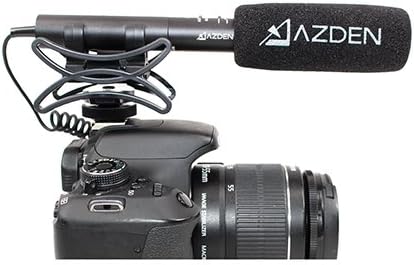
The SMX-10 includes a camera hot-shoe mount for direct attachment to compatible cameras.
- Slide the shock-mount microphone holder onto your camera's hot-shoe.
- Tighten the locking mechanism on the hot-shoe mount to secure it.
- Gently place the SMX-10 microphone into the shock-mount holder.

3.3. Connecting to Recording Device
The microphone features a permanently attached coiled cable with a 3.5mm stereo mini-plug.
- Locate the 3.5mm microphone input jack on your camera, camcorder, or other recording device.
- Plug the microphone's 3.5mm stereo mini-plug firmly into the input jack.
- If your device requires a different connector type (e.g., USB-C for some laptops), use an appropriate adapter (not included).
4. Operation
4.1. Powering On/Off
The SMX-10 has an ON/OFF switch located on its body. Slide the switch to the "ON" position to activate the microphone. Remember to switch it to "OFF" when not in use to conserve battery life.
4.2. Lo-Cut Switch
The microphone is equipped with a lo-cut switch. This feature helps to minimize unwanted low-frequency noises such as wind rumble, air conditioner hum, or traffic sounds. Engage the lo-cut switch when recording in environments prone to such interference.

4.3. Positioning the Microphone
For optimal stereo recording, position the microphone to face the sound source directly. The dual uni-directional design captures sound from the front, providing a clear stereo image. Experiment with microphone placement to achieve the desired audio quality for your specific recording environment.
5. Maintenance
- Cleaning: Use a soft, dry cloth to clean the microphone body. Do not use liquid cleaners or solvents.
- Windscreen Care: The foam windscreen can be gently hand-washed with mild soap and water, then air-dried completely before re-attaching.
- Storage: When not in use, store the microphone in a dry, cool place, away from direct sunlight and extreme temperatures. Remove the AAA battery if storing for extended periods to prevent leakage.
- Cable Care: Avoid sharp bends or excessive pulling on the attached coiled cable to prevent internal damage.
6. Troubleshooting
| Problem | Possible Cause | Solution |
|---|---|---|
| No audio output |
|
|
| Poor audio quality / Noise |
|
|
7. Specifications
| Feature | Detail |
|---|---|
| Type | Stereo electret condenser |
| Frequency Response | 100-18,000Hz |
| Sensitivity | -40dB @1kHz (1V/Pa) |
| Output Impedance | 1.5 k ohm @ 1kHz |
| Signal-to-Noise Ratio | 60dB (1kHz @ 1Pa) |
| Dynamic Range | 66dB |
| Power Supply | 1.5V DC; AAA size battery (not included) |
| Battery Current Drain | 0.5mA |
| Battery Life | 400 hours with Alkaline battery |
| Max. SPL | 100dB |
| Weight (without battery) | 1.83 ounces (approx. 51.88 grams) |
| Dimensions | 7-inch length, 0.7-inch diameter (approx. 177mm length, 17.7mm diameter) |
| Output Cable | Permanently attached with 3.5mm plug |
| Item Model Number | AZ-DSMX010 |
8. Warranty & Support
Specific warranty information for the Azden SMX-10 Stereo Condenser Microphone is not provided in this document. Please refer to the official Azden website or contact Azden customer support for detailed warranty terms and conditions.
For technical support, product inquiries, or service, please visit the official AZDEN website or consult your local dealer.


