
1. Product Overview
The Citizen BL9000-08A is a sophisticated men's watch from the Calibre series, designed with precision and functionality. It features Citizen's innovative Eco-Drive technology, which powers the watch using any light source, eliminating the need for battery replacement. This model is equipped with a minute repeater function, a perpetual calendar, and a chronograph, making it a versatile timepiece for daily wear.
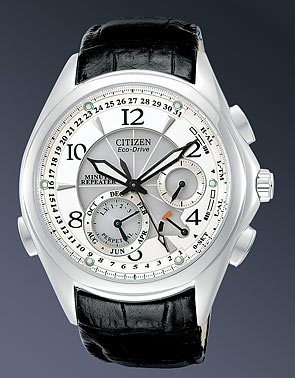
Figure 1: Citizen BL9000-08A Eco-Drive Minute Repeater Watch. This image displays the Citizen BL9000-08A watch. It features a round, cream-colored dial with black Arabic numerals and luminous hands. The dial includes three subdials for calendar functions (month, date, day of week) and a minute repeater indicator. The watch case is silver-toned stainless steel, and it is fitted with a black textured leather strap with a deployment buckle. Multiple pushers are visible on the side of the case.
Key Features:
- Eco-Drive Technology: Powered by light, never needs a battery.
- Minute Repeater: Chimes the time on demand.
- Perpetual Calendar: Automatically adjusts for odd/even months and leap years until 2100.
- Chronograph: Stopwatch functionality for measuring elapsed time.
- Luminous Hands and Markers: Enhanced visibility in low light conditions.
- Stainless Steel Case: Durable and elegant construction.
- Mineral Crystal: Scratch-resistant watch face.
2. Setup
2.1 Initial Charging
Upon first use or after prolonged storage in darkness, your Eco-Drive watch requires an initial charge. Expose the watch dial to a bright light source (natural sunlight is ideal) for several hours. The watch will begin to operate once sufficient charge is accumulated. For a full charge, refer to the charging time guidelines in the full Citizen Eco-Drive manual.
2.2 Setting the Time and Date
The BL9000-08A is a complex timepiece. Accurate setting requires careful attention to the crown and pusher operations. Refer to the detailed instructions below:
- Pull the Crown: Gently pull the crown out to the time-setting position. The second hand may stop.
- Set Time: Rotate the crown to adjust the hour and minute hands to the correct time. Pay attention to AM/PM indication if present.
- Set Date/Calendar: Use the designated pushers (typically located at 2, 4, or 8 o'clock positions) to adjust the perpetual calendar functions, including month, date, and day of the week. Consult the specific markings on your watch for guidance.
- Push the Crown: Once all settings are correct, push the crown back into the normal position to resume timekeeping.
Note: Due to the intricate nature of the perpetual calendar and minute repeater, it is highly recommended to consult the comprehensive Citizen Calibre 9000 series manual for precise setting procedures.
3. Operating Functions
3.1 Using the Minute Repeater
The minute repeater function allows the watch to audibly chime the current time. This is typically activated by pressing a specific pusher on the watch case (often at the 8 or 10 o'clock position). The chimes will indicate hours, quarter hours, and minutes. Listen carefully to distinguish the different tones.
3.2 Perpetual Calendar
The perpetual calendar automatically adjusts for the varying lengths of months and leap years. Once correctly set, it will display the accurate date, day, and month without manual adjustment until the year 2100. The subdials on the watch face indicate these calendar functions.
3.3 Chronograph Function
To operate the chronograph (stopwatch):
- Start: Press the upper pusher (e.g., at 2 o'clock) to start the chronograph.
- Stop: Press the upper pusher again to stop the chronograph.
- Reset: Press the lower pusher (e.g., at 4 o'clock) to reset the chronograph hands to zero.
4. Maintenance
4.1 Cleaning Your Watch
To maintain the appearance of your watch, wipe the case and crystal with a soft, dry cloth. For the leather strap, avoid excessive moisture and harsh chemicals. If the watch becomes soiled, a slightly damp cloth can be used, followed by immediate drying.
4.2 Water Resistance Guidelines
The Citizen BL9000-08A is designed with a water resistance rating suitable for minor exposure to water. This means you may wear the watch while washing your face or in light rain. It is not designed for use underwater, swimming, showering, or any activity involving full submersion. Exposure to steam or hot water should also be avoided as it can compromise the watch's seals.
4.3 Eco-Drive Power Cell Care
To ensure optimal performance of your Eco-Drive watch, regularly expose it to light. Avoid prolonged storage in dark places, which can deplete the power reserve. If the watch stops, expose it to bright light for several hours to recharge. The power reserve indicator (if present) can help monitor the charge level.
5. Troubleshooting
If you encounter issues with your Citizen BL9000-08A, refer to the common problems and solutions below:
| Problem | Possible Cause | Solution |
|---|---|---|
| Watch has stopped or is running intermittently. | Insufficient charge. | Expose the watch to bright light for several hours to recharge. |
| Time or date is incorrect. | Incorrect setting or impact. | Refer to Section 2.2 for setting instructions. If issues persist, consult a service center. |
| Minute repeater does not chime or chimes incorrectly. | Low power reserve or incorrect operation. | Ensure the watch is fully charged. Review the minute repeater activation steps in the full manual. |
| Condensation inside the crystal. | Exposure to extreme temperature changes or moisture. | Contact an authorized Citizen service center immediately. Do not attempt to open the watch. |
6. Specifications
Detailed technical specifications for the Citizen BL9000-08A watch:
| Feature | Detail |
|---|---|
| Model Number | BL9000-08A |
| Movement Type | Eco-Drive (Quartz) |
| Case Material | Stainless Steel |
| Crystal Material | Mineral Crystal |
| Dial Color | Cream |
| Band Material | Leather (Synthetic blend may be used for specific band types) |
| Clasp Type | Leather Deployment Buckle |
| Water Resistance | Splash Resistant (Not for submersion) |
| Functions | Minute Repeater, Perpetual Calendar, Chronograph, Luminous Hands |
| Case Thickness | Approximately 42 mm (Note: This measurement is often for case diameter in product descriptions) |
| Item Weight | 0.5 Kilograms |
| Department | Men's |
7. Warranty and Support
7.1 Warranty Information
Your Citizen BL9000-08A watch is covered by a manufacturer's warranty. The terms and duration of the warranty may vary by region. Please refer to the warranty card included with your purchase or visit the official Citizen website for detailed warranty information specific to your location.
7.2 Customer Support
For further assistance, technical support, or service inquiries, please contact Citizen customer service. You can find contact details, authorized service centers, and frequently asked questions on the official Citizen website:


