
Behringer DX626
Behringer Pro Mixer DX626 User Manual
Model: DX626
Brand: Behringer
Introduction
The BEHRINGER PRO MIXER DX626 is a professional 3-channel DJ mixer designed for both beginners and experienced DJs. It features an integrated Beat-Per-Minute (BPM) counter, super-smooth Ultraglide faders, and a robust VCA-controlled crossfader, ensuring reliable performance and creative mixing capabilities. This manual provides detailed instructions for setting up, operating, and maintaining your DX626 mixer.
Setup
Proper setup is crucial for optimal performance of your DX626 mixer. Follow these steps to connect your equipment.
1. Power Connection
Connect the supplied power cable to the mixer's power input on the rear panel and then to a suitable AC outlet.
2. Audio Input Connections
The DX626 features three dual-input stereo channels. Refer to the rear panel image below for connection points.
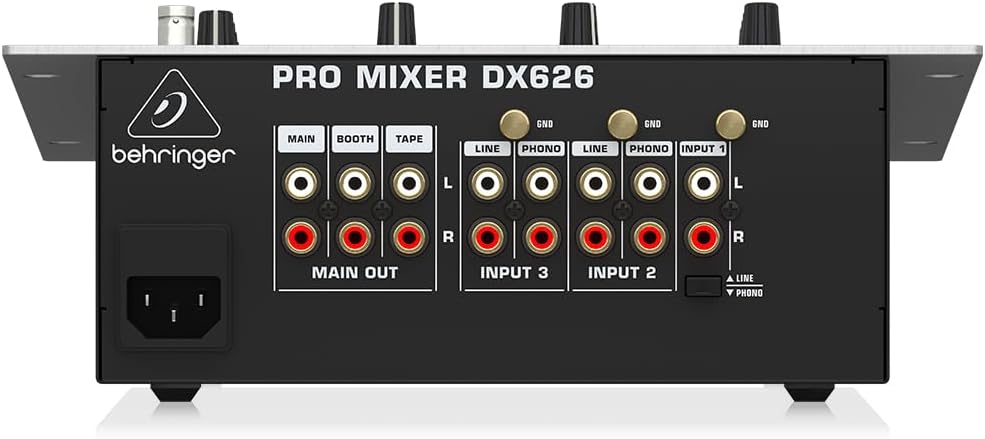
Figure 1: Rear Panel Connections
- Turntables: Connect turntables to the PHONO inputs (RCA) on channels 1, 2, or 3. Ensure the PHONO/LINE switch on the top panel is set to PHONO for the corresponding channel.
- CD Players/Media Players: Connect CD players, media players, or other line-level devices to the LINE inputs (RCA) on channels 1, 2, or 3. Ensure the PHONO/LINE switch on the top panel is set to LINE.
- Microphone: Connect a microphone to the MIC INPUT (XLR) on channel 1.
3. Audio Output Connections
- Main Output: Connect the MAIN OUT (RCA) to your main sound system, amplifier, or powered speakers.
- Booth Output: Connect the BOOTH OUT (RCA) to your monitor speakers in the DJ booth.
- Tape Output: Connect the TAPE OUT (RCA) to a recording device for capturing your mix.
4. Headphones
Plug your headphones into the PHONES output (1/4" jack) located on the front panel of the mixer.
5. Gooseneck Lamp (Optional)
If desired, connect a 12-volt BNC gooseneck lamp to the LAMP socket on the top panel for illuminating the mixer in low-light environments.
Operating Instructions
Familiarize yourself with the controls and functions of your DX626 mixer to unleash its full potential.

Figure 2: Top Panel Controls
1. Channel Strips (CH-1, CH-2, CH-3)
- GAIN: Adjusts the input level for each channel. Set this to prevent the peak indicator from lighting up consistently, which would cause distortion.
- EQ (HIGH, MID, LOW): Three-band kill EQ (-32 dB) allows you to cut or boost specific frequency ranges (highs, mids, lows) for creative mixing and sound shaping.
- Input Selector: Switches between the PHONO and LINE inputs for channels 2 and 3. Channel 1 also includes a MIC input option.
- Channel Faders: Control the individual volume level of each channel in the mix.
2. Microphone Section
- MIC INPUT: The XLR input for connecting your microphone.
- TALKOVER: Activates the manual talkover function. When engaged, the music volume will automatically lower when you speak into the microphone, allowing your voice to be heard clearly.
3. BPM Counter
The intelligent dual BPM counter displays the beats per minute for channels 2 and 3. This feature assists in beatmatching and creating seamless transitions between tracks.
4. Crossfader
The super-smooth dual-rail "Ultraglide" crossfader is VCA-controlled for utmost reliability and smooth audio performance. It allows for seamless transitions between channels 2 and 3.
5. Master Section
- MAIN: Controls the overall output volume sent to your main sound system.
- BOOTH: Controls the volume level for the booth monitor output.
- BALANCE: Adjusts the left/right stereo balance of the main output.
6. Monitor Function
- PFL (Pre-Fader Listening): Use the CH-1, CH-2, CH-3 buttons to select which channel(s) you want to monitor through your headphones before sending them to the main mix.
- CUE/MAIN Mix: Adjusts the blend between the PFL signal (pre-fader) and the main output signal in your headphones.
- PHONES: Controls the overall volume level of your headphones.
7. Peak-Hold Level Meter
The precise peak-hold level meter provides a visual indication of your output levels, with a dedicated PFL bar graph for monitoring pre-fader signals.
Maintenance
Regular maintenance helps ensure the longevity and optimal performance of your Behringer DX626 mixer.
- Cleaning: Use a soft, dry cloth to clean the mixer's surface. Avoid using abrasive cleaners, solvents, or harsh chemicals, as these can damage the finish and internal components.
- Dust: Keep the mixer free from dust, especially around faders, knobs, and ventilation openings. Dust can accumulate and affect the smooth operation of controls.
- Storage: When not in use, store the mixer in a cool, dry place, away from direct sunlight, extreme temperatures, and excessive humidity.
Troubleshooting
If you encounter issues with your DX626 mixer, refer to the following common problems and their solutions.
- No Sound Output:
- Ensure the mixer is powered on and the power cable is securely connected.
- Verify that all input and output audio cables are securely connected to the correct jacks.
- Check that channel faders, the master fader, and the booth fader are raised to an audible level.
- Confirm that the input selector switches (PHONO/LINE) are set correctly for your audio sources.
- Distorted Sound:
- Reduce the GAIN levels on individual channels to prevent clipping. The peak indicators should only flash occasionally, not stay lit.
- Ensure that your audio input sources are not overdriving the mixer.
- BPM Counter Inaccurate:
- The BPM counter is an aid for beatmatching and may not be perfectly accurate in all situations, especially with complex or irregular rhythms. Ensure clear, consistent audio input for best results.
- Crossfader Issues:
- If the crossfader feels rough, sticky, or produces intermittent audio, it may require cleaning or replacement. For internal issues, consult a qualified service technician.
Specifications
Key technical specifications for the Behringer Pro Mixer DX626:
| Feature | Specification |
|---|---|
| Model Number | DX626 |
| Brand | Behringer |
| Channels | 3 Stereo Channels (with dual inputs) |
| Item Weight | 7 pounds (3.17 kg) |
| Product Dimensions | 12.01 x 10 x 3.58 inches (30.5 x 25.4 x 9.1 cm) |
| Power Source | Corded Electric |
| Color | Silver |
| Country of Origin | China |
| First Available | August 28, 2008 |
What's in the Box
Upon unboxing your Behringer Pro Mixer DX626, you should find the following items:
- Behringer DX626 DJ Mixer
- Power Cable
- User's Manual (this document)
Warranty and Support
For detailed warranty information, product registration, and technical support, please visit the official Behringer website or contact their customer service department. It is recommended to keep your purchase receipt as proof of purchase for any warranty claims.
Related documentsDX626


Ask a question about this manual
Ask about setup, troubleshooting, compatibility, parts, safety, or missing instructions. Manuals+ will review the question and use this page’s manual context to help answer it.