
Scosche UAA3
Scosche UAA3 Multi-Vehicle All-in-One Antenna Adapter Instruction Manual
Model: UAA3 | Brand: Scosche
Introduction
The Scosche UAA3 Multi-Vehicle All-in-One Antenna Adapter is designed to facilitate the seamless integration of an aftermarket car stereo into a wide range of domestic and import vehicles. This adapter ensures clear and reliable radio signal reception by providing the necessary connections between your new stereo and the vehicle's existing antenna system.
Key features include:
- Effortless Connectivity: Ensures seamless integration of your aftermarket car stereo for superior radio reception.
- Comprehensive Compatibility: Supports a wide range of vehicles, enhancing your audio experience without compatibility concerns.
- Superior Signal Quality: Connects your car stereo directly to the factory harness, eliminating static and enhancing audio performance.
- No-Hassle Installation: Plug-and-play design simplifies the upgrade process.
- Durability & Reliability: Crafted with factory-quality materials for long-lasting performance.
Product Overview
The UAA3 adapter features multiple connectors to ensure compatibility with various vehicle antenna types. It converts the vehicle's factory antenna connection to a standard male DIN connector compatible with most aftermarket radios.

Image: Scosche UAA3 Multi-Vehicle All-in-One Antenna Adapter showing various labeled connectors for different vehicle brands (Nissan, GM, Chrysler, Ford, VW/Audi) and a standard male connector for the aftermarket stereo.
Compatibility Guide
Before installation, verify your vehicle's compatibility using the detailed fit guide provided. This ensures proper connection and optimal performance.

Fit Guide Page 1: Covers Audi, BMW, Buick, Cadillac.

Fit Guide Page 2: Covers Cadillac (continued), Chevrolet, Chrysler, Dodge.

Fit Guide Page 3: Covers Dodge (continued), Ford, GMC, Harley-Davidson, Hummer, Infiniti.
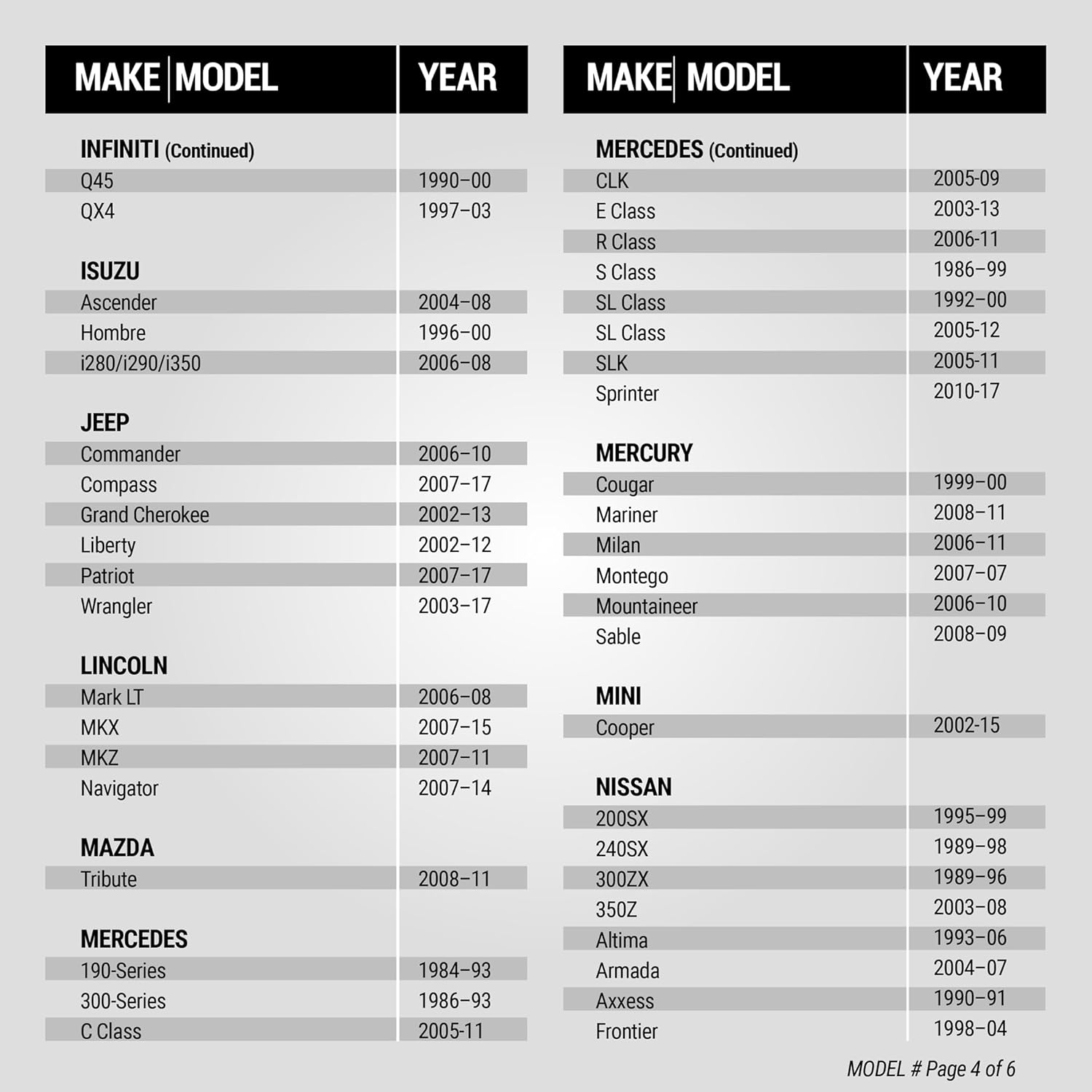
Fit Guide Page 4: Covers Infiniti (continued), Isuzu, Jeep, Lincoln, Mazda, Mercedes.
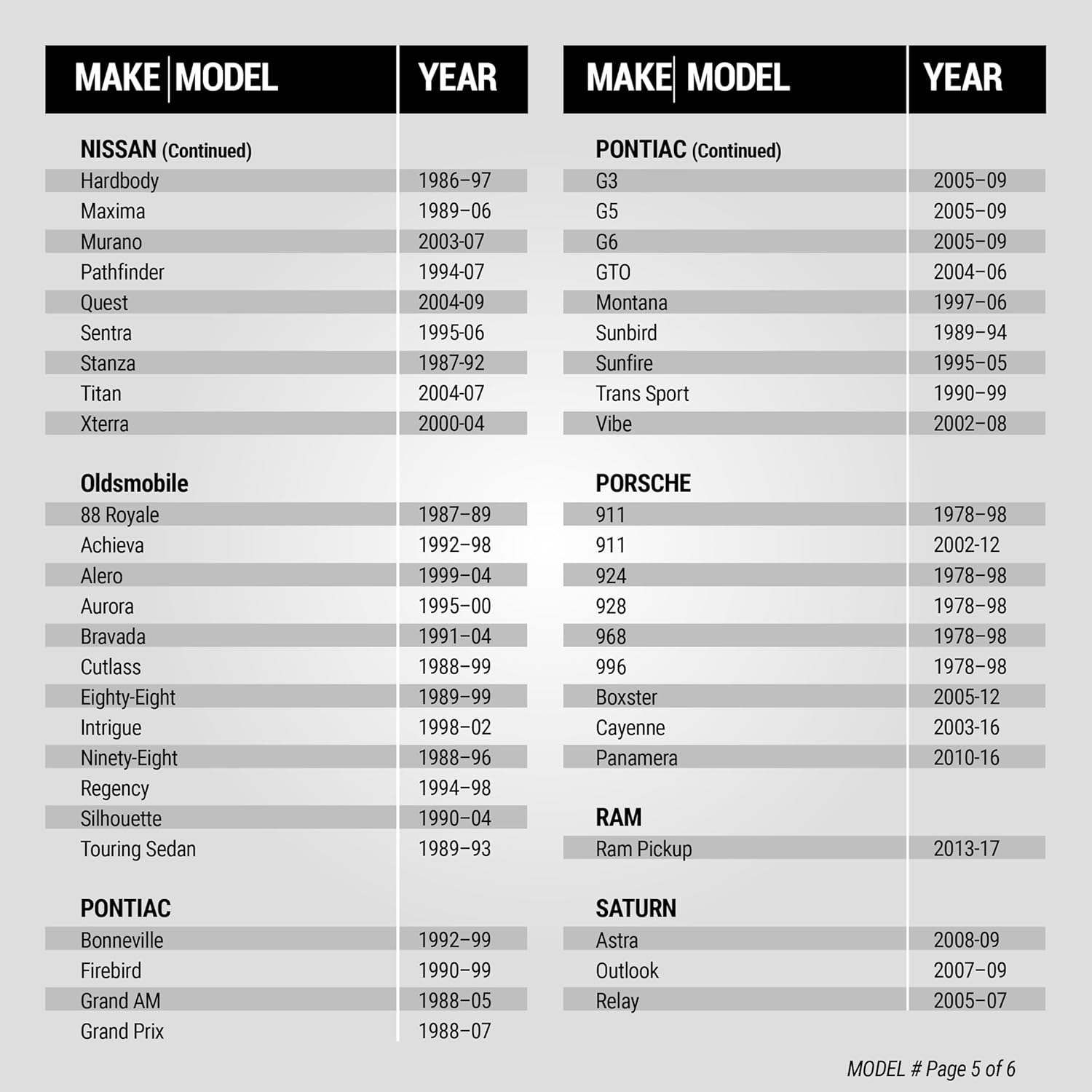
Fit Guide Page 5: Covers Nissan (continued), Oldsmobile, Pontiac, Porsche, Ram.

Fit Guide Page 6: Covers Saturn, Smart, Suzuki, Toyota, Volkswagen.
Setup and Installation
This section outlines the general steps for installing the Scosche UAA3 antenna adapter. Always refer to your vehicle's specific service manual and your aftermarket stereo's installation guide for detailed instructions.
- Safety First: Before beginning any installation, disconnect the negative battery terminal of your vehicle to prevent electrical shorts or damage.
- Remove Factory Stereo: Carefully remove your vehicle's factory stereo. This typically involves removing trim panels using a panel removal tool, unscrewing the stereo, and then unplugging all harnesses from the back of the unit.
- Prepare Aftermarket Stereo: If your aftermarket stereo requires a dash kit, install the new stereo into the dash kit using the screws provided with the stereo.
- Identify Antenna Connection: Locate the factory antenna cable in your vehicle's dashboard.
- Connect UAA3 Adapter to Vehicle: Select the appropriate connector from the UAA3 adapter that matches your vehicle's factory antenna cable. Connect this end to the vehicle's antenna cable.

Image: A hand connecting one of the UAA3 adapter's vehicle-specific connectors to the car's factory antenna harness.
- Connect to Aftermarket Stereo: Connect the standard male DIN connector of the UAA3 adapter to the antenna input on your aftermarket stereo.

Image: A hand connecting the standard male DIN connector of the UAA3 adapter to the antenna input on an aftermarket car stereo.
- Reassemble: Carefully slide the aftermarket stereo and dash kit assembly back into the dashboard opening. Secure it with screws and reattach any trim panels.
- Reconnect Battery: Reconnect the negative battery terminal.
- Test Functionality: Turn on your new stereo and test the AM/FM radio reception to ensure proper installation.
Installation Video Guide
Video: Official Scosche guide demonstrating the installation process for the UAA3 Multi-Vehicle All-In-One Antenna Adapter, including steps for removing the factory radio and connecting the new adapter.
Operating Instructions
Once the Scosche UAA3 antenna adapter is correctly installed, its operation is integrated with your aftermarket car stereo. The adapter functions passively to ensure optimal signal transfer from your vehicle's antenna to the new radio.
- Radio Functionality: Access AM/FM radio functions directly through your aftermarket car stereo's interface.
- Signal Reception: The adapter is designed to maintain the best possible signal quality from your vehicle's existing antenna.
- No User Controls: The UAA3 adapter does not have any user-adjustable controls. Its function is entirely automatic upon proper connection.
Maintenance
The Scosche UAA3 Multi-Vehicle All-in-One Antenna Adapter requires minimal maintenance. Follow these guidelines to ensure its longevity and continued performance:
- Secure Connections: Periodically check that all connections to the adapter, vehicle antenna, and aftermarket stereo are secure and free from corrosion.
- Avoid Physical Damage: Ensure the adapter and its cables are not pinched, cut, or exposed to excessive heat or moisture within the dashboard.
- Cleaning: If accessible, gently wipe any dust or debris from the adapter's exterior using a dry, soft cloth. Do not use liquid cleaners directly on the adapter.
Troubleshooting
If you experience issues with your radio reception after installing the UAA3 adapter, consider the following troubleshooting steps:
- No Radio Signal:
- Verify all connections are firmly seated. Ensure the correct adapter end is connected to the vehicle's antenna and the standard DIN plug is connected to the aftermarket stereo.
- Check the aftermarket stereo's settings to ensure the radio function is enabled and tuned to a valid station.
- Confirm the vehicle's factory antenna is functional and not damaged.
- Poor Signal Quality/Static:
- Ensure the adapter cables are not running parallel to power cables or other sources of electrical interference.
- Check for any loose or corroded connections.
- Confirm that the correct adapter was used for your specific vehicle model and year, referring to the compatibility guide.
- Intermittent Signal:
- Inspect the adapter and cables for any signs of damage or wear.
- Ensure the adapter is not being stressed or pulled by other components within the dashboard.
If issues persist, contact Scosche customer support for further assistance.
Specifications
| Feature | Detail |
|---|---|
| Model Number | UAA3 |
| Brand | Scosche |
| Item Weight | 2.39 ounces |
| Product Dimensions | 1.75 x 3 x 5.5 inches |
| Antenna Type | Satellite, Radio |
| Number of Channels | 2 |
| Impedance | 50 Ohms |
| UPC | 033991036215 |
Warranty and Support
The Scosche UAA3 Multi-Vehicle All-in-One Antenna Adapter is backed by Scosche's Limited Lifetime Warranty, ensuring peace of mind regarding product quality and durability.
For technical assistance or warranty claims, please contact Scosche customer support. Details can typically be found on the official Scosche website or product packaging.
Ask a question about this manual
Ask about setup, troubleshooting, compatibility, parts, safety, or missing instructions. Manuals+ will review the question and use this page’s manual context to help answer it.