
Introduction
The Fujifilm Finepix A345 is a compact digital camera designed for capturing high-resolution photographs with ease. Featuring a 4.1-megapixel sensor and a 3x optical zoom lens, this camera is suitable for various photographic situations. This manual provides essential information for operating and maintaining your camera to ensure optimal performance.
Setup
1. Installing Batteries
The Finepix A345 operates on two AA-size batteries. Ensure the camera is powered off before opening the battery compartment.
- Locate the battery compartment cover on the bottom of the camera.
- Slide the cover latch to open the compartment.
- Insert two fresh AA batteries, observing the polarity indicators (+/-) inside the compartment.
- Close the battery compartment cover securely until it latches.
2. Inserting an xD-Picture Card
The camera stores images and videos on an xD-Picture Card. A 16MB xD-Picture Card is typically included.
- Locate the xD-Picture Card slot, usually adjacent to the battery compartment.
- Open the card slot cover.
- Insert the xD-Picture Card with the label facing the correct direction, gently pushing until it clicks into place.
- Close the card slot cover securely.

Image: Bottom view of the Fujifilm Finepix A345 camera, illustrating the battery and xD-Picture Card compartment. The 'OPEN' indicator is visible near the latch.
Operating the Camera
1. Powering On/Off
To power on the camera, press the POWER button located on the top of the camera. Press it again to power off.

Image: Top view of the Fujifilm Finepix A345 camera, showing the power button on the right and the shutter button in the center. The lens is retracted.
2. Basic Photography
The camera features a 4.1-megapixel CCD sensor for clear images and a 3x optical zoom lens.
- Turn on the camera. The 1.7-inch LCD monitor will display the live view.
- Frame your shot using the LCD monitor.
- Use the zoom controls (W/T buttons) to adjust the optical zoom.
- Press the shutter button halfway down to focus. The camera will indicate when focus is achieved.
- Press the shutter button fully to capture the image.
3. Using the LCD Monitor
The 1.7-inch, 115,000-pixel LCD monitor provides a clear view for framing shots and reviewing captured images. It supports multiple languages for menu navigation.
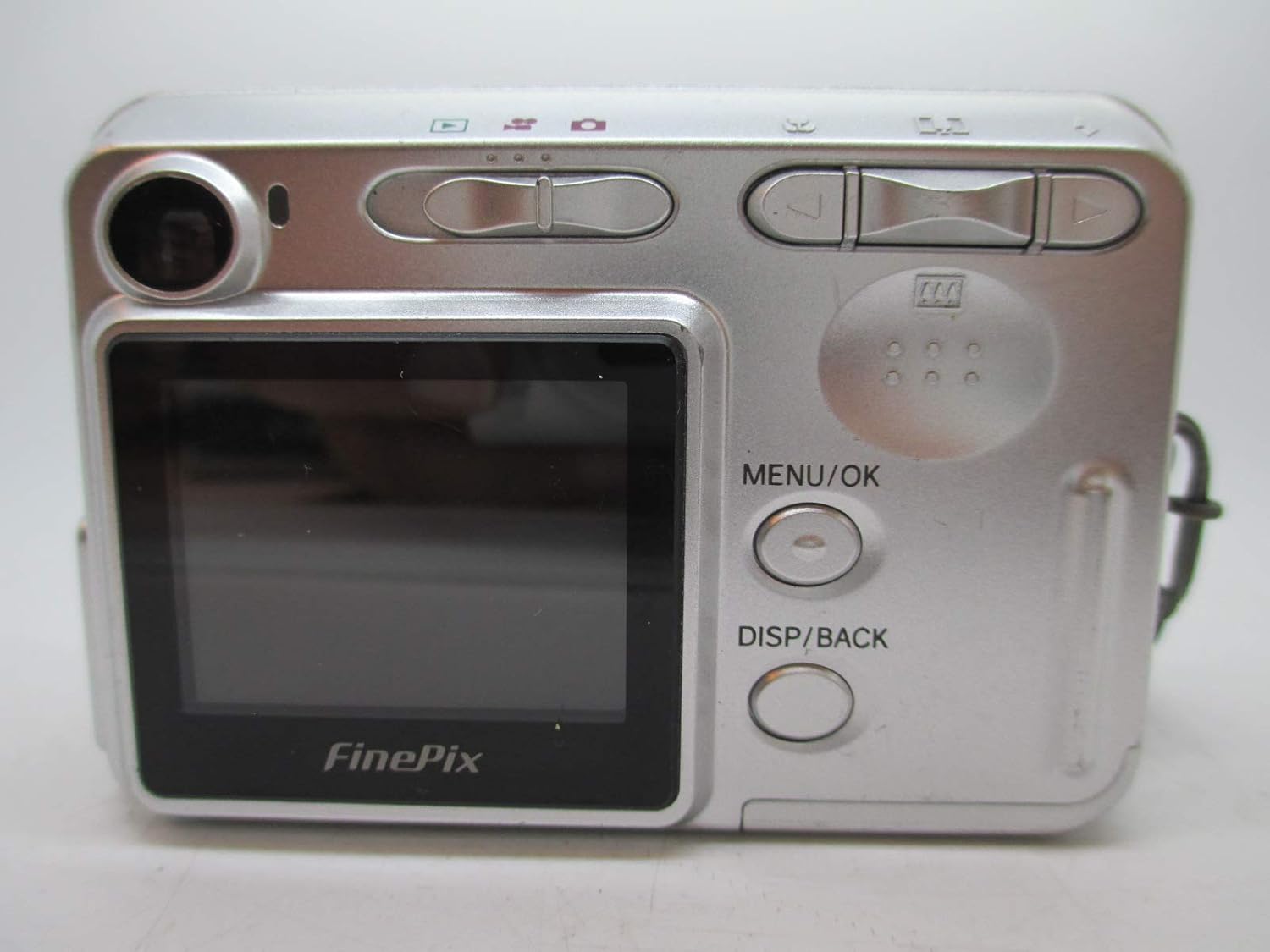
Image: Back view of the Fujifilm Finepix A345 camera, featuring the 1.7-inch LCD screen on the left and control buttons on the right, including MENU/OK and DISP/BACK.
4. Advanced Shooting Features
- Scene Position Selector: Choose from various scene modes to optimize settings for specific conditions (e.g., Portrait, Landscape).
- Macro Mode: For close-up photography, activate macro mode to focus on subjects at short distances.
- Movie Mode with Sound: Record video clips with accompanying audio. Refer to the on-screen menu for options.
- Self-Timer: Utilize the 10-second self-timer for group photos or to prevent camera shake.
- Aspect Ratio: Select the 3:2 aspect ratio for prints that match traditional photo paper dimensions.
5. Connecting to External Devices
- USB Digital Interface: Connect the camera to a computer using the included USB cable to transfer photos and videos. The camera may appear as a removable disk drive, allowing direct file access. A software CD-ROM (FinePix Viewer version 4.3) is included for additional functionality.
- Video Output: Connect the camera to a TV monitor (NTSC/PAL compatible) to view your photos and videos on a larger screen.
- PictBridge Compatibility: Print photos directly from the camera to a PictBridge-compatible printer without needing a computer.
Maintenance
1. Cleaning the Camera
- Use a soft, lint-free cloth to clean the camera body.
- For the lens and LCD screen, use a specialized lens cleaning cloth and solution. Avoid harsh chemicals or abrasive materials.
- Gently blow away dust from the lens surface before wiping.
2. Storage
- When not in use, store the camera in a cool, dry place away from direct sunlight and extreme temperatures.
- Remove batteries if the camera will not be used for an extended period to prevent leakage.
Troubleshooting
- Camera does not power on: Ensure batteries are correctly inserted and fully charged. Replace with fresh batteries if necessary.
- "AF!" warning displayed: This indicates the camera cannot achieve focus. Ensure you are not too close to the subject and that the camera is held steady. Adjust your distance or lighting conditions.
- Pictures are blurry: This can be due to camera shake, insufficient light, or incorrect focus. Hold the camera steady, use the self-timer, or ensure proper lighting. Check that the autofocus is locking onto your subject.
- Software installation issues: If the included software does not install correctly, try connecting the camera directly to your computer via USB. Most operating systems will recognize the camera as a mass storage device, allowing you to access photos directly without proprietary software. Consult Fujifilm's support website for updated drivers or troubleshooting guides if needed.
- LCD screen is dim: Check the brightness settings in the camera's menu. Ensure the screen is clean and free from smudges.
Specifications
| Feature | Specification |
|---|---|
| Image Sensor | 4.1 Megapixel CCD |
| Optical Zoom | 3x |
| Digital Zoom | 3.6x |
| LCD Display | 1.7-inch, 115,000 pixels |
| Storage Media | xD-Picture Card (16MB card included) |
| Power Source | 2x AA-size batteries |
| Start-up Time | Less than 3 seconds |
| Shutter Lag | 0.1 seconds |
| Minimum Shutter Speed | 2 seconds |
| Maximum Shutter Speed | 1/2000 seconds |
| Dimensions (L x W x H) | 3.54 x 1.18 x 2.36 inches |
| Item Weight | 6.7 ounces (0.42 pounds) |
| Included Components | USB Cable, Hand Strap, FinePix Viewer version 4.3, Software CD-ROM |
Warranty and Support
For warranty information and technical support, please refer to the documentation provided with your purchase or visit the official Fujifilm website. Keep your proof of purchase for any warranty claims.
Seller is not responsible for providing batteries.


