Introduction
Welcome to the user manual for your new Casio DB-E30-1AVDF digital watch. This manual provides detailed instructions on how to set up, operate, and maintain your watch to ensure optimal performance and longevity.
The Casio DB-E30-1AVDF is a robust, solar-powered digital watch designed for daily wear, featuring a durable silicone strap, 50-meter water resistance, and a range of useful functions including a data bank, alarm, stopwatch, and world time.
Product Overview
Key Features
- Digital Display
- Square Watch Shape
- Silicone Band
- 50-meter Water Resistance
- Scratch and Shatter Resistant Mineral Glass Dial Window
- Solar Powered (Tough Solar)
- Electro-luminescent Backlight
- Data Bank Function
- Alarm, Stopwatch, Countdown Timer, World Time, Auto Calendar
Watch Components
Familiarize yourself with the main components of your Casio DB-E30-1AVDF watch.
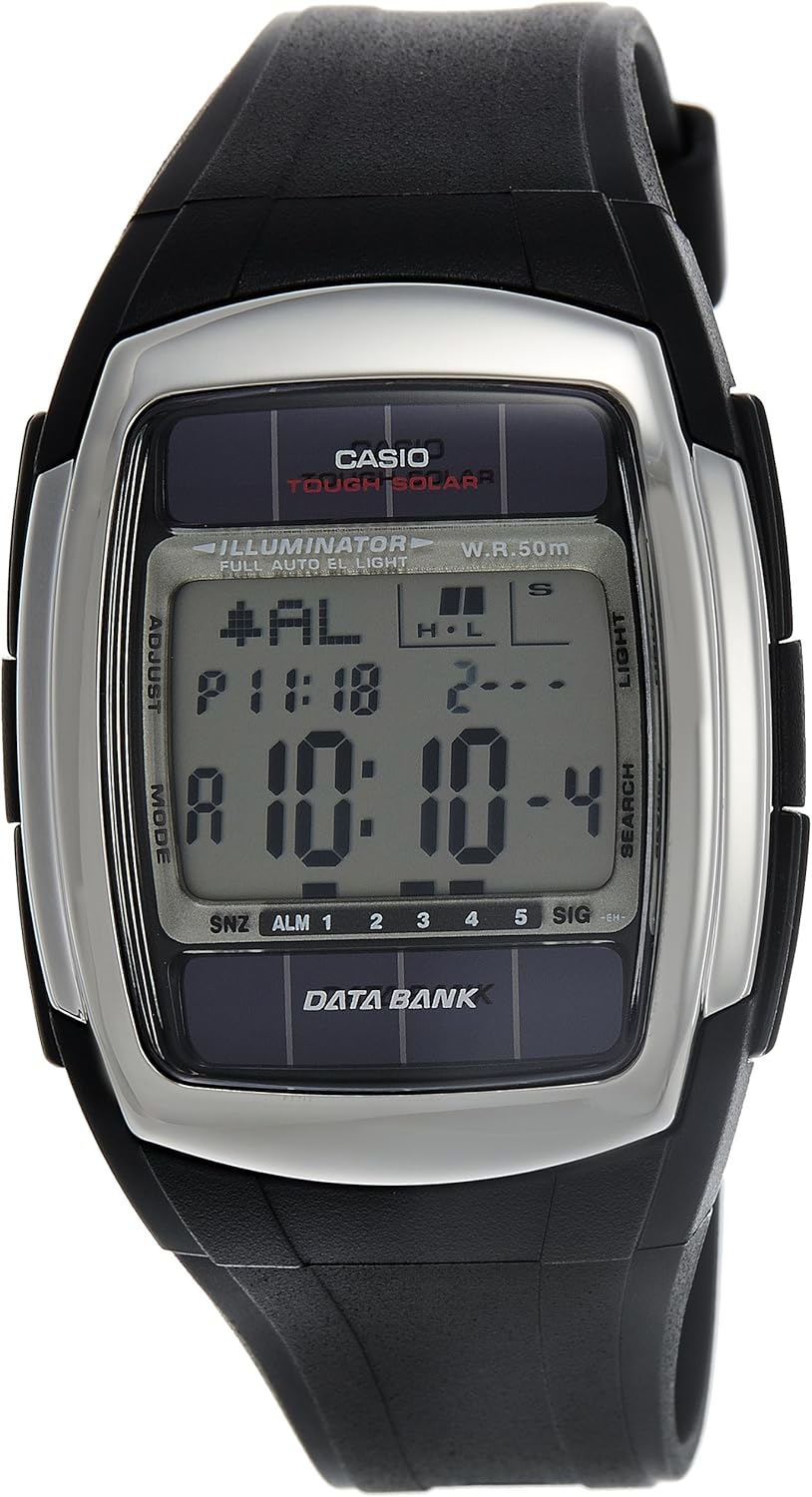
This image displays the front of the Casio DB-E30-1AVDF watch, highlighting its digital display, the 'Tough Solar' and 'Illuminator' markings, and the various function buttons labeled 'ADJUST', 'MODE', 'LIGHT', and 'SEARCH'.

This image shows the Casio DB-E30-1AVDF watch on a wrist, providing a perspective on its size and how it appears when worn. The digital display shows the time and date.

This graphic highlights the main functionalities of the watch: Alarm, Auto Calendar, World Time, Electro-luminescent backlight, Countdown Timer, Stop Watch, 50m Water Resistance, and Solar Power. A central image of the watch is surrounded by icons representing these features.

This image shows the compact silver and black box in which the Casio watch is typically packaged, featuring the Casio logo on the lid.
Setup
Initial Charging (Solar Power)
Your Casio DB-E30-1AVDF watch is equipped with Tough Solar technology, which converts light into power. Before initial use, expose the watch to bright light (natural sunlight is ideal) for several hours to ensure it is fully charged. Avoid prolonged exposure to extreme heat.
Setting the Time and Date
- In Timekeeping Mode, press and hold the ADJUST button until the city code starts to flash. This indicates the setting mode.
- Use the SEARCH and MODE buttons to navigate through settings such as city code, DST (Daylight Saving Time), 12/24-hour format, seconds, hour, minute, year, month, and day.
- Use the LIGHT button to increase a value and the SEARCH button to decrease a value (or vice versa, depending on the specific setting).
- After setting each item, press the MODE button to move to the next setting.
- Once all settings are adjusted, press the ADJUST button to exit the setting mode.
Operating Instructions
Mode Navigation
Press the MODE button to cycle through the different modes: Timekeeping, Data Bank, World Time, Alarm, Stopwatch, and Countdown Timer.
Data Bank
The Data Bank function allows you to store up to 30 sets of data, each including a name (up to 8 characters) and a telephone number (up to 12 digits).
World Time
This mode displays the current time in 30 cities (29 time zones) around the world.
Alarm
The watch features multiple daily alarms and an hourly time signal.
Stopwatch
Use the stopwatch to measure elapsed time, split times, and two finishes.
Countdown Timer
The countdown timer can be set for up to 24 hours.
Electro-luminescent Backlight
Press the LIGHT button to illuminate the display for easy viewing in low light conditions. The watch also features an auto light switch that automatically illuminates the display when the watch is angled towards your face.
Maintenance
Cleaning Your Watch
Wipe the watch regularly with a soft, dry cloth to remove dirt and moisture. For stubborn dirt, use a soft cloth dampened with water and a mild neutral detergent, then wipe dry.
Water Resistance
Your watch is water resistant to 50 meters. This means it is suitable for everyday use and can withstand splashes, rain, and brief immersion in water. However, it is not suitable for swimming, diving, or showering with hot water. Avoid operating buttons while the watch is wet.
Solar Charging Care
To maintain optimal battery life, ensure the watch is regularly exposed to light. If the watch is stored in the dark for extended periods, the power reserve may deplete, and some functions might stop. Refer to the power indicator on the display.
Troubleshooting
Display is Blank or Functions are Not Working
This usually indicates a low power reserve. Expose the watch to bright light for several hours to recharge the solar battery.
Time is Incorrect
Re-adjust the time and date settings as described in the "Setting the Time and Date" section. Ensure your home city code and DST settings are correct.
Water Appears Inside the Watch
If moisture appears inside the watch, especially if it does not clear up quickly, it may indicate a seal issue. Stop using the watch immediately and contact an authorized Casio service center for inspection and repair.
Specifications
| Feature | Detail |
|---|---|
| Brand | Casio |
| Model Number | DB-E30-1AVDF (DB28) |
| Watch Shape | Square |
| Band Material | Silicone |
| Display Type | Digital |
| Target Group | Men |
| Type | Casual Watch |
| Water Resistance Depth | 50 meters |
| Dial Window Material Type | Scratch and shatter resistant glass |
| Clasp | Buckle |
| Band Color | Black |
| Case Diameter | 37.8 mm |
| Case Thickness | 12 mm |
| Calendar | Yes |
| Case Material | Plastic |
| Dial Color | Grey |
| Batteries | 1 Lithium Metal battery required. |
| Product Dimensions | 17.78 x 17.78 x 12.7 cm; 140.61 grams |
| Manufacturer | Casio |
| ASIN | B0006IEVFG |
| Department | Men |
| International Barcode | 4971850762218 |
Warranty and Support
For warranty information and customer support, please refer to the official Casio website or contact your local authorized Casio dealer. Keep your purchase receipt as proof of purchase.


