
1. Introduction
This manual provides detailed instructions for the installation, operation, and maintenance of your Culligan US-600A Under-Sink Water Filtration System. Please read this manual thoroughly before beginning the installation process to ensure proper setup and optimal performance.
2. Product Overview
The Culligan US-600A is a compact under-sink water filtration system designed to provide clean, better-tasting water directly from your existing kitchen faucet. It effectively reduces chlorine taste and odor, ensuring a higher quality of drinking and cooking water.

Figure 2.1: The Culligan US-600A Under-Sink Water Filtration System, a compact unit designed for easy installation under your kitchen sink.
Key Features:
- Effective Chlorine Reduction: Reduces chlorine taste & odor with the included D-20A cartridge for cleaner, better-tasting water.
- NSF Certified Filtration: NSF/ANSI Standard 42 certified to reduce chlorine taste & odor, ensuring trusted filtration performance.
- Compact Under-Sink Design: Space-saving filter fits under the kitchen sink, connecting to your existing faucet without needing a separate tap.
- Easy Installation: Includes housing with mounting bracket, 3/8" tubing, quick-connect elbows, and housing wrench for DIY-friendly setup.
- Long-Lasting & Versatile: The D-20A cartridge filters up to 1,000 gallons or 12 months and is compatible with D-10A, D-20A, D-30A, and D-40A replacement cartridges.
3. What's Included
Upon opening the package, ensure all the following components are present:
- Culligan US-600A Filter Housing with Mounting Bracket
- D-20A Filter Cartridge
- 3/8" Plastic Tubing
- Quick-Connect Elbows
- Housing Wrench
- Installation Hardware (screws)
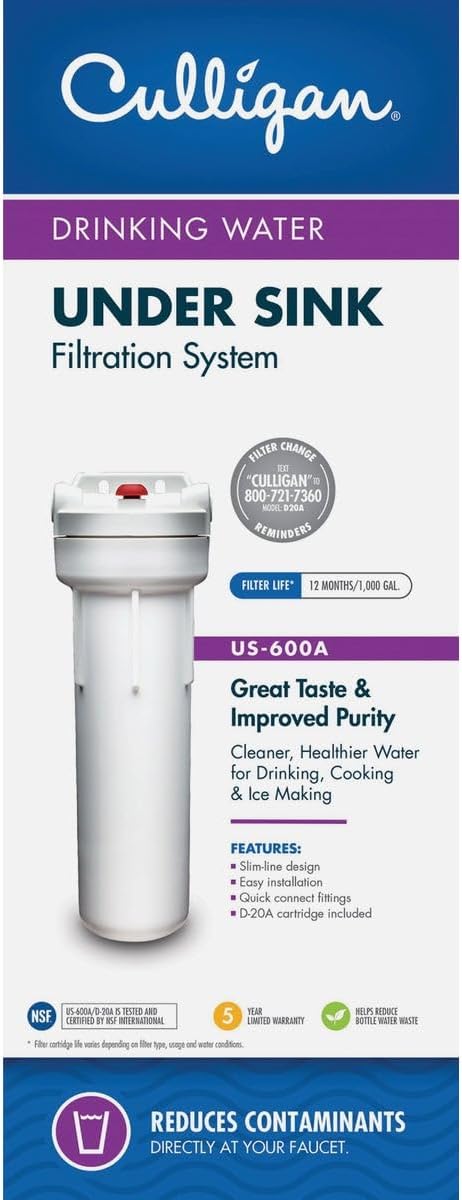
Figure 3.1: Product packaging showing the filter system and included D-20A cartridge.
4. Tools Required for Installation
To successfully install your Culligan US-600A system, you will need the following tools:
- Screwdriver
- Utility Knife
- File
- Pencil
- Drill
- Pipe Cutter or Hacksaw
- Tape Measure
5. Setup and Installation
Follow these steps for a smooth installation of your under-sink water filtration system:
- Turn Off Cold Water Supply: Locate the cold water supply line under your sink and turn the valve clockwise until the water flow stops. Open your sink faucet to release any remaining pressure in the line.
- Check Water Line Size: Verify that your existing water line size is compatible with the system's fittings. If you have a stainless steel line or a different size, you may need an adapter fitting (not included).
- Mount the Filter Housing:
- Choose a suitable location under your sink, ensuring at least 1.5 inches of space below the housing for future filter cartridge changes.
- Hold the filter housing in place and mark the screw locations on the mounting bracket with a pencil.
- Drill pilot holes at the marked locations and secure the filter housing to the cabinet wall using the provided screws.

Figure 5.1: Example of the Culligan US-600A system installed under a sink, showing connections to the cold water line.
- Cut and Prepare Water Line:
- Mark a 3-inch section of your cold water line where you intend to install the filter.
- Use a pipe cutter or hacksaw to carefully cut the marked section of the line.
- Deburr the cut ends of the pipe using a file to ensure smooth connections.
- Connect Quick-Connect Elbows: Push the two quick-connect elbows onto the cut ends of your cold water line until they hit a hard stop.
- Connect Tubing:
- Measure and cut two lengths of the provided 3/8" plastic tubing. Ensure the lengths are short enough to avoid kinking but long enough for a secure connection.
- Connect one end of the first tubing section to the "Inlet" side of the filter housing and the other end to one of the quick-connect elbows on your cold water line.
- Connect one end of the second tubing section to the "Outlet" side of the filter housing and the other end to the remaining quick-connect elbow on your cold water line, leading up to your faucet.
- Ensure all connections are pushed in firmly until they stop.
- Restore Water Supply: Slowly turn your cold water supply back on. Wait for the filter to fill with water and check all connections for leaks.
Installation Video:
Video 5.1: Official Culligan installation guide for the US-600A Under-Sink Filter. This video demonstrates the step-by-step process of setting up the filtration system.
6. Operating Instructions
After successful installation, it is important to properly flush the system before regular use:
- Initial Flush: Turn your sink faucet on and let the water run for approximately 15 minutes. During this initial flush, it is normal to observe some sputtering and tiny black particles (carbon fines) in the water. This is a normal part of the system depressurizing and flushing out manufacturing residue.
- Ready for Use: Once the water runs clear and steady, your Culligan US-600A system is ready to provide filtered water for drinking and cooking.
7. Maintenance (Filter Replacement)
Regular filter replacement is crucial for maintaining the performance and effectiveness of your Culligan US-600A system. The D-20A cartridge typically lasts up to 1,000 gallons or 12 months, but replacement frequency may vary based on water quality and usage.
- Turn Off Cold Water Supply: As with installation, turn off the cold water supply valve under your sink and open the faucet to release pressure.
- Prepare for Mess: Place a towel or small basin under the filter housing to catch any residual water during the replacement process.
- Remove Old Filter: Unscrew the bottom of the filter housing using the provided housing wrench. Carefully remove the old filter cartridge.
- Clean Housing and O-Ring: Wipe the large O-ring inside the housing clean of any excess lubricant and set it aside. Clean and rinse the bottom of the filter housing to remove any buildup.
- Re-lubricate O-Ring: Re-lubricate the O-ring with clean, food-grade silicone grease and press it back into its groove in the housing.
- Insert New Filter: Place the new filter cartridge into the bottom of the filter housing with the gasketed end facing up.
- Reassemble Housing: Screw the bottom of the filter housing back onto the top firmly, but do not overtighten.
- Restore Water Supply and Flush: Slowly turn your cold water supply back on. Wait for the filter to fill with water and check for leaks. Turn your faucet on for about 15 minutes to flush the new filter, as described in the Operating Instructions.
Filter Change Video:
Video 7.1: Official Culligan guide on how to change the filter cartridge for the US-600A Under-Sink Filter. This video provides visual instructions for the replacement process.
8. Troubleshooting
If you encounter any issues with your Culligan US-600A system, consider the following common troubleshooting tips:
- Low Water Flow: This often indicates a clogged filter. Replace the filter cartridge as described in the Maintenance section.
- Leaks: Ensure all quick-connect fittings are fully seated and the filter housing is securely tightened. Check the O-ring for proper placement and lubrication.
- Cloudy Water/Black Particles: This is normal during the initial flush after installation or filter replacement. Allow water to run for 15 minutes until clear. If it persists, re-check filter seating.
- Unusual Taste/Odor: If chlorine taste or odor returns, it's time to replace the filter cartridge.
For persistent issues, refer to the official Culligan user manual (PDF link available in the Warranty & Support section) or contact Culligan customer support.
9. Specifications
| Feature | Detail |
|---|---|
| Model Number | US-600A |
| Brand | Culligan |
| Material | Multi |
| Item Weight | 1.74 Pounds |
| Filter Capacity | 1,000 Gallons or 12 Months |
| Flow Rate | 1 Gallon Per Minute |
| Installation Method | Under Sink |
| Special Features | NSF certified, Chlorine Reduction |
| Included Components | 1 water filter system |
| Country of Origin | USA |
10. Warranty & Support
The Culligan US-600A Under-Sink Water Filtration System comes with a 5-year limited warranty. For detailed warranty information, claims, or technical support, please refer to the official user manual or contact Culligan customer service.
You can also find the official user manual in PDF format here: Culligan US-600A User Manual (PDF)
For additional information and resources, visit the official Culligan website or their brand store on Amazon:


